GL With AA – IM2010 Integration – aagCreateGLWorkDist Error Message


This issue is quite frustrating. The issue happens with Integration Manager v2010 for GL Transaction With Analytical Accounting adapter.

I had to integrate a GL Entry with AA Apportionment information. I configured everything as it’s required. When I ran the integration, it thrown the below error message:
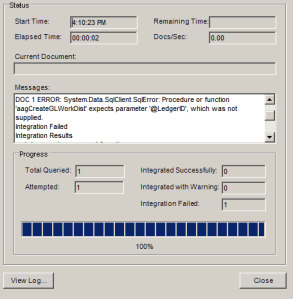
I had faced this error while doing my first such integration and to solve this error I used to setup the Destination Mapping for GL Transaction as follows:
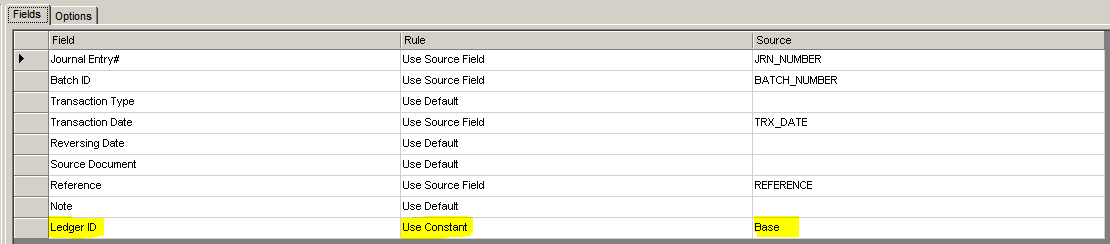
Highlighted above are the settings that we require to do.

There was a Community Post which reported the same error. You can read that post from here: IM11 hit aagCreateGLWorkDist error.

Before I did this integration, I read the post and even replied saying the Destination Setup “Ledger ID” assignment would solve this issue. BUT, on a contrary, it does not solve this error at all.

I even went to the extent of modifying this Stored Procedure aaCreateGLWorkDist (AA Developers must spare me on this, as it was just to understand the root cause of this issue). I made sure that a NULL value was passed on to @LedgerID parameter. Even if you change the code inside this procedure to use ISNULL() and replace it with relevant integer value (for a trial), it still do not work that way.

So that means, either I am still missing something on IM Destination Mapping OR this is a bug in that Stored Procedure or whichever is calling this SP.

I would like to know from people who are/were using this IM Adapter for GL with AA transactions integration.

UPDATE: This issue has been taken up by Microsoft Dev Team and a fix will be made available soon. For more information on this, please read David Musgrave’s post here: Procedure or function ‘aagCreateGLWorkDist’ expects parameter ‘@LedgerID’, which was not supplied.

VAIDY

GP2010 – Sales Charts & KPIs – Top Items By Sale Amount – Stored Procedure Bug


I stumbled across a bug (of sorts) in GP2010 SSRS Charts & KPIs for Sales Module.

GP2010 has got default Charts & KPIs designed in SSRS and we have quite hands full of Charts & KPIs which covers most of our basic requirements. One module which is very good in terms of coverage is Sales. Under Sales, we have a Chart & KPI called Top Items By Sale Amount.

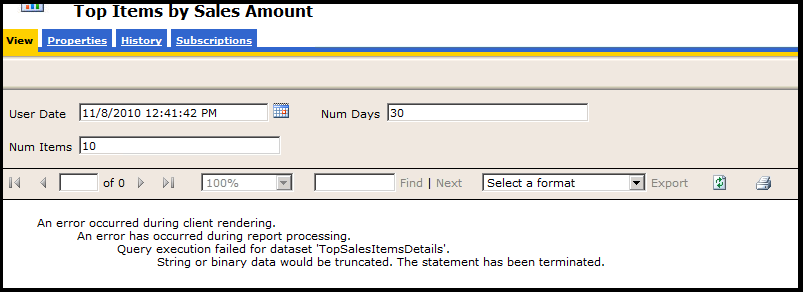
When I ran this report to view the results, I got the following error message:

The error message mentions that there is an extra bit of string data that’s getting forcefully truncated due to size restrictions. This clearly indicates a SQL Error Message. I ran the SQL Profiler furthering the probe. And the issue was rounded in to a Stored Procedure which is run to extract the needed data for this Chart & KPI, which is seeSOPTopTenSalesItemsByPriceMetric.

In that stored procedure, a temporary table is created with a column named ItemNumber which is of size char(18). We all (Consultants/Developers) know that, in GP, size of a Item Number is 31 in SQL.

So, this SSRS Chart & KPI will fail if any Item Number exceeds the size 18 in variably, which is a bug in this Stored Procedure.

FIX: I ALTERed this stored procedure to resize this particular temporary ItemNumber column to char(31) and report retrieved the details excellently.

VAIDY

Why does Microsoft Dynamics GP use a Data Folder? – David Musgrave


An informative post from David for all Consultants who face the same query from a Customer.

Read it here: Why does Microsoft Dynamics GP 10.0 and later use a Data folder?

VAIDY

Online Services for Dynamics GP – Triggers GP "Add Command" Hanging Indefinitely


I am not sure whether the issue that I am going to explain here has got any relevance to the actual issue that I faced recently. I leave it to readers and consultants out there to second my finding had they faced this before.

Issue: When I tried adding a GP Window to my GP Home Page Quick Links, the Add Command window hung indefinitely, forcing me to kill GP and launch it back.

Troubleshooting: I first ran the Dex Script Log and it was unfortunately inaccessible as GP had to be killed eventually and this file got stuck in between. I then ran SQL Profiler exactly at the time of clicking “Add Microsoft Dynamics GP Window” which triggers “Add Command” window to be opened.

Firstly, the process was still active and there was one table which got hit in a loop, I sense that an indefinite loop. The Physical Name of that table is SY07110. The Technical Name is syMenuMstr.

Secondly, this indefinitely looped process was hitting only one product ID in that table, which is 6499. This 6499 denotes the product Dynamics Online Services.

Thirdly, when I queried this table from SSMS, it had 5700+ records out of which 3750+ records where recorded only for Command Dictionary ID (CmdDictID) 6499, which is Dynamics Online Services.

I was totally clueless why this must had got so many records on this Menu Master table. I was also totally clueless what needs to be done with this product being active on my GP environment.

Solution (Temporary): I removed the Dynamics Online Services product (using Add/Remove Features) and this issue never occurred later.

I checked KB and I checked blogs & forums to no avail. Guess I was the first one to face this. Uninstalling the product Dynamics Online Services, is not a permanent solution, and it does not affect any other process than the Quick Links one. But this seems to be either a bug or something which went wrong in my environment.

Have to do some more analysis on this to get a fix.

VAIDY

Microsoft CRM 2011 – Dashboards for Techies


There is an excellent write up in Microsoft CRM Team Blog, written by Siddhartha Rai.

This article explains how Dashboards Feature in CRM 2011 can be customized to render valuable Dashboards. And this does not mean, it’s so technical. This write up explains how simply this can be done without being so technical.

Read it here: Microsoft Dynamics CRM Dashboards for Techies.

CRM 2011 promises to be terrific. Can’t wait to grab hold of it realtime.

VAIDY

Autocomplete Information in GP – Additional Info.


This is another interesting post with loads of information about Autocomplete Data in GP. Leslie Vail explains us what’s it all about Autocomplete Data in GP and where it’s stored.

Read it here: Autocomplete Data for GP – It’s not really a Mystery.

I would like to share one more interesting information along with this post.

Because of the path where this Autocomplete Data is stored, if you have two different GP versions (10 & 2010) and you have the same Company DB name (such as TWO), then whatever you see in GP10 as Autocomplete Data will also be shown in GP2010.

For instance, I enter a value “VAIDHY” on a Customer ID field in GP2010, this new value gets stored in Autocomplete Data file. When you open GP10 and try to enter a Customer ID starting with letter “V”, this value “VAIDHY” will be listed as well.

Purely because, irrespective of versions (only from GP10), GP stores it’s Autocomplete Data in User Roaming Data folder under “Microsoft Dynamics GP”, as explained by Leslie.

Sometimes good, sometimes a drawback. Depends on how you use two versions.

VAIDY

Temporary Tables in Dexterity – David


Excellent post for all Dexterity Developers.

David walks us thru’ the Temporary Tables concept in Dexterity. It explains the types of Temp. tables and when to use what type.

Another simple and complete reference post from David for all of us.

Read it here: Working with Temporary Tables in Dexterity.

VAIDY

SOP Quotations Import – Issue & Solution


Recently, I had to integrate around 1000+ Sales Quotations which comprised of 10000+ Sales Item Lines. This had to be done in a seemingly impossible timeframe, as we were totally running out of schedule.

I devised a strategy to do an All-SQL work as follows:

1. First Export required SOP tables from source database and Import it as SOP TEMP tables to destination database. The Source & Destination databases denote GP Company Databases, of course.

2. Generate the SOP Number by taking the Number Sequence from destination GP Company SOP Quotation Setup.

3. Update all SOP TEMP tables with relevant new SOP Number.

4. Identity only those fields which are required and then do a direct INSERT INTO. This insertion, in my case, happened for SOP10100 (Header), SOP10200 (Detail) & SOP10106 (User-Defined).

5. Once the above is done, run a Reconcilation on all these inserted documents, to make sure that these documents got accepted by destination GP Company as valid SOP Quotations.

All above tasks took me 5 hours of time (including 2.5 Hours of Data Updates & Reconciliation).

Excellent, and I was so happy that I could meet the deadline. I intimated the users to verify and send me the feedback. Users reported back with positive feedback and I was relieved.

ISSUE FACED: Quotations were not getting converted to Orders. Transaction Edit List shown nothing. All looked perfect.

TROUBLESHOOTING RESULTS: 30mins of troubleshooting yielded me one very silly reason behind this issue. The field in SOP10100, USDOCID1, was an Empty String for all Quotations integrated thru’ SQL. This field is the one which tells GP to which Order ID it is suppose to convert this quotation to.

SOLUTION: You all may know by now what the solution would be. Another SQL UPDATE which took the “Transfer To Order ID” value from SOP Quotation Setup and updated SOP10100 accordingly, did the trick.

WARNINGS:

1. Though I had mentioned that I followed ALL-SQL approach, it’s not supported by Microsoft.

2. I have not shared the SQL Scripts here, as it completely depends on the particular scenario and the way SOP Quotations are used by clients.

3. This post is intended to explain two things:
3.1. There are several successful & time saving approaches that we can follow, even if it’s unconventional.
3.2. With each unconventional approach, there lies a risk which cannot be foreseen. Unless, you are dead sure about your GP Technical & Database Skills, you are NOT suppose to tread any such approach.

4. I just wanted to highlight how one single field (which in our perception may look simple) may cause a critical consequence.

VAIDY

Significance of Fixed Assets REQUIRE ACCOUNT Setup Option


That was quite a precise advise from Mark Polino about Fixed Assets Setup Option.

Mark’s article, Putting the Fix in Fixed Assets, saved my day today literally. The advise, which saved me, is not in the article but in one of Mark’s reply to a query from a visitor.

The issue is this: When I add a new Asset and run the GL Posting, it did not clear FA Clearing Account and add the cost to FA Cost Account. Typically, FA Clearing Account Debit to FA Cost Credit.

In a nutshell, FA Company Setup has got an option called Require Account which needs to be checked. This will make sure that you enter an Asset Account Group or all FA Accounts separately.

The reason why I overlooked this option: When I integrated Fixed Assets onto GP10, and ran the GL Posting, it was working perfectly without any issues. That time Require Account option was not checked as my understanding towards this option was completely in different context.

Anyways, I thought I would re-blog Mark’s post for those who are struggling to understand this point.

And, Thanks Mark. You saved my day.

VAIDY

Give Time to GP to complete it’s Process before an "End Task"


It was rightly put by Belinda about a Non-Responsive GP & Ending Task and I would like to re-blog the same point.

Often, people don’t understand that they are dealing with a Background Process in GP which is performing either a Posting or Transactional Activity and they straightaway do an “End Task”. This may result in following:

1. User Activity Lock
2. User Transactional Activity Lock – This is a bit critical, as it would not allow that user to even open any Transaction Entry window (which was open when they did the “End Task”)
3. Posting Process Interruption – This is hell critical, as it would keep the transaction in the middle; between Transaction Open and Transaction Posted. This is wreak havoc at times.

Like Belinda said, JUST WAIT. We all know that you are so busy with your Day-To-Day activities and do not have time to stare at GP for more than a minute, but sometimes you do have to understand that it’s a software and it just takes its time to complete a process depending on several factors.

VAIDY