Importance of PO Line Item Entry Dates


How many of you, PO users, use the following dates on a PO Line Item Detail Entry window in Dynamics GP?

Snip20130216_1

GP defaults all appropriate fields with User Date, but user can change it with actuals.

These dates are not mere dates. They offer critical means to improve vendor followups. And this could be done per PO line item. For instance, you can create a SmartList custom alert and add it on your GP home page (Reminder Cue) for those PO line items whose Current Promised Date is reached & PO line status is not Closed, Received or Cancelled.

It’s a pain, though, to make this dates entry happen. In my case, users always would say that it’s too much of a data entry and they already have something else as followup mechanism. But trust me, they are fooling themselves (first) and the company overall.

VAIDY
Document Attachment in Microsoft Dynamics GP 2013


I am a bit late on this topic. We already have many posts (including Feature of the Day – Inside Microsoft Dynamics GP) on this written by several community members. So instead of repeating it again, I am just adding pointers here to those posts.

To just brief what it is: Document Attachment is a new feature in Microsoft Dynamics GP 2013, which would enhance the way we currently deal with document attachments on a record. If you had sensed it right, yes it’s almost like OLE Notes, but much more than that.

This scores above OLE Notes, purely on grounds of three main factors:

  1. It doesn’t restrict itself to 32 bit architecture, like OLE notes container does.
  2. It is compatible with Web Client, but OLE notes is not.
  3. It stores the attachments on company specific SQL tables. You heard it right. It stores on database by harnessing SQL Server’s file stream, if I am not wrong.

More information about this (and how to use) could be read on below posts:

VAIDY

OLE Notes & GP 2013 Web Client – Mariano


It’s a bit hard to take it, but reality being the OLE Notes attachment feature won’t work on GP 2013 Web Client for current technical reasons.

Read his post here: OLE Notes and Microsoft Dynamics GP 2013 Web Client

That brings to us a new feature called Document Attachment in Dynamics GP 2013. This can be used instead of OLE Notes. It looks just perfect for me to start using it instead of OLE. Not just because of the incompatibility with web client, but also due to it’s robust features.

More can be read in my next post and also Mariano’s.

VAIDY

OFF-TOPIC: Increase Productivity By Adding Shortcuts To “Send To”


I often copy my chunk file on to GP application folder as part of my development work, so I must keep two explorer windows open always. Copy from my development folder and paste it on to GP application folder. Difficult and frustrating (at times) to shuttle between two folders every time.

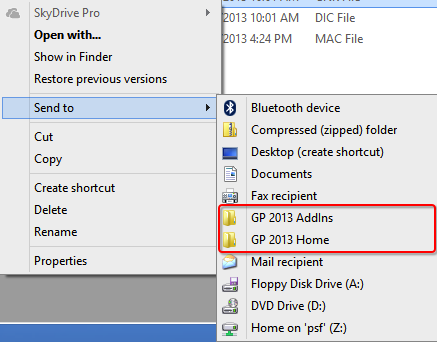
Not anymore; I just created new shortcuts to Send To menu as shown below:

Snip20130213_2

Just select my chunk file from my development folder, invoke Send To menu and send it straight to GP application folder. Awesome, isn’t it? It is, indeed. It saves almost 15-30 minutes a day depending how many times you perform copy paste with same source and destination folders.

Follow the steps explained in this blog post: How to add SkyDrive shortcut into your ‘Send To’ Menu.

The post discusses on how to add a shortcut for Skydrive, but it’s the same steps that you have to follow for any shortcut (internally on your computer or an external location).

I assure you that this trick alone would save you tremendous amount of time and effort in a day.

VAIDY

Microsoft Dynamics GP 2013 – Feature Videos


Awesome way to learn what’s new in Microsoft Dynamics GP 2013.

Inside Microsoft Dynamics GP (official GP blog) has posted a list of all Microsoft Dynamics GP 2013 Feature videos.

I personally checked out some videos and it’s highly informative, but have not gone thru’ the entire collection though.

Go ahead and explore the videos. I am sure you will start planning to optimise some of your business processes after seeing these new features.

VAIDY

Inactivate a User – Dynamics GP 2013


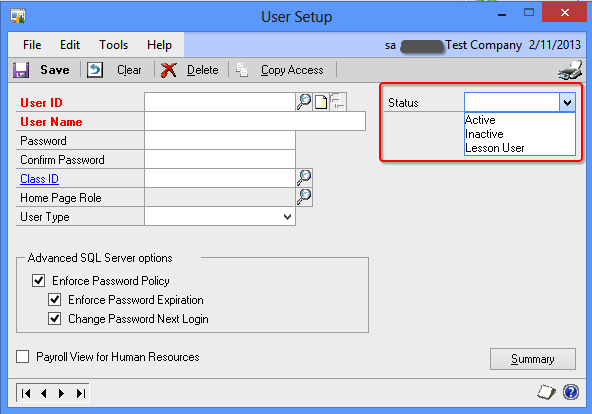
You can now inactivate a user in Dynamics GP 2013 temporarily. This is a feature addition to User Management in GP.

There is a new field called *Status* which is a Dropdown List. Contains 3 statuses namely, Active, Inactive & Lesson User.

Snip20130211_4

When a user status is set to Inactive, that user cannot log on to GP but will retain his/her access when activated again. We can still manage access information of an inactive user. Upon his/her next login, the modified access information will get into effect.

When a user status is set to Lesson User, that user can access ONLY Fabrikam Inc. (sample company).

Cool, isn’t it…!!!

VAIDY

Changing Account Format for Chart of Accounts in GP – Dynamics GP Support Services Blog


Nicely written post by Andrea Melroe on Microsoft Dynamics GP Support and Services blog.

If anyone has got any doubt about how to change the Chart of Accounts (COA) format and what are the things to understand on this process, read this post: Is it possible to change the account format for the chart of accounts in GP?

It’s highly elaborative and easy to understand.

VAIDY

Collections Management for Microsoft Dynamics GP Moves Out To Professional Advantage


Microsoft seems to be in a mood to give back all modules to its original developers. First it was Extender, then it was Audit Trails, Electronic Signatures, Risk Management Suite; now it’s the turn of Collections Management.

Errol Schoenfish, on Microsoft Dynamics GP official blog, announces that Collection Management for Microsoft Dynamics GP transits to Professional Advantage; it’s original developers.

Any licensing and module procurement would be affected only from June 1st, 2013. We have both CustomerSource and PartnerSource links to learn more about this transition.

Interesting…

VAIDY

OFF-TOPIC: Snip For Mac OS X – A Snipping Tool Alternative


This is another off-topic. But I wanted to highlight this most handy application called Snip, developed by Tencent Technology (Shenzhen) Company Limited and is also available on Mac App Store.

Snip20130209_1

Those PC users, who also used to be Snipping Tool dependants, and then became Mac OS user, would love to have an application in Mac OS X which would compensate Snipping Tool’s absence.

I used to crib about the lack of an application that I would use to do screen capturing and post-processing those captures. This tool Snip, which I came to know very recently, has done what other applications on Mac platform couldn’t.

We have built-in capturing commands in Mac OS X, such as SHIFT+CMD+4 (to capture a portion of screen), but those commands would simply take the screenshot and immediately save it on your desktop. You then have to reopen it on some other graphics tool to post-process it, such as narrating or simply painting on some text which you do not want to show to others.

This tool is amazingly simple and does exactly what you need. It just sits on that menu bar with a customisable keyboard shortcut to invoke a screen capture.

Go to the official website (link is provided in the beginning of this post) and know more about it.

Trust me, you would most certainly fall in love with this application, if you do tons of screen capturing on your day-to-day Mac OS usage.

UPDATE: There is one more app that is FREE on Mac App Store; named Share Bucket. I think it’s a serious competitor for all currently available apps.

VAIDY

Fixed Assets Depreciate Button Disabled For User – Solution


This issue was a bit tricky but not THAT tricky, though.

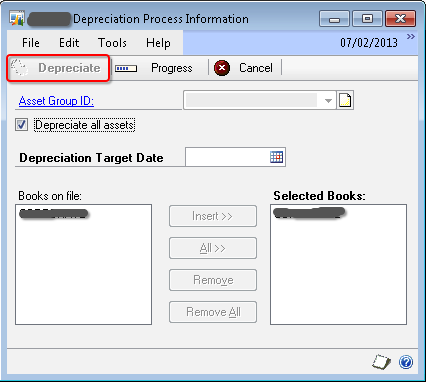
One of the users reported to me that he was not able to run depreciation because when he opened the Depreciation Process Information window (Microsoft Dynamics GP -> Tools -> Routines -> Fixed Assets -> Depreciate), the Depreciate button was disabled. Below was the screenshot that he sent to me (disabled button is highlighted in RED box):

Depreciate Window


Reason: After quite a bit of analysis (Dex Script Log & SQL Profiling using SDT), I found that there is a table where FA module temporarily records the depreciation activity initiated by any user and will retain that record the process is complete.

User confirmed to me that last time when he ran the depreciation process, it got stuck at the time of printing the results.

Solution:

The table which records the activity is FA40203 (display name: Book Setup for Depreciation). The table contains three fields: User ID, FA Book Index & FA Book ID.

I took a backup of this table (a simple T-SQL SELECT * INTO…) and removed that stranded activity record for that user.

User confirmed that he could then start depreciation process.

Its always good to start a day with some brainy troubleshooting. But not certainly good for users to start with an issue, though.

VAIDY