This one’s very thoughtful. Well, that’s what I felt.
You also may want to read it: How to Draw An Owl?
VAIDY

This one’s very thoughtful. Well, that’s what I felt.
You also may want to read it: How to Draw An Owl?
VAIDY
It was SQL Server 2008 R2, then Windows Server 2008 R2 and now comes Microsoft Dynamics GP 2010 R2. Yeah you heard me alright.
Awesome news it is. More details on here: Microsoft announces Microsoft Dynamics GP 2010 R2.
GP’s official MSFT Blog gives us the glimpse of what we can expect from this release. Sure enough, this going to be another excellent release.
VAIDY

I was attending a LinkedIn query from a User who was facing issues with GP Utilities & DB Creations. Upon checking his environment by a remote-controlled session, I identified that it was SQL Server Authentication issue, which was denying him to even log on to GP Utilities and move further.
It’s very important to understand that GP Application supports only SQL Server Mixed Mode Authentication. What if we accidentally selected (rather left changing the default SQL Authentication option which is) “Windows Authentication”?
With SQL Server 2008 (I have not checked this in SQL Server 2005 and earlier versions), we have a very simple way to change it.
1. Open SQL Server Management Studio (SSMS).
2. Login to the respective SQL Server Instance.
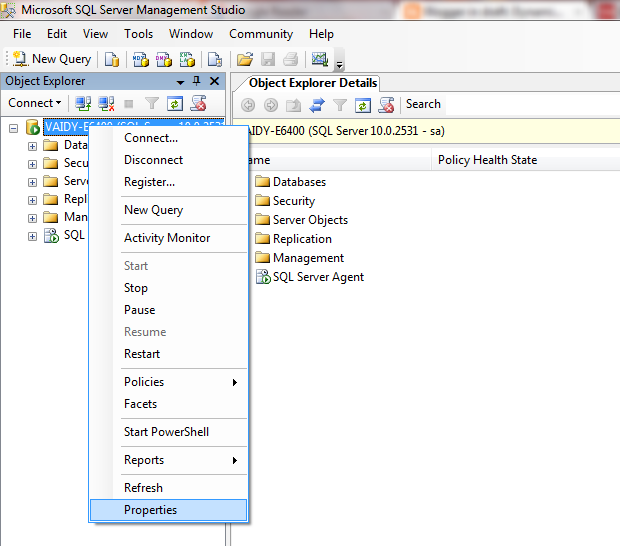
3. On the left pane, right click on the Instance Name and select “Properties”, as shown below:
4. Under the Security Page, select “SQL Server and Windows Authentication Mode” as shown below:
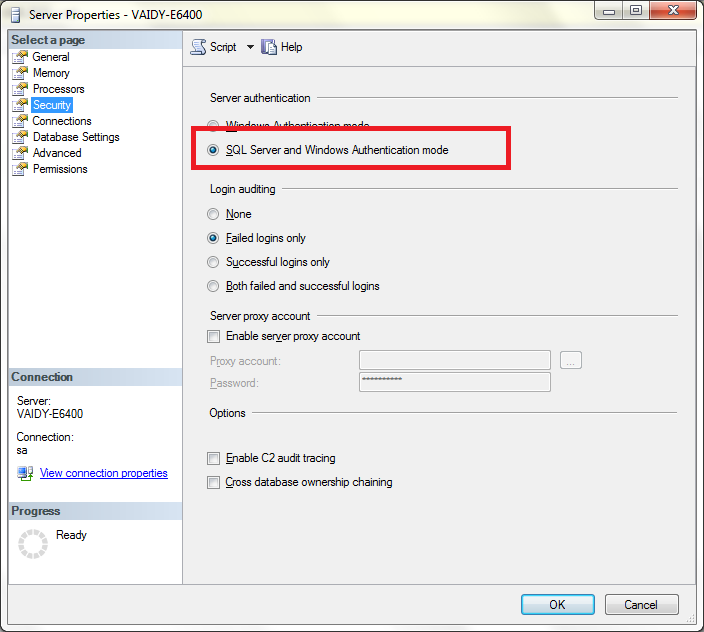
5. Click on OK and restart the SQL Server service to effect this change.
Earlier I remember, I had to uninstall and reinstall SQL Server instance had I selected the wrong authentication mode. I think the version was SQL Server 2000.
With SQL Server 2008, you will be saved with an hour or more.
Point to Remember: If you enter “sa” and it’s password correctly and still you are invited with a message that reads like “Login failed”, then make sure that SQL Authentication mode is “SQL Server and Windows Authentication Mode”.
VAIDY

So we have a book on GP overall functionality Microsoft Dynamics GP 2010 Cookbook, by Mark Polino. Now we have another one, Microsoft Dynamics GP 2010 Implementation, by Victoria Yudin.
Read more on Victoria’s post: Dynamics GP 2010 implementation book coming soon.
For those who want to preorder this book, you can reach Packt Publications’ exact page here: Microsoft Dynamics GP 2010 Implementation.
VAIDY

This issue is quite frustrating. The issue happens with Integration Manager v2010 for GL Transaction With Analytical Accounting adapter.
I had to integrate a GL Entry with AA Apportionment information. I configured everything as it’s required. When I ran the integration, it thrown the below error message:
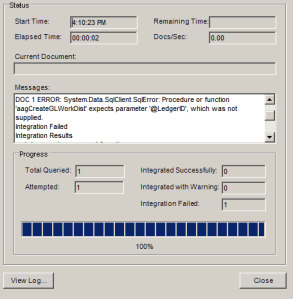
I had faced this error while doing my first such integration and to solve this error I used to setup the Destination Mapping for GL Transaction as follows:
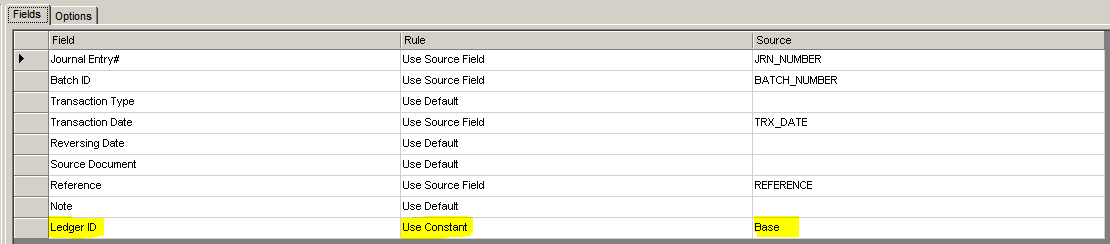
Highlighted above are the settings that we require to do.
There was a Community Post which reported the same error. You can read that post from here: IM11 hit aagCreateGLWorkDist error.
Before I did this integration, I read the post and even replied saying the Destination Setup “Ledger ID” assignment would solve this issue. BUT, on a contrary, it does not solve this error at all.
I even went to the extent of modifying this Stored Procedure aaCreateGLWorkDist (AA Developers must spare me on this, as it was just to understand the root cause of this issue). I made sure that a NULL value was passed on to @LedgerID parameter. Even if you change the code inside this procedure to use ISNULL() and replace it with relevant integer value (for a trial), it still do not work that way.
So that means, either I am still missing something on IM Destination Mapping OR this is a bug in that Stored Procedure or whichever is calling this SP.
I would like to know from people who are/were using this IM Adapter for GL with AA transactions integration.
UPDATE: This issue has been taken up by Microsoft Dev Team and a fix will be made available soon. For more information on this, please read David Musgrave’s post here: Procedure or function ‘aagCreateGLWorkDist’ expects parameter ‘@LedgerID’, which was not supplied.
VAIDY

I stumbled across a bug (of sorts) in GP2010 SSRS Charts & KPIs for Sales Module.
GP2010 has got default Charts & KPIs designed in SSRS and we have quite hands full of Charts & KPIs which covers most of our basic requirements. One module which is very good in terms of coverage is Sales. Under Sales, we have a Chart & KPI called Top Items By Sale Amount.
When I ran this report to view the results, I got the following error message:
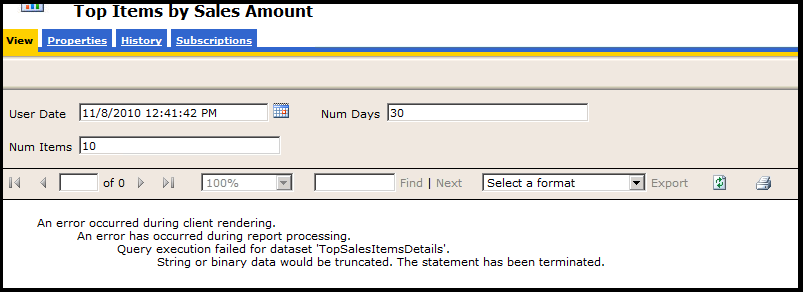
The error message mentions that there is an extra bit of string data that’s getting forcefully truncated due to size restrictions. This clearly indicates a SQL Error Message. I ran the SQL Profiler furthering the probe. And the issue was rounded in to a Stored Procedure which is run to extract the needed data for this Chart & KPI, which is seeSOPTopTenSalesItemsByPriceMetric.
In that stored procedure, a temporary table is created with a column named ItemNumber which is of size char(18). We all (Consultants/Developers) know that, in GP, size of a Item Number is 31 in SQL.
So, this SSRS Chart & KPI will fail if any Item Number exceeds the size 18 in variably, which is a bug in this Stored Procedure.
FIX: I ALTERed this stored procedure to resize this particular temporary ItemNumber column to char(31) and report retrieved the details excellently.
VAIDY

An informative post from David for all Consultants who face the same query from a Customer.
Read it here: Why does Microsoft Dynamics GP 10.0 and later use a Data folder?
VAIDY

I am not sure whether the issue that I am going to explain here has got any relevance to the actual issue that I faced recently. I leave it to readers and consultants out there to second my finding had they faced this before.
Issue: When I tried adding a GP Window to my GP Home Page Quick Links, the Add Command window hung indefinitely, forcing me to kill GP and launch it back.
Troubleshooting: I first ran the Dex Script Log and it was unfortunately inaccessible as GP had to be killed eventually and this file got stuck in between. I then ran SQL Profiler exactly at the time of clicking “Add Microsoft Dynamics GP Window” which triggers “Add Command” window to be opened.
Firstly, the process was still active and there was one table which got hit in a loop, I sense that an indefinite loop. The Physical Name of that table is SY07110. The Technical Name is syMenuMstr.
Secondly, this indefinitely looped process was hitting only one product ID in that table, which is 6499. This 6499 denotes the product Dynamics Online Services.
Thirdly, when I queried this table from SSMS, it had 5700+ records out of which 3750+ records where recorded only for Command Dictionary ID (CmdDictID) 6499, which is Dynamics Online Services.
I was totally clueless why this must had got so many records on this Menu Master table. I was also totally clueless what needs to be done with this product being active on my GP environment.
Solution (Temporary): I removed the Dynamics Online Services product (using Add/Remove Features) and this issue never occurred later.
I checked KB and I checked blogs & forums to no avail. Guess I was the first one to face this. Uninstalling the product Dynamics Online Services, is not a permanent solution, and it does not affect any other process than the Quick Links one. But this seems to be either a bug or something which went wrong in my environment.
Have to do some more analysis on this to get a fix.
VAIDY

 Dynamics GP - Learn & Discuss