Dynamics GP 2010 – Right Click Enabled


Those who do not remember keyboard shortcuts for field specific operations, GP 2010 has now got this feature enabled, a long pending one.

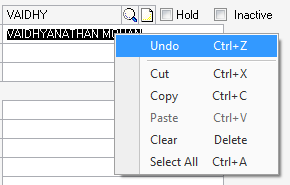
When you RIGHT-CLICK on a field, a Context Sensitive menu opens up as shown below:

This is basically the EDIT Menu. No more Ctrl-C, Ctrl-V, Ctrl-X, etc.

GP is adopting more and more Windows functionalities.

GP 2010 Teaser Articles:

Mariano on Security Enhancements
Daoud on Lookup Enhancements & Cue Reminders
Vaidy (That’s Me) on Microsoft Dynamics Online Connect

VAIDY

Dynamics GP 2010 – Microsoft Dynamics Online Connect


Consultants, Partners have started testing BETA and coming up with lot of interesting features found.

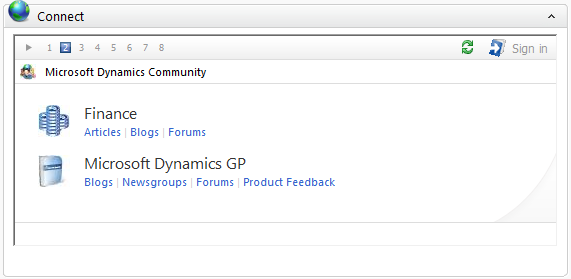
I would also give you information on one more very interesting new feature, which is “Microsoft Dynamics Online Connect” directly on your Dynamics GP Home Page. Do you want information from any Blog(s), CustomerSource or any related sites? This new feature will direct you right from Microsoft Dynamics GP Home Page.

Here is what Microsoft has to say about this feature:

The Microsoft Dynamics GP home page hosts Microsoft Dynamics Online Connect. Connect displays a series of slides that makes the benefits of the Microsoft Dynamics Business Ready Enhancement Plan easy to find and have access to. The slides allow you to perform self-help support, get information, and perform training from the Microsoft Dynamics GP home page.

Connect is available to all users on the home page and is specific to each user’s home page role. CustomerSource access is based on your Business Ready Enhancement Plan.

How is it going to look in Dynamics GP 2010? Just wait for some more time till we get official Customer Release.

VAIDY

Dynamics GP 2010 – Features I am looking at


There are massive improvements in Dynamics GP 2010. It’s too early for me to know Functional changes. But I am very eager to know the following:

1. Collaboration with Microsoft Office 2010 (Word Forms & Report Templates).
2. Business Intelligence (Sharepoint, Analysis Services, Excel Pivot, etc.).
3. Lookup Enhancements (Setting Default Lookup criteria).
4. Email Functionality (For important documents directly from GP).

And much more…

I am excited, to say the least.

VAIDY

CRM GP Adapter – Importance of showing eConnect Errors to Users


It was a pretty long day today. We had a Conference Room Pilot session on CRM & GP Integrated Solution.

While doing the testing, the Consultants were pretty much cleared all possible scenarios in CRM and at critical stage, demonstrating the CRM to GP Sales Order Integration. Much to our frustration, integration failed. They checked everything: CRM Adapter Mapping, Customer Record, almost everything. Yes, ALMOST everything and NOT everything.

Could not trace out the issue and we continued with GP side testing. Once the session got over and End-Users left for the day, I and the Consultants started debugging the issue further.

I always had insisted every Developer to open eConnect Logs in case there is any issue with Integration Tool, Web Portal, Web Services and anything which uses eConnect as business logic. And I was right. eConnect stored the error messages for those failed transactions. And once we probed those messages, we got clarity. It was simple record issue and nothing to do with Integration Adapter. We have planned to correct the record and then continue with our next level testing.

One critical issue with this CRM to GP Adapter is that it does not intimate the User who enter the records in CRM about the validation errors. Something like “Customer Payment Terms does not exist.”, “Document ID does not exist.”, etc.

While we could still go and check the Adapter log or eConnect, how the User would come to know that he entered a wrong record and tried integrating it? This particular Adapter is not User-Friendly to the extent that we would like to see. Though it is in its initial phase, this is very basic.

If I don’t know what wrong I committed when I entered a record and forced to depend on a Consultant to trace the issue, it is really something which is clearly not a positive sign.

We still have to live with it, unless Microsoft Tech Team consider this and do something about it.

VAIDY

Crystal Reports XI & Windows Server 2008


This one’s a pointer to GP Newsgroup (General) post: Crystal XI on Windows Server 2008.

Childofthe1980s has entered these posts (first one a query, second one the solution).

Should be noted down, as I am also working on the same environment here and may face the same issue. So this pointer may serve a purpose of directing my blog readers also to this issue & resolution.

VAIDY

Integrating CRM with GP – Mariano’s Guidance


It may be coincidental, but I am of-late reading lots of CRM to GP Integration articles.

This one is another gem from Mariano: Integrating Microsoft Dynamics CRM with Microsoft Dynamics GP in 72 hours…and 5 “Easy” Steps.

May sound like simple things, but very critical things.

MUST READ.

VAIDY

A Critical Miss in CRM – GP Adapter – End


I am working on integrating CRM with GP for very specific requirements and you would have read my findings and explanations in the past two articles.

That’s when I came to read this article: Successful Model for CRM Implementation. This is pointed out in The eOne Dynamics GP and CRM Blog at the right time, I would admit.

Can’t agree for more.

A MUST READ for all Consultants, Customers & Implementation Partners.

VAIDY

A Critical Miss in CRM – GP Adapter – Contd


There is a change in what I explained in previous article.

CRM GP Adapter does have a Mapping Facility where in you can select Sales Document Type & Sales Document Type ID, in the Microsoft Dynamics CRM Adapter Mapping Settings.

If there is no settings done here, it works exactly like what I explained earlier. If it finds this setting done, it creates the Sales Order accordingly.

[Thanks to Consultants, Prince & Prashantha, who are working on this Implementation and sharing this knowledge with me].

But still, the ability to create Sales Orders from CRM to GP by dynamically selecting Order Type ID & respective Document Number is still a miss.

More to follow as and when I gain more knowledge.

VAIDY

A Critical Miss in CRM – GP Adapter


This is the first time I am working on CRM GP Adapter, and I am closely monitoring it being implemented and not working on it directly.

In our business scenario, we maintain different SOP Order Document IDs for different Departments and there by different running SOP Order Document Numbers. For instance, Sales Department Orders will have a Document ID as SALES and SOP Number Sequence will be something like SALES-0000001. Services Department Orders will have a Document ID as SERVS and SOP Number Sequence will be something like SERVS-0000001 and so on.

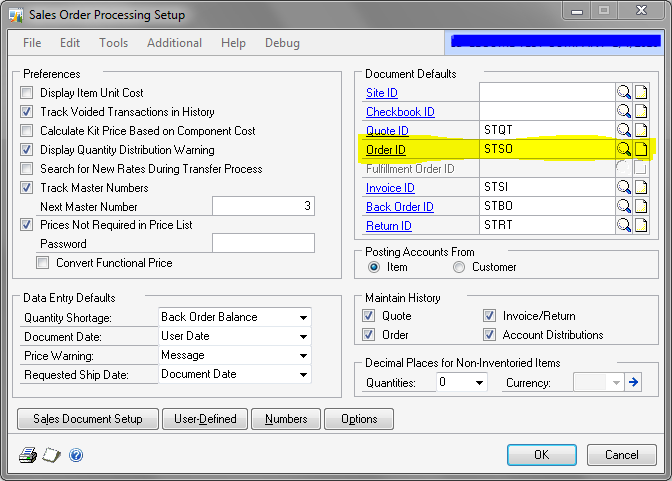
Incidentally, when I was working on CRM Order Integration to GP Sales Order, I was curious to know how the Sales Order in GP is created by using which Document ID and which running sequence number is used to generate my SOP Number in GP. The below is the answer to this query:

The highlighted SOP Default Order ID is what CRM takes to create all Sales Orders to get pushed from CRM to GP.

This we (I and another Consultant) confirmed by deleting that Default Order ID from SOP Setup and running the CRM to GP Integration for an Order. The below is the eConnect Error Log:


Microsoft.GreatPlains.eConnect Version=10.0.0.0
.Net SqlClient Data Provider

Procedure or function ‘taSopHdrIvcInsert’ expects parameter ‘@I_vDOCID’, which was not supplied.


at Microsoft.Dynamics.GP.eConnect.eConnectMethods.ExecStoredProcedures(String xml)


at Microsoft.Dynamics.GP.eConnect.eConnectMethods.eConnect_EntryPoint(String ConnectionString, ConnectionStringType ConnectionType, String sXML, SchemaValidationType ValidationType, String eConnectSchema)

CRM Adapter tries to get the Default SOP Order ID from SOP Setup and when it did not find any one being setup, it passed NULL STRING as DOCID to respective Web Services method and in turn creating a NULL STRING node in respective eConnect method.

But isn’t this absurd? When GP allow us to create as many Order IDs as we want and have as much different SOP Document Number patterns as that of Order IDs, why can’t we have the same in CRM?

In my opinion, when we have an interface between any two applications, we should have atleast the critical fields (or factors) mapped to each other. Otherwise, the purpose of integrating two products is not satisfied completely.

I do understand that some Customers maintain one single Order ID across it’s Sales Orders. But then what about the Customers who religiously maintain different Order IDs for different scenarios?

Will be working more on this in coming days and will update you all with my findings.

VAIDY
RW Function: RW_GetCommentText


This Report Writer function is another Standard GP Function, which works very similar to function RW_GetNoteText ().

This function is available to retrieve the Comment Text associated with a Comment ID. This particular function is very helpful when we use Comments extensively and create relevant reports with Comments.

The prototype of this Function is:

Function: RW_GetCommentText
Parameter 1: Comment ID (String)
Parameter 2: Number of Characters per Line (Integer)
Parameter 3: Line Number to Return (Integer)
 
Yes, what you are seeing above is exactly a replica of RW_GetNoteText() function’s prototype and each Parameter’s explanation is exactly the same.
 
The only difference is that we pass Comment ID, instead of Note ID, and retrieve the Comment Text. And of course, the underlying table is also different.
 
If someone out there wondering whether to write a function of his/her own to retrieve Comment Text, refer to this article and breath easy. We have a function already.

VAIDY