This one’s very good trick to Force SQL Server 2005 / 2008 to sort of use ORDER BY in Views.
Never knew this till Steve’s article. Good one for all SQL Developers (also for Part Time ones).
VAIDY

This one’s very good trick to Force SQL Server 2005 / 2008 to sort of use ORDER BY in Views.
Never knew this till Steve’s article. Good one for all SQL Developers (also for Part Time ones).
VAIDY
1. Install the chunk on GP Site (copy the chunk on to GP Application Folder and launch GP). You won’t be able to log on, if there is a Modified Form(s) for this product.
2. Close GP.
3. Launch GP Utilities.
4. Verify GP Dynamics Version and Company Databases Versions.
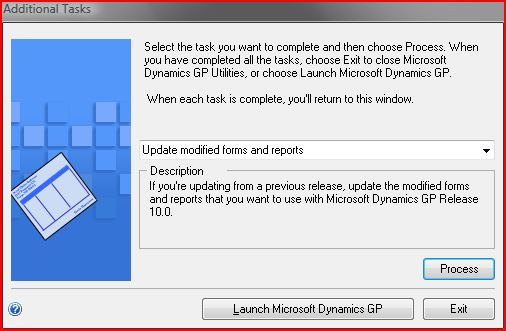
5. Then select the option “Update modified forms and reports” when this window is shown up:

Belinda explains us what’s more important in Payables Management (PM) as opposed to how it’s been used generally.
VAIDY

This one’s very realistic, Mark. I must admit that I am more than convinced.
Implementation is much more than a Project Management and it certainly requires someone who do not compromise on anything for the Quality & Safety of Project Implementation.
It certainly depends. If a Client could hire a really successful PM for an Implementation, they get more out of that single right move. But they also have to make sure that, that single move should not lead them to more destructive results.
Read Mark’s article here: Realistic Expectations: How to Avoid the Pitfalls of Outside Project Managers for Implementing Microsoft Dynamics GP
VAIDY

Till now, Microsoft Dynamics Team has released 4 versions of this CRM GP Adapter:
1. CRM Adapter Base Version – GP 10 & CRM 4
Details of this release can be read by clicking the above link. There is a terrific list of FAQ and much needed information. As the title says, it’s the base version and did what it was meant to. Read all CRM fields and make it available for GP integration and vice versa.
2. CRM Adapter FP1 – GP 10 & CRM 4
Tremendous improvement with this FP1. Below are the notable ones:
2.1. CRM Custom Fields are made available for Integration Mapping.
2.2. Critical fixes pertaining to previous release.
2.3. Integration Status messages are more meaningful and logging of those messages (from GP Web Services) are comprehensive.
2.4. Picklist Synchronization Utility – We will discuss this utility as a separate topic. Trust me, this is certainly a boon to this Adapter.
3. CRM Adapter FP2 – GP 10 & CRM 4
With this release comes the power of choice (as mentioned in the release article). You can select the integration configuration between:
3.1. CRM On-Premise Integration alone.
3.2. CRM On-Premise and CRM Hosted Integration.
More technical details are clearly explained in the release article. So I have got nothing more to say.
4. CRM Adapter FP3 – GP 10 / 11 (GP2010) & CRM 4
With this release, we have got an Adapter which is Dual Compatible. It now supports GP10 / GP2010 along with CRM4 (Hosted / On Premise).
I have not implemented this version yet and am scheduling it at the earliest.
Question: Why do I have to know the history of this Adapter? I will just download the latest one, follow the instructions to implement it. What’s the big deal in that?
Answer: The first release of this Adapter was in October 2009. The FP3 release was in May 2010. Now that’s what I admire. This tool has been taken seriously by Microsoft Dynamics Dev Team and they have given us a tremendously important and easy-to-use Integration tool. People may think that I am advocating for this Tool without knowing it’s complete character. But for me, till I have seen it, it’s awesome. What you need as a basic integration between GP and CRM, scope of the integration is very well defined and quite contenting.
This article is aimed at instilling a Confidence in Consultants & Customers that this tool is certainly a good one for real-time implementations.
More to come.
VAIDY


This took my life past 2 days and yesterday I was so relieved to have to fixed.
Issue: For a specific set of Inventory Items, Item Stock information was showing up incorrectly. The Qty Allocated is showing some units, but the user swore on everything in this world that it’s not possible. Well he had a point to substantiate his argument. Upon drilling down from Qty Allocated in Item Qty/Site Maintenance (or Inquiry), nothing showed up.
Troubleshooting Steps:
1. First thing, I checked is whether any of these items had been used on a Service Call Parts Entry. If that’s the case, then Qty Allocated will be of that respective units, but it won’t be listed in the Allocated Documents list when we drill down. Result: NONE.
2. Ran a reconciliation on these items, hoping that it would clear any unnecessary Qty Information. Result: NONE.
Now that’s a real mess. Need some quirky way to find the cause & solution.
3. [CAUTION: Do not try this out unless you know what you are doing.] I took a backup of Live and restored it on Test. Then I updated the Quantity Information in IV00102 table manually based on User’s inputs. BUT, decided to run the reconcile since I was not sure about this manual update. Result: It reverted back whatever I had updated. And back to square one.
GREAT…!!! The above step at least confirmed that there IS A VALID DOCUMENT which is holding this quantity.
4. Queried SOP10200 (SOP Line Work) table to see the lines containing one of these items. There was one SOP Order, which was doubtful. Queried SOP10100 (SOP Header Work) for that Order. THAT’S IT… I FOUND IT…
Cause: The erroneous SOP Order had not been either posted or saved properly. The reason may be due a GP Application Hang which would have forced the user to kill the session. Once we kill the session when we are entering SOP Document, SOP10200 table will contain the records without any issues, but SOP10100 table would lose all the information that we had entered other than SOP Number, SOP Type and SOP Document ID. Not even Customer ID and Default Location.
These items had been allocated on this Order technically, but since the user would have killed the session, he thought he had to reenter the document and did so. Didn’t face this issue, till he ran out of stock.
Solution: I released this SOP Order for the user to retain/delete so it would release those Allocated Units from our Inventory. Check my article, SOP – “This document has been posted.” Error & Resolution, on how to release such SOP Documents.
VAIDY

The best thing that could happen for Dynamics GP is the CRM Integration tool. This leverages the GP Functionality and extends it to CRM (or vice versa may be). There are so many things that I could talk about this beautiful Integration Tool. Some of them are:
1. Free of cost (though it must be obtained thru’ a Partner).
2. No extra software licenses.
3. eConnect as backbone.
4. Utilizes GP Web Services thoroughly.
5. Easy to use.
6. Scheduling each and every Integration to and fro GP & CRM.
7. A perfect two-way integration model without much hassles.
8. Very intuitive configuration (though it requires a bit of technical knowledge).
9. Tools such as Picklist Configuration, enhances the control of data flow.
10. Standard CRM Fields & Custom CRM Fields mapping To & Fro GP.
… and more.
There are several comprehensive tools available from reputed ISVs such as SmartConnect from eOne. And those are pretty elaborative and extensive. But this particular tool from Microsoft Team does give you what you require as basic need. To integrate data from CRM to GP and vice versa.
Not all clients would require elaborative tool for their day to day business. For instance, a business unit which require to integrate only Accounts (CRM) and Customers (GP) alone does not require a tool more than Microsoft Dynamics CRM Adapter.
Let’s start discussing about this tool in depth thru’ coming posts in this series.
Disclaimer: I discuss this based on what I have learned and how I have implemented this. I may be focussing on a particular way of implementing and using this. That’s not the end of it. We may have more ways (optimized ways) of implementing and using it. I welcome comments, feedbacks, advises, etc. from all of you to make this series meaningful and informative.
VAIDY

Mariano quotes us from Randal Mayer on How to Upgrade 150+ GP Companies.
I have never even imagined more than 15-20 companies, and this advise IS needed for all of us.
And this post also answers a major question: Is Dynamics GP really capable of handling loads and transactions? Now a customer having 150+ companies in Dynamics GP 9.0. And we have already got Dynamics GP 2010 with SQL Server 2008 R2.
That’s a lesson to all who doubt GP’s capability.
VAIDY

With GP 2010 going great guns and people have started implementing it everywhere, we are bound to have bits and pieces of issues here and there.
Janakiram MP explains one such error, Unable to connect to the Home Page Metrics URL, resolution given as well.
Those who are implementing GP 2010, please do read this.
VAIDY

 Dynamics GP - Learn & Discuss