Microsoft Dynamics ERPs – A Nice Article from SoftwareAdvice


This article, from Houston Neal, is pretty good starter for those who are in a dilemma to go for any one of the Microsoft Dynamics ERP Suites. The article explains each product (AX, GP, NAV, SL) with illustrating graphics and comparison diagrams.

Read it here: Understanding the difference between GP, NAV, SL and AX.

VAIDY

Work, Open & History – Janakiram & Leslie


This one is another good one from Newsgroup.

Janakiram has given a very brief yet clear information of what a Work, Open & History Document(s) is all about. Read it here: Work, Open and History.

Now that’s not all. Read Leslie’s article on the same. It’s enough for anyone to understand this completely. Completely, I mean it. Read it here: Moving from Work to Open to History.

Good ones to learn.

VAIDY

Frank completes 50 Tips on his GPTip42Day Series


This is awesome. Frank Hamelly completes 50 Tips on his GP Tip For The Day Series, with a tip on Inventory KIT Item Types.

Each one is a gem to treasure and remember.

Congrats Frank and we expect more, apparently.

VAIDY

Going to miss GP Tech Conference 2009 Badly


More than the concepts, it’s the interaction with Consultants and Peers that’s make a difference in our day-to-day consultancy. Learning from the experiences and getting involved with such people is something which would always be a great experience.

Having said that, I honestly miss This year’s GP Technical Conference in Fargo. I sincerely hope I would make it next year without fail. Those who make it, do share your experiences and what you learned from it.

VAIDY

FRx Installation Error – Windows Updates


This error is not documented in anywhere I believe. Would be helpful for people to have a reference on this error here.

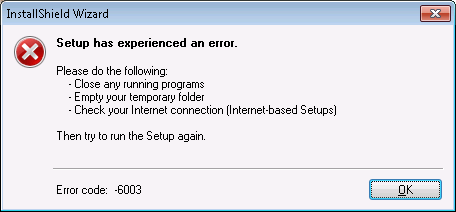
Couple of days back, I noticed an error message on installing FRx. Below is the screenshot of the error message:

The environment is Windows 7.0 Enterprise and FRx 6.7. Initially the suspect was the Windows 7.0 OS as there is no official word of FRx support on Windows 7.0 yet, if I am not wrong. Checked couple of other sources.

But after reading the message again, I got a doubt on the programs that were running at that time. No active programs were found running. The only final option was to check any Background Process(es) and close it off. Before that I tried installing FRx on my own laptop with the same environment and it proceeded without this message.

The only difference between my laptop and that client machine was Windows Updates running while the installation of FRx. I tried completing the Updates and then restarted the FRx Installation, it worked.

So anyone out there, facing this issue, just make sure that you either complete the Windows Updates or Cancel it for the moment till you install the FRx.

VAIDY

SQL Session ID – For Releasing a Stuck User


Often we get requests to release a lock happened in GP when a user tried posting a transaction or batch. And it gets stuck and the user is not able to reopen the Transaction Entry (Ledger/Subledger) form.

This is contributed to the DEX_SESSION and DEX_LOCK tables in addition to ACTIVITY, SY00800 and SY00801. This is clearly explained in the KB article #866440.

Some of the consultants often kill the Dynamics.exe process to get out of a stuck session in other to allow the concerned user to log on back and do his routines, without knowing the impact of it. Once the user logs back in after this KILL, he/she would not be able to reopen the Transaction Entry form where they got stuck initially. This in addition to deleting the ACTIVITY record for that user.

My piece of advice: Always note down the SQL Session ID which is there in ACTIVITY table before deleting the ACTIVITY record. There are two reasons why we want to do this. DEX_SESSION and DEX_LOCK tables would have this SQL Session ID as the reference to that particular user’s session. And if we don’t know this, we won’t be able to delete the respective records from these tables (as explained in the KB article).

I recently had to face the similar situation where I was left with DEX_SESSION & DEX_LOCK records without having a reference to the SQL Session ID, as the ACTIVITY record was deleted before hands. I had to spend some quality time on that to restore the system for that User ID back working.

This is really important and I am sure experienced consultants would agree with me in this regard. Always pay attention to these tables and respective records before do something hasty and repent it later.

VAIDY

Is it a right choice of being an Independent Consultant?


I bet, it is. I came here to Middle East for an assignment which involves the direct interaction with the realtime business and the people who work on it.

So far, I had never been able to understand the Accounting & it’s principles because I used to think from GP’s perspective. If someone ask me where & how to enter Sales Order in GP, I would certainly tell them. If someone seek assistance from me on modifying a form, I would do it merrily.

But only now I have started thinking from this dimension: Understanding the Business and thereby arriving at a solution. I had never got a chance to understand the core Accounting Principles but here I am doing it. I have been provided with a golden oppurtunity to learn and improve myself as a Consultant.

I am more than happy to oblige that.

I would recommend all Consultants to be associated with at least one Client directly in their career and work with them for their Business Implementation. I am sure, that will enlighten to unexpected levels.

VAIDY

CRM to GP Adapter Released


The much anticipated CRM 4.0 to GP 10.0 Adapter has shed it’s BETA tag and is now officially available for general use on US Installs. PLEASE BE NOTED that this is generally available for only US Installs.

Check out the Inside Microsoft Dynamics GP blog article: RELEASED!! – Microsoft Dynamics CRM 4.0 Adapter for …

VAIDY

Pretty Interesting DEX.INI Settings


My friend, Arunprasath VM, has shared an info on two DEX.INI settings which looks pretty new and interesting to me. I thought I would share with you all.

Below are the two switches:

duUseResourceDlls=FALSE
duExtractSqlResources=TRUE

From his explanation: These two settings will extract all SQL objects (tables, views, stored procedures, etc.) when an installation / upgradation of GP is done. These details can be found in the “SQL” subfolder inside GP Application Folder.

I am yet to try these settings, but if anyone has got any extra information about these settings, kindly do share with us.

Thanks Arun for sharing this info.

VAIDY

UPDATE: The DEX.INI switches are updated with correct spelling and values.

OLE Attachments & Record Notes – David


Quite an informative article from David on OLE Attachments and the Record Notes.

If anyone want to learn about these concepts, do read this article.

VAIDY