Around GP Blogosphere – Till 6th Jan 2009


So here we go. Some of the best articles in the past 4 days have been consolidated. Hope this be a Articles’ Map. 🙂

Developing For Dynamics GP:

David Musgrave is back. And back with an important information. In the article, Background Process is Running: Exit Aborted Message, he explains why this error is thrown and what’s the solution for that. Must read for VSTools Developers.

DynamicsAccounting.net:

Mark has lead us to two very important, on its own scope, articles.
1. Backup, Backup, Backup: This is a very critical thing that we need to cultivate as a Consultant/IT Admin/Technical Guy/Whoever who is suppose to take care of GP data. I had already posted an article on this separately, but I do not mind stressing this again. MUST READ.
2.
Lock the Taskbar: It’s a very common thing that we would have seen whenever we launch GP. And the explanation that Mark has given, is pretty simple and not-more-than-two-steps solution. I had a kind of doubt and Mariano has clarified that. You can find our discussion as comments on that article. Do have a look at it.

Dynamics Confessor:

After a brief gap, Leslie came back with two articles.
1. Dex.ini Switches – Part II: This is the second and last article in the short series. Sharing her experience, she has given us a comprehensive list of INI switches. I have never seen or heard about most of these switches. I am sure we are going to learn more and more from Leslie.
2.
Year End Closing Retained Earnings Validation: Well, I have not even crossed 1/2 the functionality, but striving hard to do so. This article did lend some insight to me, to learn this concept. Read it, you would certainly learn something.

GP2TheMax:

Frank Hamelly had posted this article quite sometime back. But this is surely very informative. Read his article, Copying Reports in Report Writer. Must Read for GP Developers.

MSDynamicsWorld:

Mark has posted this timely article. New Year Resolutions, well GP Resolutions. He’s at his best to explain possibly the much needed resolutions for all GP guys out in this world. Check this article, you would agree: Make Life Easier for Yourself with Microsoft Dynamics GP 10: Five Habits to Break in the New Year.

Ross Business Solutions:

Couple of articles on SSRS and Business Portal, comes with simple narrative and necessary information. You can’t help than craving for more information.

The Dynamics GP Blogster:

Mariano, as always, shares tremendous amount of knowledge on various topics.
1. Incorrect EIC Value in 2009 US Payroll Tax Update: Very critical information with a fix. I took some days to understand the concept and the impact of the issue. But I finally did. Don’t miss this, especially those who are GP Customers/GP Consultants. I would suggest to GP Developers as well, to know about this, so they don’t get deviated if faced.
2.
SOP Requested Ship Date Roll Down – Part II: Second and last in this series. This article explains you about rolling down the SOP Requested Ship Date to SOP Lines automatically. Uses VBA/SQL Procedure.
3.
How to search for a text within a SQL Server trigger, stored procedure, or UDF: A Must Read for Developers.

Victoria Yudin:

I have been learning a lot of GP’s functionality with real-time Accounting Knowledge. Thanks to Victoria. She has been amazing when explaining the concepts with such an ease and simplicity. This article, Using Credit Cards to pay Vendors in Dynamics GP, is of tremendous value. MUST READ for those who would seriously like to learn GP & Functionality.

Well, that’s all I could consolidate for now and I sincerely hope someone gets benefited from this.

Vaidy

Articles Consolidation from across GP Blogosphere


I am sure this would be useful to all those who would like to read all important GP articles from our GP Blogosphere.

Do expect effectively two articles in a week on my blog, which will lead you to all the GP articles, briefing on each article and a short explanation on what I perceived from those articles.

Vaidy

A Harsh Reality – Importance of Backup – Mark


Very hard lesson, indeed. Mark gives us a very harsh reality to know and stresses the importance of taking a working backup of GP Data.

Yeah, it is not just taking a backup. It is also imperative to confirm the backup set, that we have taken, actually works. Read his article: Backup, Backup, Backup.

Please remember: Taking Backup Set of GP Data is very very important. Even more important is to test it whether it is safe and working.

Vaidy

Rolling Down SOP Requested Ship Date on SOP Lines – Mariano


The short and informative series gets completed with the second article from Mariano.

The approach explained in the first article on this series, How to roll down SOP’s Requested Ship Date … Part I, is a SQL trigger which will do the trick whenever we enter a Requested Ship Date in the SOP Date Expansion Form.

The approach explained in the second article on this series, How to roll down SOP’s Requested Ship Date … Part II, is a combination of VBA and SQL Procedure. It also stresses the advantages in using a VBA based Customization.

This is just another simple and good example of how we can utilize the technical flexibility that GP provides.

Take a look at these articles, sure it will add our skills.

Vaidy

eConnect Admin Error


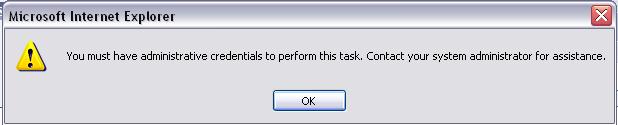
This eConnect error was a menace couple of weeks back for me and the team. The team had installed eConnect on GP Server and the runtime on one of the client machine. We somehow got convinced that we followed the correct procedures.

When we started using the web application, which calls eConnect API for certain integration, we received this error message:


We tried all possible steps and searched for a solution on the GP forums.

This is what we finally got to know, on our own: This error will be thrown, if we do not have the same version on both GP Server and Workstations/Web Server.

For instance, if the GP server eConnect version is 9.0.4.0, then the same version should be installed on Workstations/Web Server. In our case, it was this mismatch: 9.0.4.0 on GP Server Vs 9.0.2.0 on Web Server. The point I wanted to stress is: It is not just the Major Version Number that is critical. It is very critical to have the same Minor Version Number and also the subsequent numbers.

This is not the only reason for this error. There is one more reason for this error: If there is NO eConnect RUNTIME installed on Workstations/Web Server.

So if anyone face this error message, make sure that:
1. You have installed eConnect Runtime on Workstations/Web Server.
2. You have installed the same version on both ends.

Vaidy

Payables Return Transactions – Victoria


I could read this article only today. This article is of tremendous value for us. We don’t get to see such articles always, which explain the concepts with such simplicity and completeness and makes sure that it enhances our knowledge.

I would recommend everyone to read Victoria‘s article, Payables Return Transactions in Dynamics GP.

Vaidy

Checkboxes & VBA


This one is quite interesting. This could be something very trivial, but I would like to share this information.

I added a Checkbox on a Smartlist lookup using Modifier. Two functionalities with respect to this new checkbox:

1. This option should be selected by Default when we open the lookup.
2. Based on this value (selected/de-selected), the records should be refilled on the scrolling grid.

I was able to achieve the second one, by adding my code inside the validation in VBA:

If <WindowName>.<Checkbox>.Value = True Then
{My Code}
Else
{My Code}
End if

But for the first one, I tried the statement:

<WindowName>.<CheckBox>.Value = True

This never worked. I was quite confused, since the same statement worked on a validation but NOT WORKED on assignment. I checked back the VBA Manual and found that, for checkboxes we need to use either a number 1 (Select) or number 0 (De-select). So ideally, my statement should have been:

<WindowName>.<CheckBox>.Value = 1

Well, that did the trick and below is the conclusion:

To check whether a Checkbox is selected or not, you can write a code to check whether the value of that Checkbox is TRUE or FALSE. But, to select or de-select a Checkbox programmatically, you must assign either a number 1 or a number 0.

Vaidy

Let’s Welcome the New Year 2009


Wishes to all GP Community…

From 2008: Let’s celebrate all successful moments, learn from all mistakes and cherish all Happier Moments…

In 2009: Let’s dream and realize Success on all our steps, strive to and be the most Happiest Human…

WISH YOU ALL A HAPPY AND PROSPEROUS NEW YEAR 2009

Vaidy

Accessing Form Menu from Global Scripts – Patrick Roth


This is very good article on How to Access Form Menu from Global Scripts, from Patrick Roth, on Developing for Dynamics GP blog.

I have done exactly the same with VBA and Continuum API (My Article: SOP Entry – Defaulting Add Item Menu Option), but that was sort of a wrokaround and not as good as this method in DEX. This is an important article for all Dex Developers. Also make sure that you read Mariano’s query and Patrick’s reply (as comments to this article). That’s added information.

Thanks Patrick to share with us such a precious information.

Vaidy

What a tool VBA is?


It is a real pleasure to work on VBA Customizations. I just completed one such customization for a client, and believe me, it was fun and effective to achieve it.

One of the clients, asked for a criteria to be added on a Smartlist lookup. They wanted to filter records based on a value which is not provided in the standard GP/Smartlist lookup. We can still setup the Smartlist Favorite to do this, but they did not want it as everytime we open the lookup, we need to go and manually select that criteria from the Smartlist Header menu.

This had to be achieved by adding a Check Box for that criteria and upon selecting, the records should be filtered accordingly. Well, I first thought I would write some Dex triggers or some coding with Dex. But then, I finally decided to go for VBA and give it a try.

VBA did the trick, that too less than 75% of the estimated time. It’s efficient, ease-of-use, maintainable and what not? It does have limitations, I completely agree, but if you need a fast solution for simple & critical requirements, you can certainly bet on VBA.

I have started loving this brilliant tool. Mariano had rightly said in one of his articles about VBA and its efficiency. I am experiencing it now.

Vaidy