Microsoft Dynamics CRM 2011 Release Candidate


Microsoft Dynamics CRM Team Blog has got a post up there Announcing Microsoft Dynamics CRM 2011 Release Candidate and relevant links.

Those who are implementing CRM, who are interested in CRM, who are testing the CRM Beta release can now download this RC.

VAIDY

Microsoft’s Cloud strategy in perspective of Microsoft Dynamics


I just read this article on Navigate Into Success by Vjekoslav Babic, about his views on a post that’s published in Software Advise.


The article, Microsoft’s Cloud strategy in perspective of Microsoft Dynamics, goes on to agree / disagree certain points. 


Very good post up there and I am sure this would bring some thought process inside us.


VAIDY

All about "Z-" Currencies in GP


Finally, I have an article which explains why “Z-” currencies in GP are NOT REQUIRED at all. Mariano clears some very valid and important doubts about these currencies.

Read it here: Do I have to use those “Z-” currency IDs in GP?


VAIDY

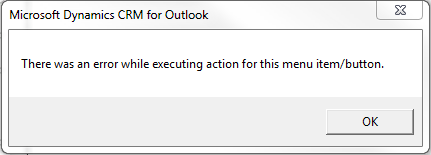
CRM 4.0 Outlook Client Error Message – There was an error while executing action for this menu item/button.


It’s CRM Implementation again and this time quite good amount of time is involved in configuring CRM & GP to Business Requirements.

I faced an error message in CRM Outlook Client and thought I would share the fix to that error. I haven’t found one single answer on all available forums leading people in the right direction.

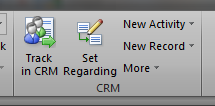
We have a new CRM Outlook Toolbar which is small yet powerfully packed with all relevant CRM activities that can be performed from within Outlook. The toolbar is shown below:

Using the “New Record” option shown above, we can create a new Lead/Contact/Account/Opportunity/etc/. This will open an IE browser window with relevant Creation form. Excellent, isn’t it? You don’t require to access CRM Web Client at all.

ISSUE: This issue that I faced would occur on following environment: Windows 7 / Vista, CRM 4.0 Outlook Client with Rollup 14 (latest), Outlook 2007 / 2010.

When you try to create a new item (Lead, Account, etc), you get an error message as shown below:

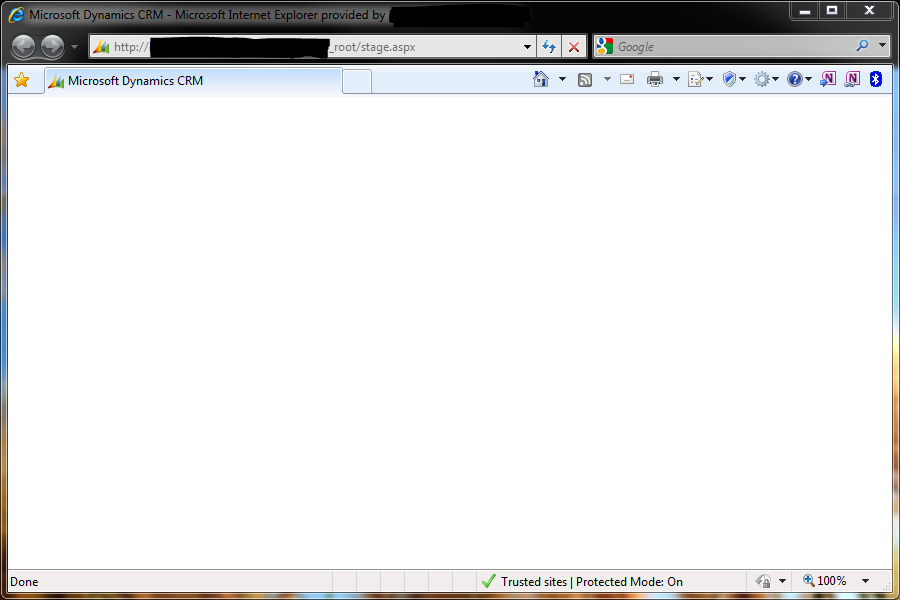
The above error message will then trigger the following IE behavior:

REASON: After some troubleshooting and surfing, some of the forum posts directed me to one single point: User Account Control (UAC). 

Invariably all those forum posts asked me to disable UAC for this CRM Outlook Toolbar functionalities to work, which is quite risky. I don’t want to compromise with that. So what else would be the solution? “Run as Administrator” of course.

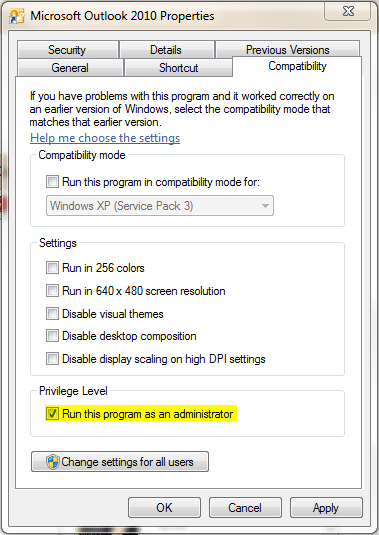
SOLUTION: NEVER DISABLE UAC in Windows 7 / Vista. It’s not safe. But you can always set any Application Compatibility to “Run as Administrator“. Below is how you enable it for Outlook Application:

So that’s it. I closed Outlook and reopened it. CRM works merrily now from Outlook.

VAIDY

DGPB Learning Resources Page


The DGPB (Dynamics GP Blogster), Mariano, has updated the Learning Resources page with GP Word Template Series and GP Architectural Foundations Series.

His post explains how to navigate. Read it here: Learning Resource Page Update.

VAIDY

Support Debugging Tool (SDT) Build #14 Released


David & his team has released Support Debugging Tool (SDT) Build 14. This release of SDT is having some very important fixes and enhancements. Read David’s post to know complete information about this build.

And I recommend this release be installed on all SDT using GP Environments.

VAIDY

How to Draw An Owl? (A Non-GP Post)


This one’s very thoughtful. Well, that’s what I felt.

You also may want to read it: How to Draw An Owl?

VAIDY

Microsoft Dynamics GP 2010 R2


It was SQL Server 2008 R2, then Windows Server 2008 R2 and now comes Microsoft Dynamics GP 2010 R2. Yeah you heard me alright.

Awesome news it is. More details on here: Microsoft announces Microsoft Dynamics GP 2010 R2.

GP’s official MSFT Blog gives us the glimpse of what we can expect from this release. Sure enough, this going to be another excellent release.

VAIDY

GP & Mixed Mode Authentication


I was attending a LinkedIn query from a User who was facing issues with GP Utilities & DB Creations. Upon checking  his environment by a remote-controlled session, I identified that it was SQL Server Authentication issue, which was denying him to even log on to GP Utilities and move further.

It’s very important to understand that GP Application supports only SQL Server Mixed Mode Authentication. What if we accidentally selected (rather left changing the default SQL Authentication option which is) “Windows Authentication”?

With SQL Server 2008 (I have not checked this in SQL Server 2005 and earlier versions), we have a very simple way to change it.

1. Open SQL Server Management Studio (SSMS).
2. Login to the respective SQL Server Instance.
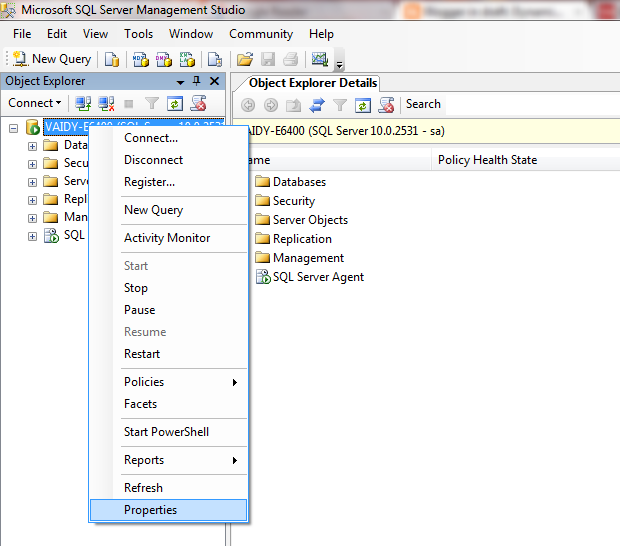
3. On the left pane, right click on the Instance Name and select “Properties”, as shown below:

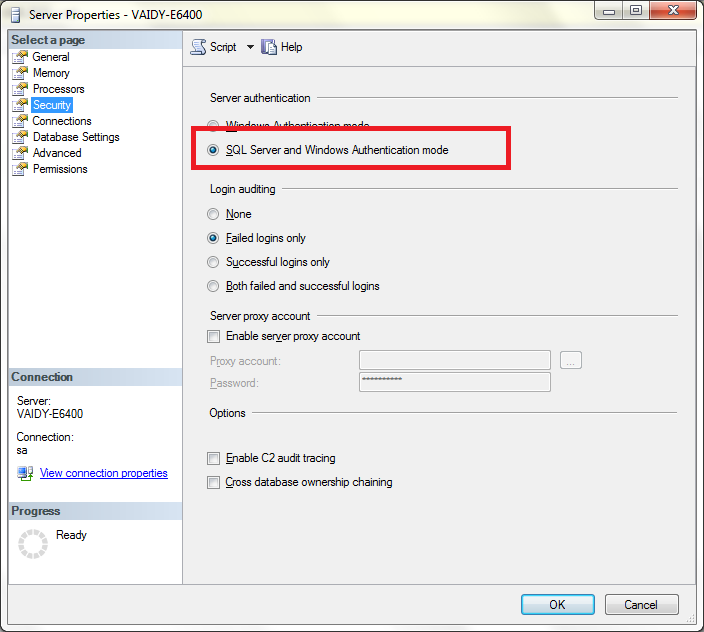
4. Under the Security Page, select “SQL Server and Windows Authentication Mode” as shown below:

5. Click on OK and restart the SQL Server service to effect this change.

Earlier I remember, I had to uninstall and reinstall SQL Server instance had I selected the wrong authentication mode. I think the version was SQL Server 2000.

With SQL Server 2008, you will be saved with an hour or more.

Point to Remember: If you enter “sa” and it’s password correctly and still you are invited with a message that reads like “Login failed”, then make sure that SQL Authentication mode is “SQL Server and Windows Authentication Mode”.

VAIDY

Victoria Yudin’s Book – Microsoft Dynamics GP2010 Implementation


So we have a book on GP overall functionality Microsoft Dynamics GP 2010 Cookbook, by Mark Polino. Now we have another one, Microsoft Dynamics GP 2010 Implementation, by Victoria Yudin.

Read more on Victoria’s post: Dynamics GP 2010 implementation book coming soon.

For those who want to preorder this book, you can reach Packt Publications’ exact page here: Microsoft Dynamics GP 2010 Implementation.

VAIDY