State of Online Accounting Industry – Q&A on Software Advice by Michael Koploy


I was contacted by Mr. Michael Koploy, Software Advice, to have a look at his then recent article; State of Online Accounting Industry.

The importance of this article is that it gives an insight about Accounting Software on Cloud, from 3 of the leading Online Accounting Software solutions. 5 important questions and you are well informed by the answers. It’s a great read and well informative.

I would like to share my views on this.

Advantages:

1. Cost – That’ll be the driving point for any one who want to go online.
2. Less/Zero Maintenance – You don’t have to worry about downtime or H/W maintenance on server or related resources.

Disadvantages:

1. Depends on providers. You can’t just trust everyone and anyone who provide an online solution. There were some recent outages from industry’s leading providers, such as Microsoft, Amazon, etc.
2. Since it’s pay as you use, you have to limit your usage if you have to get some benefit out of. When I say that, I mean, I may not have one live environment and one test environment for the price of only one environment. If I insist to have, I may have to pay for that.
3. If I have to restore a backup due to a severe mistakes, I can’t do it immediately. I don’t even know whether my service provider maintains a backdated backup or not.
4. No Accounting Software is used AS IS, without a single customization(s). If I do require a customization, then my online accounting software should have an ability to import it and get updated with.
5. Whenever there is a major update to the parent product, I may or may not have a choice to decide on whether I actually want it or not. As always, a major upgrade also include additional cost depending on HOW major it is.
6. People may not feel like THEY ARE CONTROLLING THEIR DATA. I capitalized that, because, that’s a huge question everyone would want to ask before adapting to the change.

In my humble opinion, everything else could be 100% online (Public Cloud), but Accounting Software should be a hybrid (Private Cloud). In that way, there will be a balance between cost, maintenance and others.

VAIDY

Using substring() with Text Fields – David


Back from my vacation, several posts grabbed my interest as a developer. This post from David is one of them.

David explains how to resolve an issue that was found in Sivakumar’s SDT (Support Debugging Tool) based solution. In a nutshell, the issue was with Text type fields and dexterity function substring().

Read it here; Quick Tip: Using substring() with a text field datatype.

VAIDY

Taking A Much Needed Break


As you all know by now, I have not been active on my blogging due to a very stringent schedule for past 5 months. And I had been burning my energy for past 2 years without a halt.

Now, I am extremely happy and relieved to have got a much needed break from work and will be going on a vacation for a month from now. I am excited enough to get in touch with my native country and my people. There is long schedule for the next one month; no escape from that. But that’s going to be ALL PERSONAL. Meeting people, visiting places, attending functions. I badly need it.

Does not mean that I will not be keeping touch with Dynamics GP. 🙂 I will certainly be reading all posts from fellow bloggers and will be updating myself with happenings.

Once I am back from my vacation, I assure I would be a hungry soul and be posting on my blog as frequently as it had never been.

VAIDY

Dynamics GP Developer Insights – Series of Posts on Developing For Dynamics GP


Brian Roney and his team at Microsoft (Dynamics GP Technical Division) is going to post series of articles which will enlighten us on what’s been going on with Dynamics GP development.

Series titled as Dynamics GP Developer Insights.

GP developers across world, stay tuned for a brilliant series.

VAIDY

Best Practice for Dexterity Version & Build Numbers – David


David’s post, Best Practice for Dexterity Version and Build Numbers, explains a very important concept in chunk creation process.

We must version our products which is very important and also ethical. Small-time Dex developers do not understand this process when they deliver a simple customization. 
I sincerely believe that this post from David would enlighten people about this.
VAIDY

SQL Server Services – Do Not Set To "Automatic (Delayed Start)"


I am not sure anyone else would have faced this issue. But I did couple of days back that almost killed my system.

I formatted my system and built it from scratch, that obviously also included SQL Server. I always set SQL Server services (SQL Server Database Service, SQL Server Agent, SQL Server Reporting Service, etc.) to Automatic. This means, when OS gets booted, all these services will also get started before we see Desktop.

I read a KB article on MSFT site, which explained each of Application Startup options; Automatic, Automatic (Delayed Start), Manual, Disabled.

Difference between Automatic and Automatic (Delayed Start) is that Automatic option lets the concerned service to get started immediately after OS boots. Automatic (Delayed Start) option lets all services of OS to get started first and then after a brief delay starts the concerned service.

After reading above, I decided to set SQL Server Services startup option to Automatic (Delayed Start). And that proved disastrous.

Restarting the system never progressed beyond STARTING WINDOWS. And when I switched off system forcibly and rebooted it, system asked me to either BOOT SYSTEM NORMALLY or RUN SYSTEM STARTUP FAILURE DIAGNOSTIC.


Selecting either of above yielded nothing. I had no other option than to reinstall OS.

Moral of this bitter story: Never set Automatic (Delayed Start) as Startup option to all SQL Server Services. If you don’t want these services to be started immediately when OS boots, then set it up to Manual.

VAIDY

"Illegal Address Field" Error while accessing a Global


This one’s interesting and quite straightforward too.

I had to create a new Global field in my customization. Instead of creating a new field, I added an existing GP field (‘Customer Number’) and wrote my code to assign value and retrieve value as required.

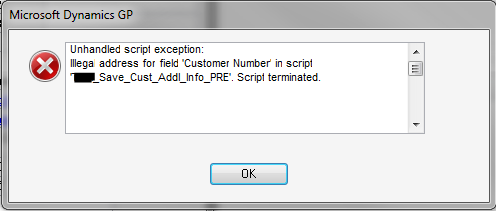
I created the chunk and when my code was executed at run-time, I received the following error message:

At the first look, it’s all correct. I have referred to a Global field which exists pretty much in my dictionary, otherwise it would not have even got compiled in first place.

So what else would be the reason? It’s plain and simple. I created a “new Global field from an existing GP field”. Which means, when I created my chunk, I should have added this resource explicitly to my dictionary, using Transfer Resources Dex Utility option. OR I should have first created a new field itself and then add that to Globals.

Since I didn’t do above, compiler did not find that resource at all in my dictionary or GP’s dictionary (Dynamics.dic) and then threw this error message.

I created a new field itself in my custom dictionary and added that to Globals. Things were perfectly alright.

Sometimes, focusing more on brain draining issues may actually drain your brain. Well, I am serious. Otherwise, how in your opinion I missed this above simple concept?

Update: David has posted a quick tip on why this issue occurs and what is the best possible solution to this.

VAIDY

Fixed Assets Suffix


Fixed Assets Suffix is quite confusing, at least that’s what I was thinking about.

According to GP:

When you enter an asset ID, you also must enter a suffix for it. The asset ID is used throughout Fixed Asset Management to identify assets; the suffix is used to identify components of assets. The default suffix is 1. You can accept the default suffix or enter or select a different one.

For someone who do not understand what exactly it is, I would like to simplify.

Consider the following scenario:

I am purchasing 10 laptops of identical configuration for my staff. Following will be my asset record:

Asset ID: LAPTOPS
Suffix: 1
Acquisition Cost: $3000 ($300 per laptop)
Quantity: 10
Location: My Office
Physical Location: IT Stores
Custodian: IT Manager or IT Department (whichever way you would like to perceive)

Now, my IT department allocates one laptop to an employee belonging to Finance department. I must now pass an Asset Transfer for one laptop from this asset ID. Once I transfer one laptop, following will be my new & updated asset records:

— For all other 9 laptops that are not allocated yet
Asset ID: LAPTOPS
Suffix: 1

Acquisition Cost: $2700 ($300 per laptop)
Quantity: 9
Location: My Office
Physical Location: IT Stores
Custodian: IT Manager or IT Department

— For 1 laptop that got allocated to an finance employee
Asset ID: LAPTOPS
Suffix: 2
Acquisition Cost: $300
Quantity: 1
Location: My Office
Physical Location: Finance Department
Custodian: Employee to whom this laptop is allocated to

Asset Suffix will be incremented as and when you do a partial transfer. It is not advisable to use Asset Suffix for non-identical assets. For instance, if you purchase 10 laptops but non-identical configurations, it’s not standard practice to create one asset ID with quantity 10.

Hope this helps.


VAIDY

Smartlist Favorite Visibility


Most of the queries that I am receiving from my users regarding Smartlist is like below:

1. Why my Smartlist Favorite is being shown to all?
2. I created a Smartlist Favorite in one company. It is not showing up in other company. Why?

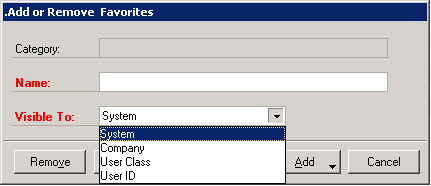
Answer is quite simple and straightforward. They had not selected an appropriate *Visible To* option.

Smartlist favorites can be created with either one of available four different visibility options.

1. System
2. Company
3. User Class
4. User ID

Shown below is how it looks like:

1. System: Visible to all users across all companies.
2. Company: Visible to all users, but visible only on that particular company.
3. User Class: Visible to all users under the user class in which the user who creates this favorite is, but visible across all companies.
4. User ID: Visible only to this user, but across all companies.

Related PostChanging a smartlist favorite’s visibility thru’ SQL

VAIDY