Microsoft Dynamics GP Support & Services blog has given the two direct upgrade paths, in case you are looking for: Upgrade Paths to Microsoft Dynamics GP 2013!
Quite crucial information that we must remember.
VAIDY
Microsoft Dynamics GP Support & Services blog has given the two direct upgrade paths, in case you are looking for: Upgrade Paths to Microsoft Dynamics GP 2013!
Quite crucial information that we must remember.
VAIDY
With more and more excitement being felt on GP 2013 Web Client, David gives us some more insight on this and more.
The post, Microsoft Convergence 2012 – GPPC Games and Web Client, explains the good things and also the limitations of Web Client in its first version.
This post, therefore, is very important for developers and consultants to gear up for this awesome client and understand what they must do to get the existing GP environments to work on the new release post upgrade.
Thanks David for the all important post. It was really crucial for us to understand.
VAIDY
I was in fact awaiting Sivakumar’s post about the new section that he has been working on. I got the privilege to go thru’ this first before his post went public.
Siva’s new section is all about GP 2010 R2 SQL Objects (Tables, DBs, Stored Procedures, Views, etc.). Like the one we have in MS Word documents that can be accessed from GP SDK, this is also an interesting concept and also very informative for all developers out there, who may not have access to SQL Server on a real time.
Read his post here, Dynamics GP 2010 R2 Database SDK, and share your thoughts with him.
I am sure this is going to be of immense help for all of us.
VAIDY
I am currently watching Convergence 2012 virtual session named “The Road to Microsoft Dynamics GP ’12′”and got this snapshot which is self-explanatory:
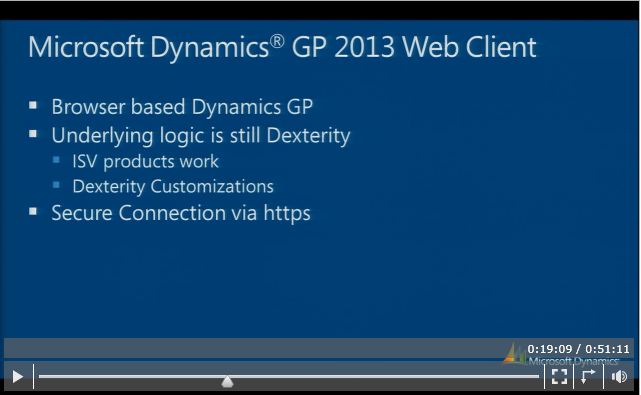
I took this snapshot as is from the virtual session.
Recently I converted all our existing VBA customizations (critical ones) to Dexterity and now this news. Those who were preaching against Dexterity and predicted it’s doomsday, please change your mindset at least from now.
VAIDY

I am talking about *Auto-Assign Serial Numbers* and *Auto-Assign Lot Numbers* options in Sales Order Processing Options Setup window.


It’s CRM Implementation again and this time quite good amount of time is involved in configuring CRM & GP to Business Requirements.
I faced an error message in CRM Outlook Client and thought I would share the fix to that error. I haven’t found one single answer on all available forums leading people in the right direction.
We have a new CRM Outlook Toolbar which is small yet powerfully packed with all relevant CRM activities that can be performed from within Outlook. The toolbar is shown below:
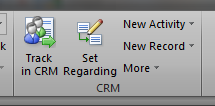
Using the “New Record” option shown above, we can create a new Lead/Contact/Account/Opportunity/etc/. This will open an IE browser window with relevant Creation form. Excellent, isn’t it? You don’t require to access CRM Web Client at all.
ISSUE: This issue that I faced would occur on following environment: Windows 7 / Vista, CRM 4.0 Outlook Client with Rollup 14 (latest), Outlook 2007 / 2010.
When you try to create a new item (Lead, Account, etc), you get an error message as shown below:
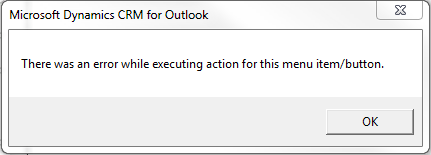
The above error message will then trigger the following IE behavior:
REASON: After some troubleshooting and surfing, some of the forum posts directed me to one single point: User Account Control (UAC).
Invariably all those forum posts asked me to disable UAC for this CRM Outlook Toolbar functionalities to work, which is quite risky. I don’t want to compromise with that. So what else would be the solution? “Run as Administrator” of course.
SOLUTION: NEVER DISABLE UAC in Windows 7 / Vista. It’s not safe. But you can always set any Application Compatibility to “Run as Administrator“. Below is how you enable it for Outlook Application:
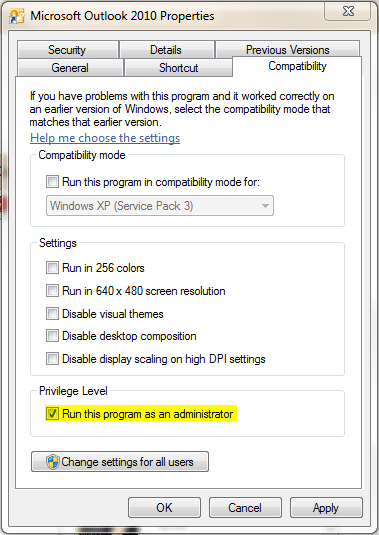
So that’s it. I closed Outlook and reopened it. CRM works merrily now from Outlook.
VAIDY

I recently worked on an issue reported by one of my Finance Colleagues, whose team takes care of Cashbook Bank Management (CBM) Transactions as process owners.
They post Receipts from CBM and that in turn creates an AR Receipt. They post these AR transactions either by posting the AR Batch having that CBM originated receipt OR sometimes by directly posting that AR Receipt by deleting the Batch Number from that transaction.
A week earlier, they reported an issue:
Couple of receipts were voided in AR after posting it in AR, but it is not showing up in CBM Transaction Enquiry/Void process, for them to apply that void entry in their Bank Book. That means, voiding specific CBM originated AR Cash Receipts is not automatically creating a void link in CBM.
Quite serious and I had no clue whatsoever. I asked them for some samples of those which were voided in AR and getting reflected in CBM as well. Idea is to find THAT difference which prevents the couple of AR Voids not getting shown up.
The major and critical difference that I found is as shown below:
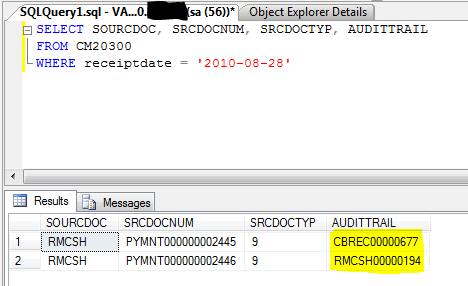
The first payment #2445 was voided in AR and it created a void link entry in CBM, whereas the second payment #2446 was voided in AR and it DID NOT created a void link entry in CBM. The difference, after seeing the above screenshot, is quite telling.
Payment #2445 contains an Audit Trail code which starts with CBREC (denotes a CBM Receipt) and Payment #2446 contains an Audit Trail code which starts with RMCSH (denotes an AR Receipt). Quite ridiculous, we may think, since both are created from CBM. But on a specific occasion, system does warn us as shown below:
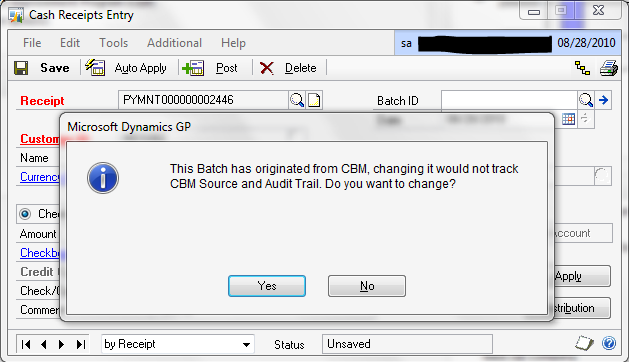
The above warning is shown, when we delete the Batch Number from the CBM originated AR Cash Receipt. If you ignore / confirm this warning message by clicking YES, then the Audit Trail link between CBM & AR Receipts is broken, thereby any future actions on these transactions would never get automatically reflected.
Process Explanation: When we post a CBM Receipt, it creates an AR Cash Receipt in a Batch with Batch Number as the CBM Transaction’s Audit Trail Code, such as CBREC00000677. When you post this AR Batch as it is from AR, this Audit Trail Code link will be established completely on both CBM and AR Tables. When you either void or reverse this AR Cash Receipt in AR, based on the Audit Trail Link, it automatically creates a Void / Reverse entry in CBM.
Normally, for one Cash Receipt in CBM, one AR Batch with CBM Audit Trail Code as Batch Number will be created. But at times, CBM maintains one Audit Trail code for several CBM Receipts (typically this happens when you want to run the CBM Receipt Posting Journals for all receipts at a time, and for that, you do not close the receipt window each time you post an CBM Receipt). In such cases, if the User wants to post only one AR Receipt in a Batch, he/she opens the transaction directly from AR Cash Receipt, REMOVE the batch number from that transaction and post it.
This Batch Removal action triggers the above warning message to the users to confirm whether they are aware of this Audit Trail Link breakage and that they are willingly do it. If the user say YES, it’s broken. You would never be able to reverse this action, at any point of time later.
For those who use CBM for their business processes, GIVE HEED TO THIS WARNING MESSAGE. This warning message is not just a typical GP Warning Message and it does have some serious implication towards how later this particular transaction is going to be treated in GP.
Addendum: Not all warning messages are junk in GP. This particular mindset among users is quite common, as sometimes they really do see some junk messages (Exceptions, DBMS Errors, etc) and they don’t seem to pay attention to Messages at all over a period of time; Partly due to the unwillingness to understand about the Product, Partly due to the misunderstanding from a particular warning message and Partly due to Addons’ / Customizations’ messages created by ISVs, Developers, etc. Once user get a feeling that such messages are a waste to read OR possess least significance, they start avoiding ALL messages. This may result in serious impacts.
My humble advise to all out there: Pay Attention to GP Warning Messages. If you feel like it’s wrongly thrown, contact your Support Consultant / Partner / Report to Microsoft.
BUT DO NOT EVER IGNORE Warning Messages.
VAIDY

This one’s quite baffling. The scenario is this:
1. I have my VBA Customizations on a 64 Bit Live Environment.
2. I wanted to setup a Dev Environment so that I can work on Enhancements and Additions. The Dev Environment is nothing but my laptop and it’s quite obviously 32 Bit.
3. I had DBs restored from Live and GP installed with necessary addons on my laptop.
4. Imported Modifier/VBA Customizations from Live to my laptop. There we go with an error message, which I am yet to solve:

And it took me to the VBA Editor. Since it said “VBA6.DLL is not found”, I wanted to check whether all References are proper. And below is what I found:
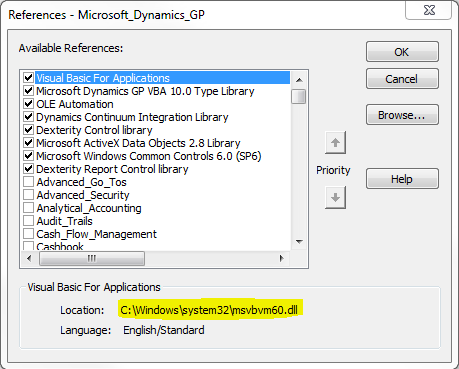
See the highlighted path and filename. It’s completely different from what it has to be “VBA6.DLL”.
Excellent and a pat on my back. Now why this is happening. I found the reason when I cross checked Live Environment VBA References:
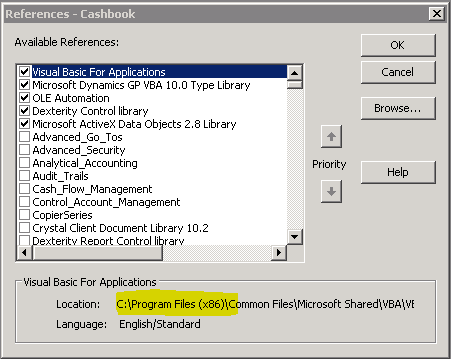
Alright, the issue is this:
1. On a 64 Bit Server, GP and VBA Files are installed on Program Files (x86) folder.
2. Whereas on a 32 Bit machine, GP and VBA Files are installed directly on Program Files folder.
That’s the difference. Once you import and start GP it does work for the first time. Once you close GP and reopen it, it refers to (x86) folder. Since it’s not found, it starts throwing this message.
The sad parts: Firstly, I won’t be able to change the path back to Program Files folder manually by clicking on BROWSE in the References window. Secondly, I won’t be able to remove the reference by unselecting it and then reattach the VBA6.DLL reference. It will always throw me an error message like this:
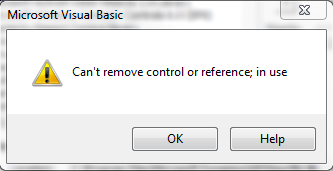
I am in a fix now. We may have some other ways to handle this. I am working on that. There may be a followup post which will explain the methods that can be used to fix this issue.
Meanwhile, if anyone has faced this issue, do share your ideas and how you fixed it. It would save me some time.
UPDATE – 1: The reason explained above is substantiated, when I did another test. I imported 64 Bit Server VBA Customizations onto another 64 Bit Environment, it works. I imported a 32 Bit Server VBA Customization onto another 32 Bit Environment, and it works.
UPDATE – 2: The reason that I had explained in this article, is only partial. There are more to this issue. My next article explains the solution and also contains a link to Dynamics GP Partner Forum post, which led to a fix. Read it here: Solution to “File Not Found: VZBA6.DLL” Error Message.
VAIDY

1. Install the chunk on GP Site (copy the chunk on to GP Application Folder and launch GP). You won’t be able to log on, if there is a Modified Form(s) for this product.
2. Close GP.
3. Launch GP Utilities.
4. Verify GP Dynamics Version and Company Databases Versions.
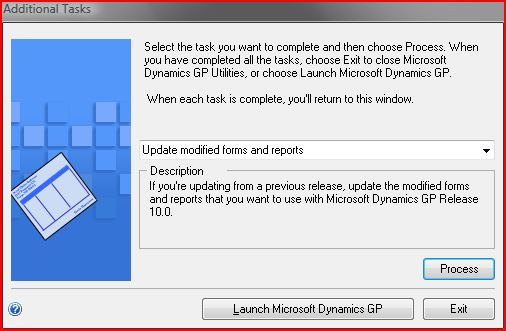
5. Then select the option “Update modified forms and reports” when this window is shown up:

KINDLY NOTE: This post is PERSONAL and nothing to do with Dynamics GP…
Time moves on… Moves on very fast…
Our beloved NIRAJ, Son of Shan & Uma, completes his first year in this world. 🙂 Yup tomorrow is his first Birth Anniversary…

Let’s all join to wish him a Happy Birthday & Blissful Life…!!!
VAIDY

 Dynamics GP - Learn & Discuss