Three Trigger Technique – A Reference for Dex Developers


Triggers in Dexterity; the most powerful and safest way of writing Cross Dictionary Customizations. Often, we get stuck in our Customization Development, not knowing how to intercept certain processes in GP (or any 3rd Party Product).

The Three Trigger Technique, by David Musgrave, explains the “Scope, Relevance & Preciseness” of placing a Trigger. Every Dexterity Developer knows how to write a trigger and on which object. But very less would know where to write it and how safely that can be placed for execution.

First article, Using the Dexterity Three Trigger Technique Part I, explains the theory with a real time example.

Second article, Using the Dexterity Three Trigger Technique Part II, explains the Three Trigger Technique with the support case that David addressed.

Per his bullet points at the end, concentrate on the following (instead of the actual scripts and the fix that he had provided):

– Three Trigger Technique
– Cross Dictionary Triggers
– Capturing and Using References

Must Read and for our Reference.

VAIDY

GET TABLE in the context of a Window


Another classic example of why we should read Newsgroup and Community posts, to learn more and extend the level of our Expertise.

I read this Dynamics GP Community post, SOP Transaction Issue, and there was a discussion on this issue. While this query is yet to be answered or provided a solution with, there are couple of things that we may learn.

1. David mentioned that the issue could be due to multiple users accessing the Next SOP Number. And the code might probably have dealt with Next SOP Number wrongly. I have been instructing this to anyone who asks me how to retrieve the Next Number (for any document that matters). As soon as you retrieve the Next Number from the Setup, you have to increment it by one and save the value in respective Setup Table. For instance, if I generate the SOP Number thru’ my code, I should first retrieve the Next SOP Number from SOP Setup table, then increment the SOP Number by one and finally update the incremented value on to SOP Setup table.

2. Ron Draganowski (of Olsen Theilen Technologies Ltd.) explained how SOP Entry form works when we enter a transaction. The issue of using GET TABLE statement on SOP_HDR_WORK table, was clearly explained. I shall brief you of what he explained: Once we start entering an SOP Document (precisely after tabbing out of SOP Number field), a dummy record is created with only SOP Type and SOP Number in SOP_HDR_WORK table and it is duly locked to store the rest of the values when the Save Record occurs. Now the point here is: Most of us would not know that while inside the SOP Entry process, using GET TABLE on SOP_HDR_WORK will silently release the locked record. And this will have a drastic effect in the later stage of the SOP document process.

Read this Community Post for more and complete details from David and Ron.

VAIDY

Displaying Note Text on a GP Report


I was trying to answer a GP Newsgroup Post, How to add SY03900 table in the Sales Report.

Simplifying the query: Can we display the Note Text for any record (for instance, Customer Note, Vendor Note, Item Note, etc…) on a standard GP report? If so how?

I first suggested to write a RW (Report Writer) function, to pass Note Index as the parameter and return the Note Text from the function. The user replied back, saying that he does not deal with 3rd Party Chunks and he customized the report using Report Modifier. Moreover, he does not have VBA.

Challenge: We are left with only Report Modifier. No new table relationship can be defined. No VBA. No user-defined RW Functions.

Then came David’s reply to the same post. He sent us a link from his blog, which explains Built-In RW Functions which can be used for many default requirements. Getting Note Text is one of them. That’s my starting point to explore this.

Solution: Below is the step by step instruction on how we can achieve this, with limited customization tool options, but with abundant Built-In RW Functions. I have modified the Detailed Item List (Run from Item Maintenance Print Button) for the sample. This sample works with Dynamics GP 10.0.

1. Open the report from Report Modifier (or click on Modify from the Report Window).

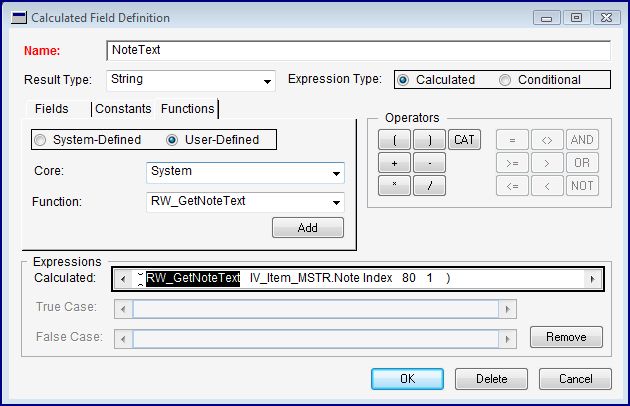
2. Create a new Calculated Field as follows:

3. The Built-In RW function is RW_GetNoteText() and the Series is System.

4. The first parameter is the Note Index value, which is in my case, Item’s Note Index stored in IV_Item_MSTR table.

5. The second parameter is the Number of Characters which is suppose to be shown in one line. The maximum number of characters is 80.

6. The third and final parameter is the Line Number. This instructs the function to get the first set of chars, second set of chars and so on, depending on the Line Number value.

7. On the whole, from my sample definition, it is going to show me the First 80 Characters in the Item Note Text.

Add this Calculated Field anywhere on your report, of course on a more relevant place.

To see the sample that I have developed, please visit this link and download the package file: Using Built-In RW Function to Display Note Text on a Report.

Inspired by David’s Article: Using the Built-In Report Writer Functions.

VAIDY

Flooding Fargo – Let’s flood our prayers and support


Things seems to look better as the Red River is reportedly levelling off, according to CNN’s report.

Let’s flood our prayers and extend our support (in whatever way we can) to guys there in Fargo to overcome this tough time. May God be with Fargo People and lift their spirit up to fight this tough moment.

God Bless.

For the entire Dynamics Community: Kindly be patient for the responses from MS Dynamics Support Team in Fargo to any of your queries. Things will get better at the earliest and we will be having this excellent team’s support sooner.

VAIDY

About DUOS – Mariano


DUOS is defined and explained by Mariano on his latest post. Must read.

VAIDY

GP – 50 Tips in 50 Minutes – Mark Polino


I surely missed this one. Mark is kind enough to put it on web: 50 Tips in 50 Minutes.

Make sure that you don’t miss this truly amazing pieces of information.

VAIDY

Important Edit: For those who do not have MS Office 2007 installed on their machines, you can find the compatible Powerpoint Presentation file on this link: 50 Tips in 50 Minutes (PPTv97-2003).

SQL Views on DUOS Data – David


This one is of tremendous value. David explores more on DUOS and shows us how to Create Views out of DUOS Data.

While mentioning about this, Mark Polino had specified that DUOS is the better option to store some extra values. I agree completely with his views.

Additionally, VBA & DUOS is a boon for GP Developers to write even a complex customization simply and effectively.

VAIDY

I found my Happiness


I have just read about this: The eternal feeling that one experience when one hold his/her new born kid and see her smiling at him/her…


Now I can explain them a bit better on my own experience. 🙂

It’s my immense pleasure to share my eternal happiness of the birth of my Cute Baby Girl on Tuesday 10th March 2009.

Now there is another GP in my life, which is equally satisfactory: Great Pleasure…

VAIDY

VBA Online Workshop – Mariano


Well, this is one of my all-time favorites. I have been completely interested and involved in VBA Customizations nowadays, and Mariano’s Online VBA Workshop came at the right time.

First article, Adding Custom Fields and Lookups to a Window, is a step by step detailed article on how to add custom resources and lookups to any window. The beauty of VBA is that, we can develop seemingly complex customizations involving any forms and 3rd party products, with less or just above less efforts.

Second article, Setting Up the VBA Project, explains us the points: Adding Windows & Objects to VBA, Setting up Cross Dictionary References with VBA and Adding VBA Code with the VBA Editor. The best part of VBA, to stress this again, is it’s coding. We can write a single statement instead of bulk of statements. The code example given in this article, which opens the Smartlist Debtors/Prospects Lookup, is just a single line of code, but actually it would have involved more than just that. Adding Cross Dictionary References to our VBA project reduces the bulkiness of coding.

Third and Final article, Adding VBA Code to the Project, explains us how to write code to our VBA project. Topics covered are: UserInfoGet(), Continuum API & DUOS. VERY VERY important topics for any VBA developer to know. I do have couple of samples up my sleeves, but this one is NOT just the sample. It is going to be more like a Dynamics GP VBA for Dummies.

Thank you Mariano, for this wonderful workshop. This workshop has just kindled further my interest in VBA and related topics.

VAIDY

Translation Series is Complete Now


We now have a collection of articles, from David, in a perfect sequence to learn about Translating Dexterity Applications.

The first two articles, Writing Translatable Dexterity Code & Writing Multi-Lingual Dexterity Code, discussed about what needs to be done to make our custom code TO BE and NOT TO BE translatable code.

The third article, Translating Dexterity Code, introduced a tool which translates the string and message resources to the respective native language and also steps that need to be followed to achieve this translation.

The fourth article, How to Horizontally Flip the Windows, explained us about doing this smart stuff of flipping windows horizontally. This is especially useful in ME region, as the users like to see the screens on Arabic language and with this flipping, the screens look exactly how GP is developed on Arabic from the scratch.

The fifth article, Dexterity and Double-Byte Languages, explained us about why Double-Byte characters are not supported in Dexterity. Well, we would expect though, in future, to have this added to GP technology, but as David clearly mentioned, it is not in the wish list, at least for some more time. That does not stop from one to do the R&D and get something done like the screenshot that is shown. We can certainly go about it. The screenshot of that Chinese version, tells us that nothing is impossible.

The sixth and final article, Handling Translation when Customizing with VBA, is a much needed article for me at least. David was kind enough to add this originally unlisted article to the series after my query on how to handle the VBA Customizations while translating. It so happened that I was working on a VBA Customization when this series came up and since we all write VBA event codes on ModelDialog Handling, it was quite imperative to know how to deal this. And the explanations were more than enough to feed my thoughts and experiments.

On the whole, this one is a series of valuable articles to treasure as a GP Developer. Thanks David, for your time and efforts in consolidating the necessary information and giving us this series.

VAIDY