Analytical Accounting “aagCreateTree” Dimension Creation Error Message & Reason


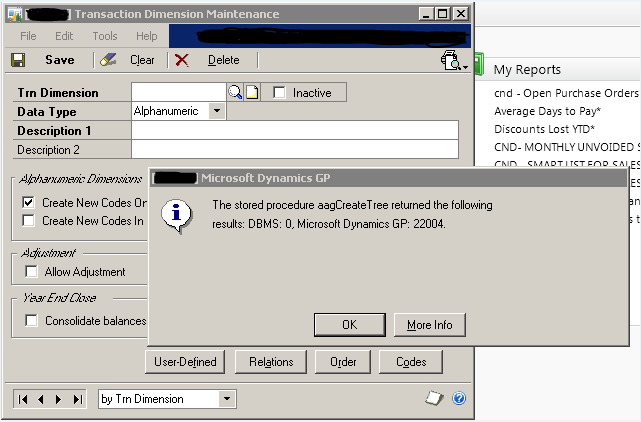
I received an email from one of the users with an attachment that displayed an error message while trying to create a new Analytical Accounting Dimension. Below is the screenshot that I received:

Upon debugging the stored procedure aagCreateTree, I realized that another stored procedure named aagGetCompanyStatus returned this error number 22004.

This stored procedure validates the version of Analytical Account and the status of particular company, from where you are trying to create a dimension. In my case, there was no record of this company at all.

I finally realized that Analytical Accounting company information was missing on table AAG00104 in DYNAMICS database. I am not sure how and why this could be missing, unless I forgot to run the AA company setup routines (which I did, to my best knowledge).

Solution: I had to rerun the AA company setup options again and recreate the records.

Just in case, someone faces this issue, make sure that you check AA company setup records.

VAIDY

User Access Setup Error: GPS Error RevokeUserAudit: 58


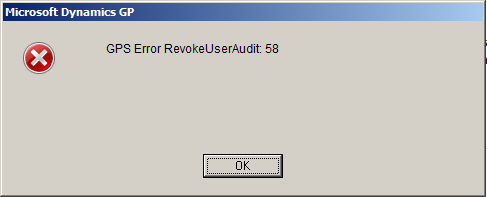
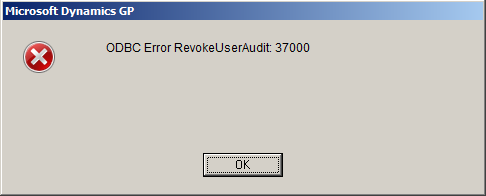
I faced this error message from the time I upgraded to GP2010 R2. The error message is thrown when we revoke access to a user on a company. Below is the exact sequence of error messages that I received:

Since I had not doing this frequently (it’s maximum 3 users in 6 months) and also the purpose of revoking access was working without any issues, I did not consider this as a harmful message.

Yesterday, I had to revoke access to users for an existing company due to some maintenance. Minimum of 10 users and I started receiving this error message each time I select a user and revoke access. It’s then I decided to check this out and clear it once for all.

I could get only one link with exact error message, which I found on our Community Forum. User Access Setup Error: GPS Error RevokeUserAudit: 58.

Let me explain what I did to get rid of this.

1. Check the second error message. It says it did not find the stored procedure *mxCallRevokeUserAudit*.

2. I checked whether this stored procedure is available on any other company that I had on my GP environment. I could not find one on any company.

3. I was intrigued by the name of this stored procedure since, it’s not similar to any Microsoft Dynamics GP SQL object naming convention.

4. I then launched GP and opened Tables Resource Description (Microsoft Dynamics GP -> Tools -> Resource Descriptions -> Tables).

5. Since the message said something about *Audit*, I thought I would first check with *Audit Trails* module. To my surprise (and joy, of course), Physical Name of all tables started with *MX*.

6. I then concluded that the SQL Stored Procedure what I am looking at, is also of *Audit Trails* module.

Now I could not do much with that, since I could not find that stored procedure anywhere. I checked my GP licenses and it did not cover *Audit Trails* module at all.

When I upgraded to Microsoft Dynamics GP2010 R2, I had selected this module also for installation. Since this module is not covered under my license, it installed the dictionary but it did not create the SQL procedures (that’s my assumption and I may be wrong).

The only option that was left; to remove this product from my environment (by removing DYNAMICS.SET file contents alone and not the dictionary itself).

This removed that now (in)famous error message.

VAIDY

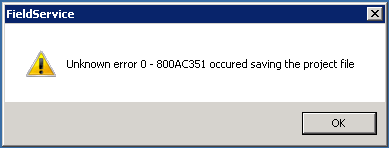
"Unknown error 0 – 800AC351 occurred saving the project file" – Error & Solution


My last post discussed about an error message faced by users once GP2010 R2 upgrade was over. This post gives you a solution for that.

The following error message was faced by users when they log off from GP:

Initially I thought it was occurring only on “sa” login. But couple of users today reported the same error when they logged off from GP.

When I analyzed this further, I realized that users who have access to Field Service processes in GP alone were getting this error message. Those who do not have access never reported this issue at all.

That made me to think about next step in solving this. No one has reported this issue yet, thus leaving me in the lurch.

I finally found a solution for this menace.

SOLUTION:

1. I logged off all users from GP environment, as it is Terminal Server environment for us.
2. Launched GP and opened Visual Basic editor.
3. Opened Field Service VBA project.
4. Did some harmless edits (like adding some comments, etc.).
5. Opened the “References” wizard.
6. Unselected all references and selected it back.
7. Compiled the entire project to check whether I am getting any error message.
8. Saved VBA project.
9. Logged off from GP.

Surprisingly (but expectedly) the error message never appeared again.

Those who are looking for some solution for this menace, here it is for you.

VAIDY

Don’t update "Batch Status" thru’ SQL when users are logged on


A user complained about a batch not being able to be posted. The error message is something like this: This batch is currently receiving transactions.

Normally when a user complains about something like this, a GP Administrator or Consultant’s immediate step is to check what the *Batch Status* field holds in SY00500 (Batch Header) table. The legend for this field says:

0 – Available – BATCH_AVAILABLE
1 – Marked to Post – BATCH_POSTING
2 – Marked to Delete – BATCH_DELETING
3 – Marked to Receive – BATCH_RECEIVING
4 – BATCH_DONE_POSTING
5 – BATCH_PRINTING
6 – BATCH_UPDATING
7 – BATCH_POSTING_INCOMPLETE
8 – BATCH_PRINTING_INCOMPLETE
9 – BATCH_UPDATING_INCOMPLETE
10- BATCH_RECURRING_INCOMPLETE
11 – BATCH_POSTED_WITH_ERROR

And quite apparently, in my case, it was 3. i.e. BATCH_RECEIVING. It’s very easy to update this field back to ZERO that denotes BATCH_AVAILABLE, so user can post it.

I could have also done the same thing. But I did not. I just wanted to make sure that this batch indeed did not receive any transactions. How do we identify whether a batch is receiving transactions or not? That I will address in another post.

This one is intended to caution a Consultant or Administrator NOT to update *Batch Status* thru’ SQL for any batch which is marked as BATCH_RECEIVING when users are logged on.

It would break a valid transaction being saved in this particular batch. When a batch receive transactions, GP locks this batch from getting posted only by updating the *Batch Status* field with BATCH_RECEIVING. By changing that from back end, we are risking batch getting corrupted.

Tell the user that he/she has to wait. And wait till users log off from GP. And then check whether the *Batch Status* becomes BATCH_AVAILABLE. In case it is not, then you update it thru’ SQL.

It is worth waiting for sometime than trying to clear a mess. I take this opportunity to insist again: SQL is not ALWAYS an appropriate approach for issues that we face in GP.

UPDATE: David has sent me a link, which quite obviously I missed mentioning here. How did I miss this? We do have a way to release stuck batches without logging off users.

VAIDY

Stuck Receivables Transaction due to Incorrect Amounts


Yesterday, I received a support request from one of our users who tried posting a batch full of receivables transactions and received an error message for one transaction whose distribution amounts did not match document amount.

It was suppose to be a simple task to release this transaction for edit, but due to some reason this transaction got stuck in between. It did not come back to it’s original batch and quite obviously it did not get posted either due to that error.

Following are the steps involved in releasing that transaction:

CHECKS

1. Check whether the transaction is still in RM10301 (RM Sales Work) table.

In my case it was still in RM10301 table.

2. Check the fields BACHNUMB (Batch Number) and BCHSOURC (Batch Source) in RM10301 table for that transaction.

In my case, BACHNUMB contained the USER ID who tried posting the batch; BCHSOURC contained XRM_Sales instead of RM_Sales, since it was in the middle of posting process and got stuck.

3. Check whether a batch with that user’s USER ID is created in SY00500 (Batch Header) table.

In my case, there was indeed a batch with that User ID. Because of which, this user could not open Receivables Transaction Entry window and was receiving the (in)famous error message “A previous transaction level posting… … …”.

CORRECTION STEPS

1. I first created a Receivables batch (I named it as RM-RECOV).

2. Through SQL Server Management Studio, I updated RM10301 table fields BACHNUMB and BCHSOURC as follows:

BACHNUMB = ‘RM-RECOV’
BCHSOURC = ‘RM_Sales’

3. Deleted the batch [USER ID] from SY00500 table, to remove user’s transaction posting session lock.

4. Tried opening that transaction on Receivables Transaction Entry form. Since the batch number RM-RECOV was updated through backend, it did not obviously update batch information. Due to which, I still could not open this transaction.

5. As a final step, I ran Receivables Reconcile Batch Information (Tools => Utilities => Sales => Reconcile). This step updated the amount from that erroneous transaction on to batch RM-RECOV.

After above steps, user was then able to reopen that transaction and edit it.

Bottomline: SQL approach is not always the only option for consultants to clear such issues. We need to perform some crucial application level tasks that would compliment SQL methods.

VAIDY