Dynamics GP 2010 – Security Enhancements (Precaution)


Developers who had read the article from Mariano on GP 2010 Security Enhancements, should have by now understood one important change.

For any Customer(s), if any Developers have coded Triggers / VBA on the event(s) of User Login / Switch Company windows should now rethink their logic.

I am not saying that we MUST change the existing logic, but I am still warning you all to understand how exactly the “Remember this User” and “Remember this Company” options in GP 2010 works and based on that we must change our code accordingly.

So people, just beware and don’t forget to think in Multi-Dimensions when you read any new feature or enhancements to existing ones in GP 2010.

VAIDY

Dynamics GP 2010 – Word Templates (Important Information)


This article does not explain how Word Template work in GP 11 Beta.

This is intended to inform that there may be Consultants / Partners who would not be able to see “Template” as an option at all when they run a report in GP 11. To get it working, the following link provides us Open XML SDK that must be installed for this feature to work.

Thanks to an Anonymous user who shared this in my article: Dynamics GP 2010 – Features I am looking at.

VAIDY

Dynamics GP 2010 – Right Click Enabled


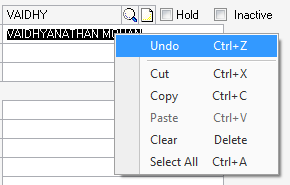
Those who do not remember keyboard shortcuts for field specific operations, GP 2010 has now got this feature enabled, a long pending one.

When you RIGHT-CLICK on a field, a Context Sensitive menu opens up as shown below:

This is basically the EDIT Menu. No more Ctrl-C, Ctrl-V, Ctrl-X, etc.

GP is adopting more and more Windows functionalities.

GP 2010 Teaser Articles:

Mariano on Security Enhancements
Daoud on Lookup Enhancements & Cue Reminders
Vaidy (That’s Me) on Microsoft Dynamics Online Connect

VAIDY

Dynamics GP 2010 – Microsoft Dynamics Online Connect


Consultants, Partners have started testing BETA and coming up with lot of interesting features found.

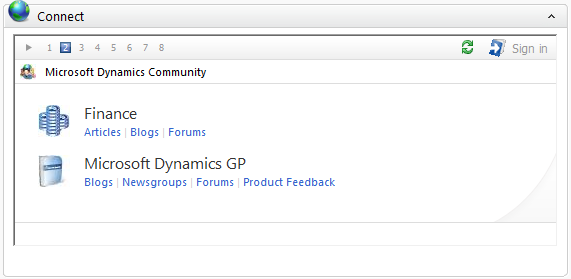
I would also give you information on one more very interesting new feature, which is “Microsoft Dynamics Online Connect” directly on your Dynamics GP Home Page. Do you want information from any Blog(s), CustomerSource or any related sites? This new feature will direct you right from Microsoft Dynamics GP Home Page.

Here is what Microsoft has to say about this feature:

The Microsoft Dynamics GP home page hosts Microsoft Dynamics Online Connect. Connect displays a series of slides that makes the benefits of the Microsoft Dynamics Business Ready Enhancement Plan easy to find and have access to. The slides allow you to perform self-help support, get information, and perform training from the Microsoft Dynamics GP home page.

Connect is available to all users on the home page and is specific to each user’s home page role. CustomerSource access is based on your Business Ready Enhancement Plan.

How is it going to look in Dynamics GP 2010? Just wait for some more time till we get official Customer Release.

VAIDY

Dynamics GP 2010 – Features I am looking at


There are massive improvements in Dynamics GP 2010. It’s too early for me to know Functional changes. But I am very eager to know the following:

1. Collaboration with Microsoft Office 2010 (Word Forms & Report Templates).
2. Business Intelligence (Sharepoint, Analysis Services, Excel Pivot, etc.).
3. Lookup Enhancements (Setting Default Lookup criteria).
4. Email Functionality (For important documents directly from GP).

And much more…

I am excited, to say the least.

VAIDY