What is Days Sales Outstanding (DSO) and how it is calculated?


The concept that I learned in past 2 days is this: Days Sales Outstanding (DSO) and the way you calculate it.

Joshua Burnett has posted an article on this way back in March 2009. Read it here: The DSO Calculation (Days Sales Outstanding).

It’s quite simple and yet very deep in concept. I simply loved to read and learn. I am sure it would be useful to some people out there, trying to understand what DSO is all about.

VAIDY

T-SQL "UNION" Vs "TABLE variable"


Very recently I learned this. And what a change it has made to all of my SQL based projects! I am sure people who are hardcore SQL programmers would already know this. Thought of sharing this for those who would want to know something interesting.

I had a SQL Stored Procedure that is about to retrieve records of a same table from two different databases. The usual approach was something like below:

SELECT [column_name_1], [column_name_2], [column_name_3], …
FROM [db_name_1]..[table_name]

UNION

SELECT [column_name_1], [column_name_2], [column_name_3], …
FROM [db_name_2]..[table_name]

This was working till these tables contained records less than 30000 rows. And it started taking significantly unacceptable time (like 10-15 seconds). I then thought of creating a temporary table and dump records from one DB then from other. There is a potential issue in that, in the form MULTI-USER environment. When two different users invoke this stored procedure at the same time, this temporary table must cater for both. I was not really sure about how I can address this.

Then came this idea of using TABLE VARIABLE. It’s like a Structure in C++. This is how I modified my stored procedure:

DECLARE @TABLE_NAME TABLE
(
Column_1 DATATYPE,
Column_2 DATATYPE,

)

INSERT INTO @TABLE_NAME (Column_1, Column_2, …)
SELECT [column_name_1], [column_name_2], …
FROM [db_name_1]..[table_name]

INSERT INTO @TABLE_NAME (Column_1, Column_2, …)
SELECT [column_name_1], [column_name_2], …
FROM [db_name_2]..[table_name]

SELECT Column_1, Column_2, …
FROM @TABLE_NAME

After this, the program started taking around 2-5 seconds with more than 50000 records to handle. Not to forget, this program contained several grouping and calculations.

I don’t have to worry about delay and also TEMP TABLE issues that are potentially disastrous. I am still not sure how this is handled in terms of memory allocation. What happens after this program completes it’s process, is also a factor that I am yet to figure out.

But, so far, I have found this as one of the best methods in recent times.

VAIDY

Dexterity "Reject Script" Command – David


David’s recent post on reject script command in Dexterity has got some really crucial information about it’s scope and usage.

After 7+ years of Dexterity experience, I did learn something which I had not in the past. MUST READ for any Dex developer.

VAIDY

Microsoft Dynamics GP2010 R2 – SSRS BI maxRequestLength Error


Another one, luckily Mohammad R. Daoud has got an answer to this issue.

Once GP2010 R2 installation is over and GP Utilities start configuring system, almost the last setup is SRS Reports Deployment wizard. It’s a welcome change from previous versions, as this one is more explanatory and clear.

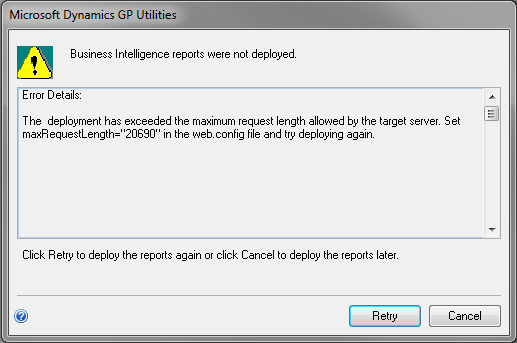
Once it starts deploying reports, the following error message is thrown:

The message is self-explanatory on what needs to be done to get rid of this message. To understand how to find WEB.CONFIG file, read Mohammad R. Daoud’s post; Dynamics GP 2010 R2 Business Intelligence Installation Error maxRequestLength.
Thanks Daoud. It was really helpful.
VAIDY

Microsoft Dynamics GP 2010 R2 – SRS Reports Deployment Error


Everyone knows that GP2010 R2 got released well before it’s announced date (1st May 2011). And I was no exception in starting off with it.

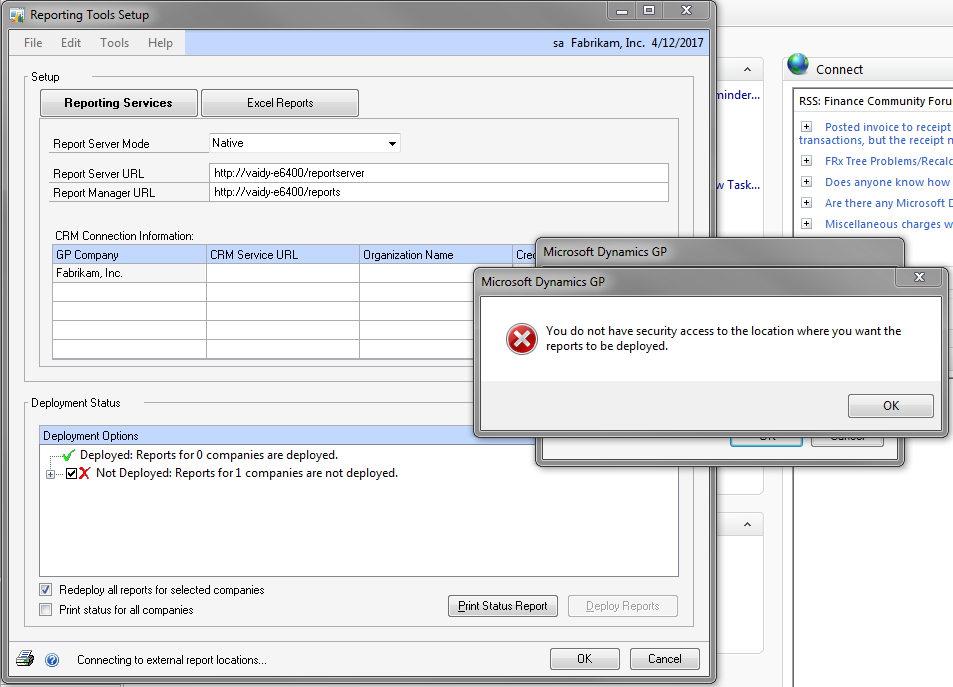
I installed GP 2010 R2 on my laptop and it went thru’ merrily. And started off with deploying SSRS and Excel Reports. Below is the error message I am getting:

Reason: I am running SQL Server 2008 R2 Express. For some reason, SRS deployment do not recognize SQL Server Express editions and it requires either Standard or Enterprise.
So people, those who would wish to deploy SRS on SQL Server 2008 R2 Express, please do not.
VAIDY

Microsoft Dynamics GP Web Client – David shares more information


Microsoft Dynamics GP Web Client – Teaser Articles


Matt Landis shows us a great glimpse of Microsoft Dynamics GP Web Client. Awesome to see GP’s future.

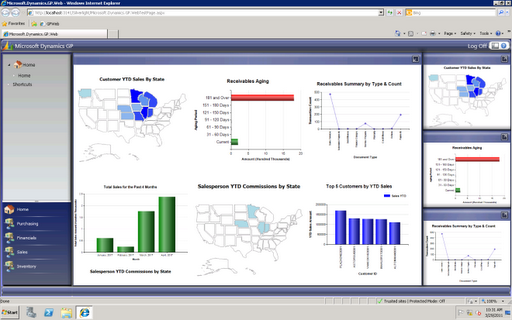
Following image is from Mariano’s blog article, Microsoft Dynamics Convergence Atlanta 2011: Day 2 Morning:

The web client seems to be getting developed using Microsoft Silverlight. There are much more news and announcements to come from Convergence 2011.

Trust me, it’s gonna be fun in an year from now with Microsoft Dynamics GP.

VAIDY

CRM 2011 Update Rollup 1 Released


CRM 2011 Update Rollup 1 is released. List of all bugs that are fixed can be read on this KB Article #2466084.

Looks like there are some really critical bugs that have got fixed. Those who are in CRM2011 RTM, it’s time for you to sit up and take notice of this rollup.

VAIDY

Microsoft Dynamics GP Support And Services Blog


I am not going to introduce this blog, because that part is taken care by the first post in this new blog from Microsoft.

Microsoft Dynamics GP Support And Services Blog, is from Microsoft Support Team catering various support and services topics of Microsoft Dynamics GP.

Start following this blog for more critical information. Stay tuned.

VAIDY

Failed To Create Object – OLE Error due to Adobe Reader X


Something seems to be amiss with Adobe Reader X and Dynamics GP. Yesterday we upgraded Adobe Reader to version X on our Terminal Server, where our Dynamics GP application resides.

Till then, users were able to attach PDF files to GP records using OLE Object Container. But post upgrade, all users are facing the following error message whenever they try to attach a PDF file or view an existing PDF attachment:

Looks like I am not the only one to face this issue. There is a community forum post which raises the same question. Link to that post: Errors when opening or creating PDF OLE Attachments in Dynamics GP notes.
Not sure how to resolve this at the moment, other than retaining older version of Adobe Reader.
VAIDY