Mariano talks about Dexterity & Intellisense and why it would benefit us. Read that article and vote for it here: Vote For Dex & Intellisense.
VAIDY

Mariano talks about Dexterity & Intellisense and why it would benefit us. Read that article and vote for it here: Vote For Dex & Intellisense.
VAIDY

We are now having three blogs helping us out in SQL Views for varied needs.
1. Victoria Yudin’s Blog
2. Mark Polino’s Blog
3. Ron’s Blog – Real Life Dynamics User
To my best knowledge, the above are the active blog till now and continue to enrich us with more SQLs.
Do follow these blogs without fail.
VAIDY

David explains why Smartlist Builder View may not return records and on which scenario.
Check out his post here: SmartList Builder based on SQL View not returning Data.
VAIDY

This one’s very good trick to Force SQL Server 2005 / 2008 to sort of use ORDER BY in Views.
Never knew this till Steve’s article. Good one for all SQL Developers (also for Part Time ones).
VAIDY

1. Install the chunk on GP Site (copy the chunk on to GP Application Folder and launch GP). You won’t be able to log on, if there is a Modified Form(s) for this product.
2. Close GP.
3. Launch GP Utilities.
4. Verify GP Dynamics Version and Company Databases Versions.
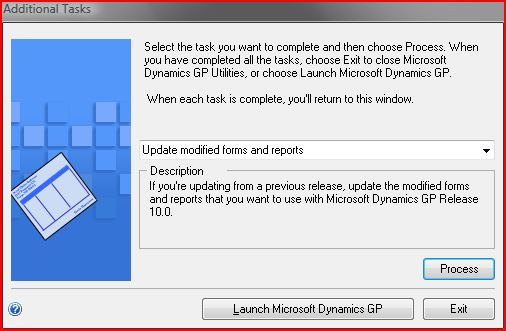
5. Then select the option “Update modified forms and reports” when this window is shown up:

Belinda explains us what’s more important in Payables Management (PM) as opposed to how it’s been used generally.
VAIDY

This one’s very realistic, Mark. I must admit that I am more than convinced.
Implementation is much more than a Project Management and it certainly requires someone who do not compromise on anything for the Quality & Safety of Project Implementation.
It certainly depends. If a Client could hire a really successful PM for an Implementation, they get more out of that single right move. But they also have to make sure that, that single move should not lead them to more destructive results.
Read Mark’s article here: Realistic Expectations: How to Avoid the Pitfalls of Outside Project Managers for Implementing Microsoft Dynamics GP
VAIDY

Till now, Microsoft Dynamics Team has released 4 versions of this CRM GP Adapter:
1. CRM Adapter Base Version – GP 10 & CRM 4
Details of this release can be read by clicking the above link. There is a terrific list of FAQ and much needed information. As the title says, it’s the base version and did what it was meant to. Read all CRM fields and make it available for GP integration and vice versa.
2. CRM Adapter FP1 – GP 10 & CRM 4
Tremendous improvement with this FP1. Below are the notable ones:
2.1. CRM Custom Fields are made available for Integration Mapping.
2.2. Critical fixes pertaining to previous release.
2.3. Integration Status messages are more meaningful and logging of those messages (from GP Web Services) are comprehensive.
2.4. Picklist Synchronization Utility – We will discuss this utility as a separate topic. Trust me, this is certainly a boon to this Adapter.
3. CRM Adapter FP2 – GP 10 & CRM 4
With this release comes the power of choice (as mentioned in the release article). You can select the integration configuration between:
3.1. CRM On-Premise Integration alone.
3.2. CRM On-Premise and CRM Hosted Integration.
More technical details are clearly explained in the release article. So I have got nothing more to say.
4. CRM Adapter FP3 – GP 10 / 11 (GP2010) & CRM 4
With this release, we have got an Adapter which is Dual Compatible. It now supports GP10 / GP2010 along with CRM4 (Hosted / On Premise).
I have not implemented this version yet and am scheduling it at the earliest.
Question: Why do I have to know the history of this Adapter? I will just download the latest one, follow the instructions to implement it. What’s the big deal in that?
Answer: The first release of this Adapter was in October 2009. The FP3 release was in May 2010. Now that’s what I admire. This tool has been taken seriously by Microsoft Dynamics Dev Team and they have given us a tremendously important and easy-to-use Integration tool. People may think that I am advocating for this Tool without knowing it’s complete character. But for me, till I have seen it, it’s awesome. What you need as a basic integration between GP and CRM, scope of the integration is very well defined and quite contenting.
This article is aimed at instilling a Confidence in Consultants & Customers that this tool is certainly a good one for real-time implementations.
More to come.
VAIDY


 Dynamics GP - Learn & Discuss