Online Services for Microsoft Dynamics GP


This one’s going to be very interesting and widely used features in Microsoft Dynamics GP.

Inside Microsoft Dynamics GP has got a post that explains couple of new Online Services that are going to be available from November 1, 2010.

Those features are:

1. Payment Services: Enables customers to accept electronic payments directly thru’ ERP.
2. Commerce Services: Build and publish new sales catalogs on demand and extend the sales reach across multiple online channels.

This is going to be available for Microsoft Dynamics GP 10.0 SP5 and Microsoft Dynamics GP 2010.

More details here: COMING SOON – Online Services for Microsoft Dynamics GP.

This will be an excellent feature once we understand how it works and how effectively we can use it.

VAIDY

GP2010 with Management Reporter – VPC Available


Inside Microsoft Dynamics GP has got a post that announces the Availability of GP2010 With MR (Management Reporter) VPC.

It details the VPC and features involved in it.

VAIDY

Lock PO Number Field in PO Entry


There are several reasons for GP Users to disable PO Number field in PO Entry, in order to not override the Next PO Number sequence in POP Setup.

And there are several methods and tools (Dex, VBA, etc) in accomplishing that. I have tried my bit in getting this functionality extended in PO Entry form.

Please find & download the chunk here: Disable PO Number in PO Entry

PRODUCT DETAILS:
1. Version: 10.4.4
2. Name: PO Number Disable
3. Product ID: 1983
3. Dictionary: POD.DIC
4. Forms Dictionary: F1983.DIC
5. Reports Dictionary: R1983.DIC

COMPATIBILITY:
1. Compatible GP Version: Dynamics GP 10.0 SP4

IMPORTANT:
1. This chunk is not a part of Microsoft Dynamics GP Products. This is a Custom Chunk developed by me.
2. I will be more than happy to improve this based on Users Feedback, but I cannot assure that all feedbacks would be met immediately or within a desired time.
3. This particular functionality works only in PO Entry Form.
4. Test this once in your Test Environment before using it on your Live Environment.
5. Please make sure that you have read the Limitations section in this post completely and you have understood that.

FUNCTIONALITY:
1. Once user selects a PO Type (Standard, Blanket, etc) and bring the focus to PO Number field, this chunk will allow GP to generate the Next PO Number from the POP Setup.
2. Then it immediately locks the PO Number field.
3. Then it takes the focus back to Buyer ID field.
4. Once you save the PO, it again releases the field.

LIMITATIONS:
1. Since the PO Number field had to be locked from user changing the PO Number value, users won’t be able to enter any PO Number directly on the PO Number field.
2. For instance, if a user wants to open an existing PO Number which he/she knows readily and does not require a Lookup, this functionality may prevent them from entering that PO Number.
3. In a nutshell, to edit an existing PO, user must use PO Number Lookup at all times.

I will update this post with an upgraded chunk as and when a feedback is addressed. I will also update the link above by adding a Readme File explaining the removal of this product from GP Folder and Dynamics.set.

VAIDY

Importance of PM Module in GP – Belinda


Belinda explains us what’s more important in Payables Management (PM) as opposed to how it’s been used generally.

VAIDY

Item Qty Allocated, Oh But Actually Not…! – Issue & Fix


This took my life past 2 days and yesterday I was so relieved to have to fixed.

Issue: For a specific set of Inventory Items, Item Stock information was showing up incorrectly. The Qty Allocated is showing some units, but the user swore on everything in this world that it’s not possible. Well he had a point to substantiate his argument. Upon drilling down from Qty Allocated in Item Qty/Site Maintenance (or Inquiry), nothing showed up.

Troubleshooting Steps:


1. First thing, I checked is whether any of these items had been used on a Service Call Parts Entry. If that’s the case, then Qty Allocated will be of that respective units, but it won’t be listed in the Allocated Documents list when we drill down. Result: NONE.

2. Ran a reconciliation on these items, hoping that it would clear any unnecessary Qty Information. Result: NONE.

Now that’s a real mess. Need some quirky way to find the cause & solution.

3. [CAUTION: Do not try this out unless you know what you are doing.] I took a backup of Live and restored it on Test. Then I updated the Quantity Information in IV00102 table manually based on User’s inputs. BUT, decided to run the reconcile since I was not sure about this manual update. Result: It reverted back whatever I had updated. And back to square one.

GREAT…!!! The above step at least confirmed that there IS A VALID DOCUMENT which is holding this quantity.

4. Queried SOP10200 (SOP Line Work) table to see the lines containing one of these items. There was one SOP Order, which was doubtful. Queried SOP10100 (SOP Header Work) for that Order. THAT’S IT… I FOUND IT…

Cause: The erroneous SOP Order had not been either posted or saved properly. The reason may be due a GP Application Hang which would have forced the user to kill the session. Once we kill the session when we are entering SOP Document, SOP10200 table will contain the records without any issues, but SOP10100 table would lose all the information that we had entered other than SOP Number, SOP Type and SOP Document ID. Not even Customer ID and Default Location.

These items had been allocated on this Order technically, but since the user would have killed the session, he thought he had to reenter the document and did so. Didn’t face this issue, till he ran out of stock.

Solution: I released this SOP Order for the user to retain/delete so it would release those Allocated Units from our Inventory. Check my article, SOP – “This document has been posted.” Error & Resolution, on how to release such SOP Documents.

VAIDY

Home Page Metrics Error in GP2010 & Resolution – Janakiram MP


With GP 2010 going great guns and people have started implementing it everywhere, we are bound to have bits and pieces of issues here and there.

Janakiram MP explains one such error, Unable to connect to the Home Page Metrics URL, resolution given as well.

Those who are implementing GP 2010, please do read this.

VAIDY

Void OR Return? – Belinda’s Advise


Belinda advises on what needs to be done when we want to reverse a wrong SOP Invoice. Read it here: Void an Invoice or enter a Return.

Now, let me add to that advise. As she has pointed out, if you have posted an SOP Invoice and if it involves an Inventory Item, it’s a thumb rule that we must pass a Return.

Return does the following:

1. Returns Inventory Items to our Stock.
2. Returns Serial / Lot Numbers for the respective Item as well.
3. Reduces also the Customer Receivables.
4. Passes a reverse GL.

So your Inventory is correct, Receivables is correct & is your GL.

VAIDY

Why Extender Information does not get transferred?


I have been getting this query on WHY EXTENDER INFORMATION ON A SOP QUOTATION DOES NOT GET TRANSFERRED TO THE CORRESPONDING ORDER?
Well, there is obviously no logical reason behind it. Given the fact that SOP User Defined values are getting transferred from Quote to Order to Invoice, we expect the same thing from Extender Information also. Point substantiated.
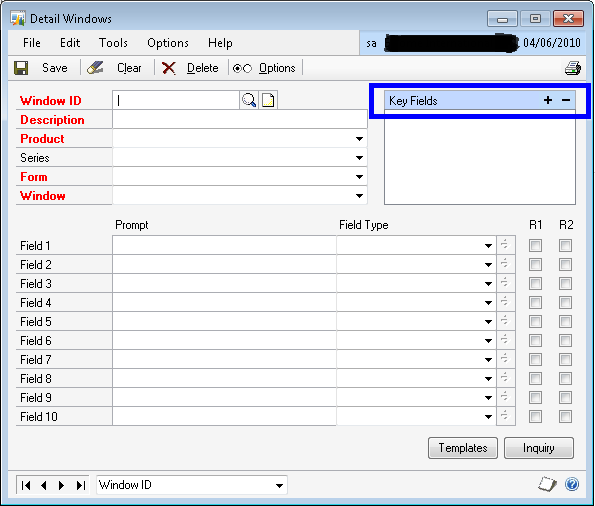
But why Extender Information does not get transferred? There is a technical reason behind it. Extender Information is created based on the Key Fields that we are setting up in the Extender Window/Detailed Window definition form as shown below (COLOR BLUE BOX):
Most of the times, when a Consultant / End User create an Extender Information Window (or Detail Window) for an SOP Document, the Key Fields are typically “SOP Type” and “SOP Number”. When the user enters some information for an SOP Document, Extender saves this information in it’s table for the Key Value . For instance, if your SOP Document Type is Quotation, then SOP Type is 1. And if your SOP Document Number is STD-QT-123456, then the Extender Key Fields combination is:
STD-QT-1234561 {Last character “1” stands for SOP Type Quotation}.
When you convert this Quotation to an Order, a new SOP Document Number and SOP Document Type is created. For instance the above Quotation may get transferred to an Order of SOP Type 2 and SOP Document Number STD-OD-333333. Obviously for this SOP Order, the Extender Key Field combination would be:
STD-OD-3333332 {Last character “2” stands for SOP Type Order}
Extender does not understand the new Key Fields combination and it does not show up when you open that Extender Information Window (or Detail Window), as the information for the Quotation is for different Key Fields combination.
Hope the above explanation is clear.
Now, you may ask me another question: GP also does the same thing. Converts a Quotation to an Order with different SOP Type and SOP Number, but it still retains the SOP User Defined values. Why can’t Extender do the same thing?
For that query, I do not really have an answer both technically and logically.

But for now, that’s how Extender works.

UPDATE: You can’t really say that this is Extender’s drawback. Simply, Extender is a generic Addon for GP, which leverages the functionality. Having said that, Extender people cannot really write a specific code like what I explained above. Which does not make sense for developers to release a product with such process specific code. Moreover, Key Fields combination on SOP Documents can be anything along with SOP Type and SOP Number. Sometimes even without that. We really don’t know. Now, read the remaining part of this post.

For All Consultants out there: Be very clear on this point and design your solutions accordingly. Make sure that your Customers understand this point as well.
Let me not end this article on a negative remark.
Extender does give us a beautiful feature, which is Extender Inquiry. This makes sure that when you post a transaction which has an Extender Information, it is also shown when you inquire that transaction. And best part is that, you can either edit it even after posting or you can keep it Read-Only.
Nonetheless, Extender IS a very good tool for all Customers out there. It’s us Consultants, to decide on how effectively we are going to utilize it for Customers’ needs.
VAIDY

How to Configure Word Templates in GP2010 – David Musgrave


This article seems like an extension to what Inside Dynamics GP explained us on GP2010 Word Templates (Feature of the Day Series). But that extended information is what matters for us. You may miss this information if you are not a Developer. Rather it may not sound relevant for you in that case.

David explains How to Configure, and most importantly, Where These Templates are Stored. Quite interesting.

Thanks David, for the insight.

VAIDY

CBM – User [username] is busy with batch [batchname].


As promised in my previous article, here we go.

This is another frequent error message that Users get when they enter CBM Manual Payments in a CBM Batch:

CAUSE: There will be an Activity record inserted when you open a Batch for Payment Entry, in the table CB300006 (Display Name: Batch Entry Records Locked). This does not get cleared at times.

SOLUTION:

I. Follow the Resolution Steps I & II from this article: http://www.vaidy-dyngp.com/2010/04/cbm-checkbook-checkbook-id-is-already.html.

II. Run the following query once above steps are completed.

DELETE CB300006 WHERE USERID = ‘[username]’ AND BACHNUMB = ‘[batch number]’

We are good to go now.

VAIDY