Void OR Return? – Belinda’s Advise


Belinda advises on what needs to be done when we want to reverse a wrong SOP Invoice. Read it here: Void an Invoice or enter a Return.

Now, let me add to that advise. As she has pointed out, if you have posted an SOP Invoice and if it involves an Inventory Item, it’s a thumb rule that we must pass a Return.

Return does the following:

1. Returns Inventory Items to our Stock.
2. Returns Serial / Lot Numbers for the respective Item as well.
3. Reduces also the Customer Receivables.
4. Passes a reverse GL.

So your Inventory is correct, Receivables is correct & is your GL.

VAIDY

SmartConnect 2010 Hotfix – Crucial


There is a SmartConnect 2010 Hotfix available now, which is crucial for 64 Bit Installations specifically.

More details here: SmartConnect 2010 Hotfix.

VAIDY

VBA – Adding Extender Windows to GL Transaction Entry Lines : David Musgrave


This is another code wonder from David Musgrave.

A Hybrid approach (VBA & Dex) which solved a GP – Extender issue. Read it here: VBA – Adding Extender Windows to GL Transaction Entry Lines.

A Must Read for GP Developers.

VAIDY

GP, ODBC DSN & 64 Bit Systems


This post is long pending, since I had worked on the topic around 2 months back.

According to GP Installation Instruction, To set up an ODBC data source, enter the name you assigned to the SQL Server when you installed Microsoft SQL Server. A data source name called Dynamics GP also is created using SQL Native Client. If you don’t want to set up an ODBC data source, mark the Do not create a data source option.

It’s very handy (and recommended too) to create the ODBC DSN thru’ GP Installation, when we install GP on a 64 Bit System. We all know that GP is a 32 Bit Application. When we install GP on 64 Bit System, it gets installed with 32 Bit Compatibility.

Typically, on a 64 Bit System there are two ODBC Data Source Maintenance wizards available. One is for 64 Bit and other for 32 Bit. What you open from Control Panel -> Administrative Tools (or Start -> Run -> ODBCAD32.exe), is nothing but default 64 Bit ODBC DSN Maintenance wizard.

If you manually create a System DSN for GP, GP Application does not recognize this DSN at all. We have to actually create a System DSN for GP in 32 Bit ODBC DSN Maintenance wizard, which is accessible from the following path:

C:\Windows\SysWOW64\odbcad32.exe

We have to explicitly open this application from the above path and create System DSN for GP there.

Trust me, both look exactly the same. Application Name ODBCAD32.EXE is also the same for both. But location & compatibility factor is different.

In case, you are stranded when your ODBC DSN is not listed in GP’s Welcome Screen Server Dropdown, on a 64 Bit System, rest assured that you have not created DSN on the correct DSN Maintenance wizard.

VAIDY

Microsoft Dynamics GP & CRM – A Gradual Progress


I am currently working on a realtime GP & CRM 2-Way Integration.

Needless to say, I have learned a lot and would like to share what I have learned. And moving forward, you would be seeing a mix of articles which talks about both Dynamics GP (my life) and Dynamics CRM (my interest).

As a first step, I will be posting my first CRM article about CRM – GP Adapter’s Picklist Configuration utility in a couple of days.

I hope you all would be interested.

VAIDY

Management Reporter Features – Explained by Sandeep Walia


There are many articles across the Blogosphere on Management Reporter for MS Dynamics ERPs.

This one’s pretty good in terms of explaining the basics of MR. And also the points which would make Customers migrate to MR from FRx.

Read the article, Management Reporter For Dynamics ERP – An Analysis, on ERP Software Blog.

UPDATE (19JUN2010): The above link to the original article on ERP Software Blog, seems to be broken and not working.

VAIDY

Niraj’s First Birth Anniversary…!


KINDLY NOTE: This post is PERSONAL and nothing to do with Dynamics GP…

Time moves on… Moves on very fast…

Our beloved NIRAJ, Son of Shan & Uma, completes his first year in this world. 🙂 Yup tomorrow is his first Birth Anniversary…

Let’s all join to wish him a Happy Birthday & Blissful Life…!!!

VAIDY

Avoiding Sign-Off Hell – Mark Polino


I had seen this not long ago. And this article by Mark Polino should have come a bit earlier.

Read it: Avoiding Sign-Off Hell.

MUST READ for all Partners / Consultants.

VAIDY

Why Extender Information does not get transferred?


I have been getting this query on WHY EXTENDER INFORMATION ON A SOP QUOTATION DOES NOT GET TRANSFERRED TO THE CORRESPONDING ORDER?
Well, there is obviously no logical reason behind it. Given the fact that SOP User Defined values are getting transferred from Quote to Order to Invoice, we expect the same thing from Extender Information also. Point substantiated.
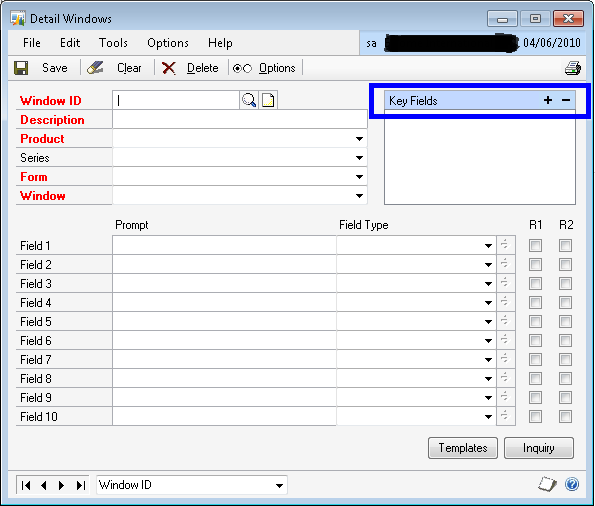
But why Extender Information does not get transferred? There is a technical reason behind it. Extender Information is created based on the Key Fields that we are setting up in the Extender Window/Detailed Window definition form as shown below (COLOR BLUE BOX):
Most of the times, when a Consultant / End User create an Extender Information Window (or Detail Window) for an SOP Document, the Key Fields are typically “SOP Type” and “SOP Number”. When the user enters some information for an SOP Document, Extender saves this information in it’s table for the Key Value . For instance, if your SOP Document Type is Quotation, then SOP Type is 1. And if your SOP Document Number is STD-QT-123456, then the Extender Key Fields combination is:
STD-QT-1234561 {Last character “1” stands for SOP Type Quotation}.
When you convert this Quotation to an Order, a new SOP Document Number and SOP Document Type is created. For instance the above Quotation may get transferred to an Order of SOP Type 2 and SOP Document Number STD-OD-333333. Obviously for this SOP Order, the Extender Key Field combination would be:
STD-OD-3333332 {Last character “2” stands for SOP Type Order}
Extender does not understand the new Key Fields combination and it does not show up when you open that Extender Information Window (or Detail Window), as the information for the Quotation is for different Key Fields combination.
Hope the above explanation is clear.
Now, you may ask me another question: GP also does the same thing. Converts a Quotation to an Order with different SOP Type and SOP Number, but it still retains the SOP User Defined values. Why can’t Extender do the same thing?
For that query, I do not really have an answer both technically and logically.

But for now, that’s how Extender works.

UPDATE: You can’t really say that this is Extender’s drawback. Simply, Extender is a generic Addon for GP, which leverages the functionality. Having said that, Extender people cannot really write a specific code like what I explained above. Which does not make sense for developers to release a product with such process specific code. Moreover, Key Fields combination on SOP Documents can be anything along with SOP Type and SOP Number. Sometimes even without that. We really don’t know. Now, read the remaining part of this post.

For All Consultants out there: Be very clear on this point and design your solutions accordingly. Make sure that your Customers understand this point as well.
Let me not end this article on a negative remark.
Extender does give us a beautiful feature, which is Extender Inquiry. This makes sure that when you post a transaction which has an Extender Information, it is also shown when you inquire that transaction. And best part is that, you can either edit it even after posting or you can keep it Read-Only.
Nonetheless, Extender IS a very good tool for all Customers out there. It’s us Consultants, to decide on how effectively we are going to utilize it for Customers’ needs.
VAIDY

Deploying GP SSRS Reports – maxRequestLength Error & Resolution


I was deploying GP SSRS Reports on SQL Server 2008 64 Bit and was facing the following error message:

There was an exception running the extensions specified in the config file. —> Maximum request length exceeded.

Googled it and here the resolution: http://www.developmentnow.com/g/115_2006_4_0_0_735861/Request-Length-Exceeded.htm

I hope this would be a useful tip for people out there deploying SSRS for GP.

VAIDY