Cross Dictionary Triggers on DEX.DIC


This post is kind of reblogging David’s post, Cross Dictionary Dexterity Development, for just one reason.

We can write cross dictionary triggers on DEX.DIC. I had tried this once, some years ago, and could not succeed. I never got a chance or requirement again that would push me beyond that limit. Looks like that chance is here and now.

And this is certainly the right time for me to reblog this point and the post itself.

VAIDY

Fiscal Year Start Date & End Date – SQL Query


I am currently working on custom SSRS dashboards performance tuning and related exercises. One task among all is to automate the Fiscal Year Start Date and Fiscal Year End Date based on which Fiscal Year we are in.

If the fiscal year is the same as calendar year, we can hard code the values to 1-Jan-[current year] and 31-Dec-[current year]. Since it’s not in my case, I had to dynamically get the dates from somewhere.

The simplest way for me is to query this from GP Fiscal Periods Setup table, which is SY40101.

Following is the query, if anyone would like to know how the dates are retrieved:

SELECT FSTFSCDY Fiscal_Start_Date,

LSTFSCDY Fiscal_End_Date

FROM SY40101 

WHERE YEAR1 = CASE WHEN MONTH(GETDATE()) >= [first month of your company fiscal yearTHEN YEAR(GETDATE()) ELSE YEAR(GETDATE()) – 1 END

With above, I can now be rest assured that by the time a new fiscal year is started, my dashboards would automatically get refreshed with new start & end dates.

This query would also work if the fiscal year is as good as the calendar year.

VAIDY

AF: Microsoft Dynamics GP 2013 to use Ctree as Primary Database Platform


UPDATE: Now that I have reached the fag end of 1-Apr-2012, I thought I would just update this post saying that the following post was just an AF post. So just sit back and relax. Happy AF Day!

Awesome. That’s an interesting and also surprising fact about Dynamics GP 2013.

David’s post, reveals that Microsoft Dynamics GP 2013 is going to use Ctree as primary Database platform.

Microsoft’s strategy is getting extremely clear with this fact. It’s going to be low cost, platform independent and more, if I have understood this correctly. 🙂

Below are some very important advantages, as explained by David:

  1. Low overheads
  2. Fast performance
  3. Automatic creation of tables when they are not present
  4. Less code required since necessity of zDP_ stored procedures are not going to be

I want you all to read his post fully to understand the significance of this.

VAIDY

What feature(s) do you use in Support Debugging Tool (SDT)?


Support Debugging Tool (SDT) is a perfect tool for any GP Administrator/Consultant. It is simply terrific. It has become a part of almost all GP implementations nowadays. And I am no exception on having this tool installed on my GP environment.

David wants to know how we use this tool. What feature(s) is/are useful to you on your GP administration/troubleshooting/maintenance?

Check his post, Microsoft Dynamics Convergence 2012 Houston – Day 2, and register your feedback as a comment. Our comments/feedbacks are required ONLY to justify the time and efforts that are put in on this amazing tool’s development. That said, our comments/feedbacks will be valuable.

I have registered my comment. When are you?

VAIDY

Top Smartlist Builder Question – “Can I do a Multi-company Summary Smartlist?”


Collins Dynamics GP Blog tells us about the Top Smartlist Builder Question, which is Can I do a Multi-Company Summary Smartlist?

The answer is a very positive YES.

It’s basically a simple and easy-to-understand feature. This feature is quite important for all clients with multiple companies on a single GP environment.

Pay a visit their post and you will know how exactly to use this feature.

VAIDY

GP 2013 Web Client – More Insight From David


With more and more excitement being felt on GP 2013 Web Client, David gives us some more insight on this and more.

The post, Microsoft Convergence 2012 – GPPC Games and Web Client, explains the good things and also the limitations of Web Client in its first version.

This post, therefore, is very important for developers and consultants to gear up for this awesome client and understand what they must do to get the existing GP environments to work on the new release post upgrade.

Thanks David for the all important post. It was really crucial for us to understand.

VAIDY

Dynamics GP 2010 is compatible with SQL Server 2012


Mariano, in his new post, confirms that Microsoft Dynamics GP 2010 is compatible with SQL Server 2012. The post also has got links to both CustomerSource and PartnerSource.

This is a good news, since SQL Server 2012 will precede Dynamics GP 2013, which means customers would be first upgrading their SQL Server first.

SQL Server 2012 has got tremendous amount of features that are going to be crucial in future.

So let’s gear up for some serious upgrades.

VAIDY

Average Days to Pay Calculation (SQL Code)


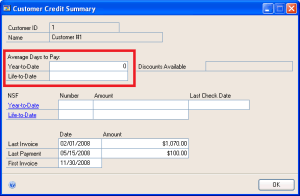
Average Days To Pay (ADTP) is a very crucial information for us to assess a customer or group of customers and their nature of paying the invoices.

In GP, we have this calculated and displayed when we select a customer in Customer Credit Summary window (shown below):
The following is the definition & formula taken from GP Receivables Management manual, which clearly explains how this is calculated:

After a customer has paid his or her first invoice, the average days to pay (ADTP) is calculated based on the number of invoices a customer has, the time taken to pay the first invoice, and the time taken to pay the most recent invoice.

The formula for calculating the average days to pay is:

ADTP = (Current ADTP) x (Number of Invoices) + (Number of Days Taken to Pay Most Recent Invoice) / (Number of Invoices + 1)

The time it took to pay the first invoice would provide the initial value for the Current ADTP. Any later invoices paid by this customer will provide the values for the number of invoices and the number of days taken to pay the most recent invoice. The ADTP calculated on the customer’s initial invoices then becomes the “Current ADTP.” You can use this value when you recalculate the ADTP for later invoices.

With this as basis, I have written a SQL script (link for which is provided at the end of this post) which will calculate ADTP group by a Customer ID.

Parameters of this SQL Procedure:

1. @FROMDATE – Self-Explanatory

2. @TODATE – Self-Explanatory

So pass two dates and the results are shown based on invoices between those two dates.

I have heard from several GP users that the result what GP shows on Customer Credit Summary window is not correct at times. This SQL script will give you a chance to compare between two and decide which one’s correct.

As always, your feedbacks are welcome.

RM_AverageDaysToPay.sql

VAIDY

My Blog Domain Migration & Page Redirection


Dear All,

I have been working for couple of days to move my current blog, vaidy-dyngp.com, to a new domain, vaidymohan.com.

The new domain is still under design and customization, but I am currently working on testing blog redirection, which will take you readers from old blog post to a near/accurate page on the new blog.

During this time, you all may face issue(s). I must admit that I sincerely understand your frustration and I am working on minimizing that.

But I promise, the new blog design would certainly please you all once it is opened for public access.

VAIDY

Dynamics GP 2010 R2 Database SDK – Siva


I was in fact awaiting Sivakumar’s post about the new section that he has been working on. I got the privilege to go thru’ this first before his post went public.

Siva’s new section is all about GP 2010 R2 SQL Objects (Tables, DBs, Stored Procedures, Views, etc.). Like the one we have in MS Word documents that can be accessed from GP SDK, this is also an interesting concept and also very informative for all developers out there, who may not have access to SQL Server on a real time.

Read his post here, Dynamics GP 2010 R2 Database SDK, and share your thoughts with him. 

I am sure this is going to be of immense help for all of us.

VAIDY