DBCC SHRINKFILE


There is an amazingly simpler yet highly informative post up on TECHNET portal, which proved very handy this morning.

My systems admin reported to me that our SharePoint server ran out of storage for some reason unknown to him, but he could identify that it was SQL Server program files folder which consumed 80% of storage.

I immediately knew what could be the reason. It’s those crazy log files problem. To truncate and clear these overeating log files, I had to use this command: DBCC SHRINKFILE.
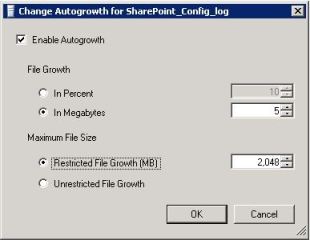
SP-Log-FileGrowth

Once I cleared out all unnecessary file space from these log files, I had to setup the File Growth and Maximum File Size (shown in the screenshot beside):

Never for a DB log file, we should setup the file growth as “In Percent”. This would prove disastrous over a period of time. Instead, always set it up to “In Megabytes” and enter a least sensible value; in my case I had set it up to 5MB.

For a DB Log file, 2GB should be reasonable amount of file space to hold the logs. To learn more about Log files, read this post on TECHNET: The Transaction Log (SQL Server).

We must understand one thing, that shrinking the DB log has got it’s own impact.

VAIDY

Seven Sins Against T-SQL Performance – Grant Fritchey on Simple Talk


UPDATE: this was drafted long ago, but couldn’t really got to post it till now. You might find this post a bit old, BUT it’s quite relevant even now and extremely informative post.

I came across this gem of an article which lists out 7 things that affect T-SQL performance.

I do not want to take anything out from that article and post it here, as you would realize by reading the original post, you would learn some very important concepts.

Read it here: The Seven Sins Against T-SQL Performance.

VAIDY

Implicit Conversions Causing Deadlocks in SQL Server


Quite an interesting but crucial post up there on Sans SQL blog.

The post explains that Implicit conversions in SQL Server could actually trigger a deadlock. And there are definitions for each important term (such as deadlock, implicit conversion, etc.) with an example.

I believe this post would be useful for those who work extensively on SQL Server.

VAIDY

T-SQL Function for Proper Case Format


We do not have a built in T-SQL function to convert any string (or a statement) to Proper Case format, also known as Title Case. This I feel is a very simple feature that SQL Server could have provided us, but missing even in it’s latest version, SQL Server 2012.

I thought I would highlight some links which would be useful for T-SQL programmers in our community:

  1. David Wiseman’s Solution
  2. Jeff Smith’s Solution
  3. Pinal Dave’s Solution

There are many more solutions, but above are noteworthy.

VAIDY

Quick SQL Tip: Keyboard Shortcut for Database Selection in SQL Server 2012 SSMS


Till SQL Server 2008 R2, if you want to change the database on which you would like to execute a SQL query in SQL Server Management Studio (SSMS), the keyboard shortcut to do so was CTRL + U from the query window.

Now from SQL Server 2012, it is CTRL + ALT + J.

So those who tried this using the old shortcut, keep in mind that the new shortcut.

VAIDY

SQL Server 2012 Performance Dashboards – Some Real-Time Snapshots


Following are some real time SQL Server 2012 Performance Dashboards, taken from a real time SQL Server 2012 environment:

HOME PAGE


EXPENSIVE QUERIES – CPU


EXPENSIVE QUERIES – DURATION


and much more…

It’s a great set of reports for every SQL Server DBA to understand his/her SQL Server environment.

VAIDY

Microsoft SQL Server 2012 – Performance Dashboard Reports


In March 2012 (precisely 6th March 2012), Microsoft made available SQL Server 2012 Performance Dashboard Reports which can be used to identify whether there is a current bottleneck on the system, and if so, capture additional diagnostic data that may be required to resolve it.

More information on this can be read from the download page: Microsoft SQL Server 2012 Performance Dashboard Reports.

One point worth to be highlighted is that this doesn’t require Reporting Services to be installed.

It’s a very crucial and important tool for any database administrator.

VAIDY

Cashbook Bank Transfer Error: Date entered is not a current period for checkbook [Checkbook ID]


This was a menace for the past 4 days, to say the least.

I was reported of this issue, where a user when trying to enter a bank transfer for a checkbook, on a date in previous month, he got this error message (in the title of this post) as shown below:

The above message occurred only for one particular checkbook and not for others.

First step was to ensure the fiscal period was not closed. It was not.

Second step was to ensure that they had not run the reconciliation for this checkbook, so genuinely it had closed the period. It was not.

Third step was to run check links for Checkbook Master, to ensure that things are fine with Checkbook ID master record. It was perfect.

Fourth step was to take SQL Profile and see where exactly this message pops up. When I took twice, the results were different. Due to Analytical Accounting. But that I never got to know since, my focus was more on CB tables.

I referred to the ONLY AVAILABLE forum post, Date Entered is not for Current Period for CashBook, which was way back in year 2010. No solution was provided though.

I decided to take the SQL profile again, but this time without Analytical Accounting to avoid extra lines on the trace file. I took the profile twice and both matched line by line.

The last table where the buck stopped was CBINT605 (Reconciled Amounts) on DYNAMICS database. When I queried this table manually, following was the result:

As you see above, there was a record for this checkbook ID, with a date 30-Apr-2012. Due to which, if you enter any date on or before 30-Apr-2012, it fails.

I checked the user again to ensure that he had not run any reconciliation for this checkbook. He assured that he didn’t, but he also mentioned that he was demonstrating this process to a user, but did not complete it. Bad. Demonstrating on a live company is very bad.

I took a backup of this table and then deleted this record.

Now, my checkbook accepts any date for it’s bank transfer entry.

MORAL OF STORY #1: Messages never lie. If there is a message, it will most probably be correct.

MORAL OF STORY #2: Never ever do any R&D on live company. Never ever demonstrate anything on a live company. That’s why test companies are for.

VAIDY

Formatting SQL Procedures


Have you ever opened a standard GP stored procedure?

I do it at least on a weekly basis and have always found it impossible to read as it is. So I end up aligning the procedure first and then read it to understand the logic.

Not anymore. David has shared information on some portals which does this in seconds and give us an aligned code.

Standing out from his list is Poor SQL, from what I learned from my usage.

And there is a plugin for SSMS which does this from within SSMS. This tool is called SSMS Tools Pack.

Happy aligning.

VAIDY

Item Decimal Places Currency & Inventory Adjustments


Q: From where does the Inventory Adjustment entry retrieve a product’s Decimal Places Currency value?

A: When we create a product, this value will be defaulted from the Functional Currency of that company. While entering an Inventory Adjustment for this product, the decimal places currency value will then be retrieved from the product master record.

I realized this when I faced an issue couple of days back. I got a requirement where, I have to facilitate an automated program that will replicate a product information (Master, Quantities/Site, Vendors, Currencies & Price List) from one company to another. Of course, with necessary changes that are specific to the destination company.

It worked merrily till both companies had functional currencies with same number of decimal places. I had to extend this program on to another company, whose functional currency supports 3 decimal places. Now you might have realized the issue. My program, quite honestly, was written with a hardcoded value of 2 decimal places.

When I created some products on my new company using this program, I could not enter Inventory Adjustments with 3 decimal places. It was always 2. Upon spending some time on this, I realized what I have mentioned at the start of this post. You cannot override this at all.

So those who write customization like what I have explained above, beware of all such nuances which will play very crucial role in day-to-day transactions.

VAIDY
