13 Favorite New Features of GP 2013 – Webinar by Frank Hamelly & MSDynamicsWorld #MSDYNGP


I attended a webinar conducted by Frank Hamelly and was organised by MSDynamicsWorld.com. It’s about 13 new, interesting and favorite features of GP 2013. The webinar was on last Wednesday, 18th December 2013.

Following are the features:

  1. Reason Codes
  2. PO Tolerance
  3. PO Prepayments
  4. Sales Ship To Address Name
  5. Sales Suggest Line Items
  6. Fixed Assets Inter-company Transfer
  7. Fixed Asset Historical Depreciation Report
  8. Historical GL Journal Entry Report
  9. 1096 Form – Summary of 1099 Forms
  10. Default Sort for Customer & Vendor Lookup
  11. Reprint Payables Checks & Remittance Forms
  12. Reconcile To GL – Inventory
  13. Select Printer at Print Time

Apart from above list, there was one another feature, SmartList Navigation Pane Resize, which was discussed. This one is an awesome enhancement. Though it might sound trivial, it was one which was time and again requested by many customers and consultants.

Watch this webinar on demand from following link: 13 Favorite New Features in Microsoft Dynamics GP 2013.

I have a post coming up in couple of days that address the first feature in this list; Reason Codes. Stay tuned.

VAIDY

Mission MB3-700 Accomplished (Microsoft Dynamics GP 2013 – Installation & Configuration)


MS_2013(rgb)_1547

It’s been more than 4 years since I had taken any competitive examination, be it Microsoft Dynamics GP or anything else. I felt like being outrageously stagnant for my stature and decided to accomplish Mission MB3-700; Microsoft Dynamics GP 2013 Installation & Configuration.

I had to solely rely on my implementation experience and some user manuals, especially for Web Client. Having done a test drive of Web Client couple of weeks back did help me to bigger extent. But that was not enough surely.

After a week of extensive preparation outside my work hours, I can proudly declare that I have accomplished my mission. MB3-700 is conquered.

I am now a proud Microsoft Dynamics GP 2013 Installation & Configuration Specialist.

It’s only a beginning and there is certainly more to conquer. I sincerely believe I will.

VAIDY

Field Level Security: Quick Reference To Security Modes


I was brushing myself up for my Microsoft Dynamics GP 2013 – Installation & Configuration (MB3-700). One of the many topics that I think would be very important for all customers is Field Level Security (FLS).

This post is not about explaining WHAT it is, but to give you a quick reference on list of security modes that are available:

Following is the list taken straight from GP System Setup manual:

  • Password Before: You must enter a password before getting access to a field. Password After You must enter a password after modifying a field for the changes to be saved.
  • Warning Before: A warning will be displayed and access to that field will be denied.
  • Lock Field: You can’t use or modify the field.
  • Disable Field: The field will be displayed but it will not be available.
  • Hide Field: The field won’t be displayed.
  • Password Window: You must to enter a password before access to the window is permitted.
  • Disable Window: Enter the system administrator’s password to have access to the window.
  • Password Form: Users or classes must enter the correct password before access to the form is permitted.
  • Disable Form: You must enter the system administrator’s password to modify the form.

FLS is in my opinion the easiest way to enforce necessary and unobtrusive security.

VAIDY

Book Review: Microsoft Dynamics GP 2013 Cookbook – Ian Grieve & Mark Polino


This was my first book as a reviewer this year. I am in fact a bit too late to write about this gem. As like previous books, this book will remain treasured in my shelf.

The book I am talking about is: Microsoft Dynamics GP 2013 Cookbook.

Snip20131211_7

The book is written by MVPs Ian Grieve and Mark Polino. They need no introduction. If you are a GP consultant or community member, you should be knowing them. Let’s jump into the review straightaway.

Anybody who would like to buy a book, nowadays, look at immediate benefit that they get from it. We are no more disconnected. For any issue, we have a possible solution lying out there, you just need to reach it. Google it, Bing it (like how Ballmer say), email your peers, tweet it, register your question on relevant forum and you have experts who are happy to volunteer and guide you through your issue.

I am especially proud of my Dynamics GP Community, where almost all the times you won’t be left dissatisfied. You have a question, ask the community and rest assured that somebody would take that extra effort and get you through.

In such an age of unlimited guidance and resources, what makes this book a “GO GET IT” book? Apart from the authors who have got tons of experience and expertise collectively, content of this book is telling for us to treasure a copy.

This book is structured as follows:

  • Chapter 1: Personalising Dynamics GP
  • Chapter 2: New in Dynamics GP 2013
  • Chapter 3: Organising Dynamics GP
  • Chapter 4: Automating Dynamics GP
  • Chapter 5: Harnessing the Power of SmartLists
  • Chapter 6: Connecting Dynamics GP to Microsoft Office 2013
  • Chapter 7: Exposing Hidden Features in Dynamics GP
  • Chapter 8: Improving Dynamics GP with Hacks
  • Chapter 9: Preventing Errors in Dynamics GP
  • Chapter 10: Maintaining Dynamics GP
  • Chapter 11: Extending Dynamics GP with the Support Debugging Tool
  • Chapter 12: Extending Dynamics GP with Professional Services Tools Library

Chapter 1 discusses about how to personalise GP. You have so many ways to personalise your accounting system. There is no one standard way to do that. But with GP, there is a specific set of standard tweaks that will come in handy. I am not touching any single tweak here in my review. No spoilers. If you are a GP consultant already and know something (or more) about GP, you would still won’t go empty handed.

Chapter 2 discusses about what’s new in Dynamics GP 2013. This book is basically a Second Edition to the book Microsoft Dynamics GP 2010 Cookbook written by Mark. Apparently, a followup book like this should discuss about new features compared to old version of GP. This chapter does that precisely. The difficulty in writing a cookbook is to choose recipes that are interesting, appealing and significant to a user. With loads of new features in GP 2013, this chapter picks recipes that will surely be appealing and significant. These are standard ones required by most of the customers.

Chapter 3 discusses about how to organise GP. An accounting system is no small thing. They are big, confusing at times and scattered in terms of accessibility. 100% success of an ERP system is achieved only when we gain users’ confidence. This chapter gives us some recipes to organise GP and thereby gaining more confidence in using it. A simple thing like “User Defined Fields” can give more clarity to either a transaction or a master record. This chapter is full of such simple yet effective recipes.

Chapter 4 discusses about automating certain processes in GP. Time is precious to anyone. Especially when it comes to business, seconds matter. I have heard from lot of frustrated users that their ERP system does not help them do things faster enough. This chapter brings us some recipes that will help a user perform quicker and save time. Recipes range from manual process to totally automated process.

Chapter 5 discusses about SmartList and how it can be used efficiently. I have mentioned several times at many places that SmartList is the best tool to see your data and analyse it. You can do wonders with SmartList. And being a dedicated chapter on SmartList, this one talks about how to bend your SmartList to better extent and get what you want from it.

Chapter 6 discusses about connecting GP to Office 2013. One of the many reasons Microsoft talk about having Dynamics GP as our ERP is it’s interoperability with MS Office. From Letter Writing Assistant to Excel Reports, GP can talk seamlessly to two of the most productive tools in MS Office; Word and Excel. By end of this chapter, you should be well versed with GP data analysis.

Chapter 7 discusses about some (among many) hidden features in GP which can be so useful in tuning GP. Why are these hidden? Are they not visible to users? Not in that context. It’s hidden because it’s there all these times, but not being stressed upon. We won’t know how important they are till we actually use it. This chapter explains these features in it’s precise context so you know their exact importance. There are many such features in GP. I wish we would get to see a Third Edition Cookbook soon from Mark & Ian.

Chapter 8 discusses about improving GP with hacks. No no, not literal hacking. GP is secure and nobody can *hack* it as it is. When we talk about GP hacks, we are basically talking about how to get *into* GP and make it more efficient. Read this chapter to learn more about this. I am not going to discuss even a single recipe here. No spoilers. But trust me, this chapter gives you some best hacks to make GP smart and efficient.

Chapter 9 discusses about preventing errors in GP. That’s a nice chapter. Resolving errors is one way of addressing issues. Preventing some of the common errors is totally the smartest way of addressing things. You don’t let issues come to you. Anticipate them and kill them well before they arise. You can save a lot of support fees, believe me. More than anything, less number of error messages in GP means more confident and relieved users are. I again insist on this; if you want your GP implementation to be 100% successful, you MUST gain users’ confidence in GP.

Chapter 10 discusses about maintaining GP. GP is just another software and like all others, it requires periodical maintenance too. From taking necessary backups, to performing SQL DB tuning, to troubleshoot issues without much disturbance to users, maintaining GP is very important. This chapter explains some recipes to handle many such situations.

Chapter 11 discusses about Support Debugging Tool (SDT). Developed by David Musgrave and his team, this tool is a consultant’s Swiss Army Knife. Learn more about this tool on the link provided in the beginning. This chapter, though, summarises some important usages of this tool and how it extends GP’s functionality.

Chapter 12 discusses about Professional Services Tools Library (PSTL). From simple requirement such as changing a customer ID or vendor ID to complex requirement such as duplicating a company’s data, PSTL addresses all. This chapter focusses mainly on those which are day-to-day requirement.

I mentioned exact same words in my previous two reviews. And I am not going to shy away to write same words here: Ian and Mark have put their sincere and precious efforts in writing this book. More than writing a book, it’s the intention to share their experience and expertise with all of us. A book from them is surely going to be useful without doubt.

Go for it. Get one copy and taste their experience. It’s surely going to make a world of difference in the way you interact with an amazing product, that is Dynamics GP. Those who wish to buy this book can do so by clicking on the link provided at the beginning of this review OR by clicking on the book logo.

To the authors, Ian & Mark: Ian, I had told you (in the month of June if I remember correctly) that I would be writing about this book. I could not do that till this day. I hope you would forgive me for that delay :-). Brilliantly written book. I am using many recipes from this book, so I know at first hand how useful this book is for us, consultants.

Mark, we all owe you a lot. What more could I say! This book, especially, has become my reference guide from the time I got it; honestly speaking.

I am just hoping to see another Cookbook soon; this book is simply not enough. 🙂

GP 2013 Web Client – Cross Domain Error


This probably would be a common error faced by many of us across the GP world, while trying to access GP 2013 Web Client.

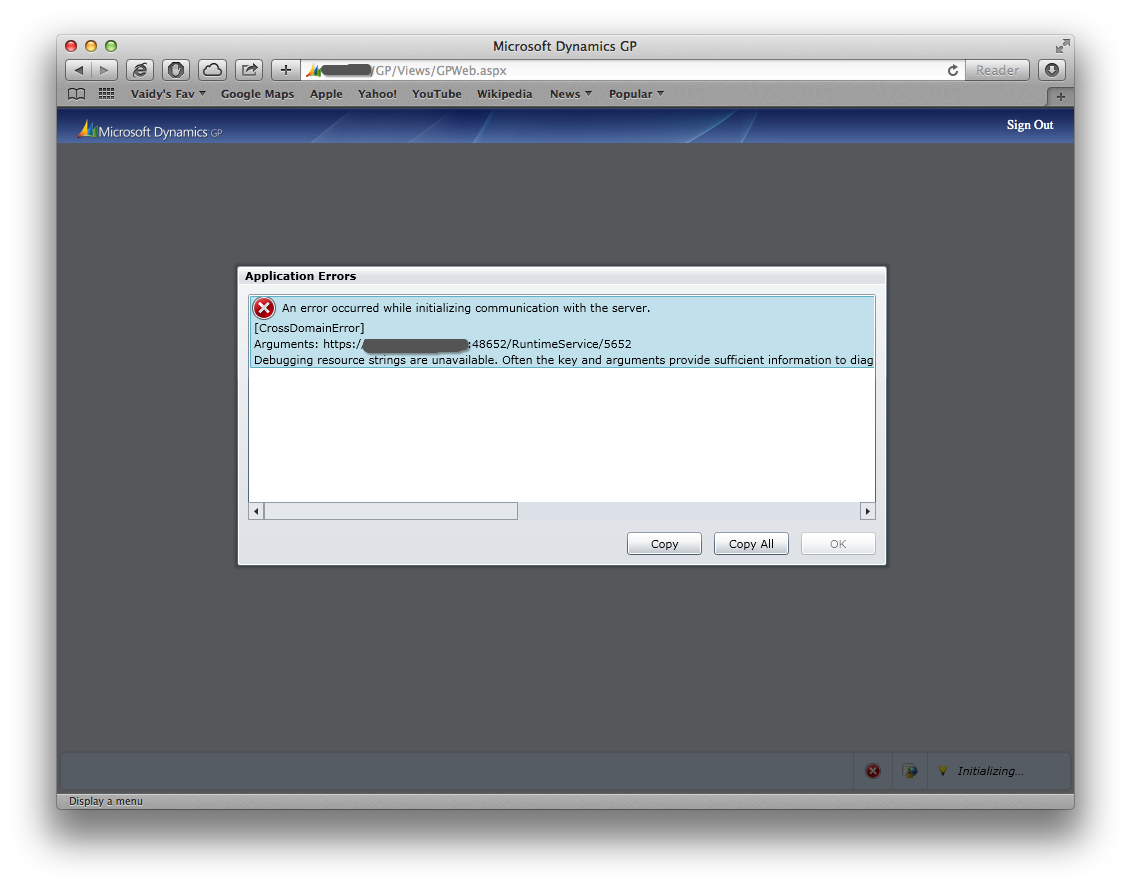
Upon launching GP web client on my browser, it asked me to enter my domain credentials and once I did that, I was greeted with following error:

Snip20131209_5


Complete error message is as follows:

Severity: Critical
Summary: An error occurred while initializing communication with the server.
Details: [CrossDomainError]
Arguments: https://<machine name>.<domain name>:48652/RuntimeService/5652
Debugging resource strings are unavailable. Often the key and arguments provide sufficient information to diagnose the problem. See http://go.microsoft.com/fwlink/?linkid=106663&Version=5.1.20913.00&File=System.ServiceModel.dll&Key=CrossDomainError

Reason is quite trivial; I had entered the url on my browser as follows:

https://<machine name>/GP

Instead, I should have entered the url on my browser as follows:

https://<machine name>.<domain name>/GP

For instance, if my GP web client server name is GPDEV and my domain name is GPDOMAIN.COM, then I should enter my url as follows:

https://gpdev.gpdomain.com/GP

There could be several other reasons for this CrossDomainError issue, but above solution fixed mine.

VAIDY

Book Review: Microsoft Dynamics GP 2013 Reporting (Second Edition) – David Duncan & Chris Liley


My second book as reviewer is Microsoft Dynamics GP 2013 Reporting – Second Edition written by David Duncan and Chris Liley.

Snip20131206_19

This book is second edition to their famous Microsoft Dynamics GP 2010 Reporting. So those who have read this book before would see the new book as an upgrade. And that’s quite obvious as this book covers more on reporting features that are now part of Dynamics GP 2013.

The book is structured as follows:

  • Chapter 1: Meeting the Reporting Challenge
  • Chapter 2: Where Is My Data and How Do I Get It?
  • Chapter 3: Working with the Builders – SmartList and Excel Reports
  • Chapter 4: Report Writer and Word Templates
  • Chapter 5: Utilising the SSRS Report Library
  • Chapter 6: Designing Your Analysis Cubes for the Excel Environment
  • Chapter 7: Utilising Analysis Cubes for Excel for Dynamic Reporting
  • Chapter 8: Designing Financial Reports in Management Reporter
  • Chapter 9: Viewing Financial Reports in Management Reporter
  • Chapter 10: Bringing it all Together
  • Appendix: Comparing the Dynamics GP Reporting Tools Against Different Reporting Challenges

Chapter 1 discusses about challenges faced by a report developer and how to get prepared to meet them. If there is one thing that’s changing constantly at Dynamics GP front is how we visualise the data that is entered in GP day-to-day. Financial statements, revenue analyses, stock analyses, multi-dimensional analysis of your business and then there is big data which you might want to link with your own business. This chapter provides food for your thoughts on Reporting overall.

Chapter 2 discusses about how GP stores your data and how easily and efficiently you can access them. This one is, in my opinion, very crucial chapter for any GP report developer. Unless you know how GP is structured and how data is stored, you can never become a successful report developer. To quote the authors themselves: Knowing where to begin is a critical first step. This chapter shows us exactly that.

Chapter 3 discusses about SmartList Builder and Excel Reports Builder. Two most amazingly simple yet efficient tools to create any report. Excellent chapter again.

Chapter 4 discusses about Report Writer and Word Templates. Report Writer, in my opinion, is a very underestimated tool. I am sure David Musgrave would pat me to have said this. Knowing this tool would most definitely help any GP report developer to harness their knowledge on GP data and structure. Word Templates were introduced some time back and meant to be alternative to Report Writer reports. So knowing them also would be better.

Chapter 5 discusses about SSRS reports that come with GP. If your are a SQL developer and you are asked to develop some reports on GP, SSRS is THE best reporting tool. Know the data and you are on. Brilliantly written chapter.

Chapter 6 and 7 discusses about Analysis Cubes for GP. If you require multi-dimensional reports on GP data and want to know how to develop them, these chapters are for you.

Chapter 8 and 9 discusses about Management Reporter, the replacement of FRx, but much more an advanced technology. These two chapters take you step by step in understanding MR and how to design reports.

Chapter 10 summarises whatever been discussed on all previous chapters.

Appendix gives you a view of all reporting tools that are discussed in a simple yet informative table. And this book is certainly not complete without this table. Amazing piece of information one could ask for.

David and Chris have put their sincere and precious efforts on writing this book. Their expertise on reporting is going to be a guiding force through this book to all of us.

This book is published by Packt Publications. Those who would like to buy this book can do so by clicking on the link provided at the beginning of this post OR by clicking on the book logo.

To the authors, David & Chris: I thank you both for this great book and accepting me as one of the reviewers. It’s very difficult to talk about the greatness of this book in one single post, but I guess I have done my best. It’s going to be my reference on anything about GP reporting. Thanks again.

VAIDY

GP 2013 Web Client Rendering on Mac OS Based Browsers


We all know GP 2013 Web Client is rendered on Silverlight. Though Silverlight plugin is available for Mac based browsers, rendering is not same as how it is rendered on Windows based browsers.

Below are some samples:

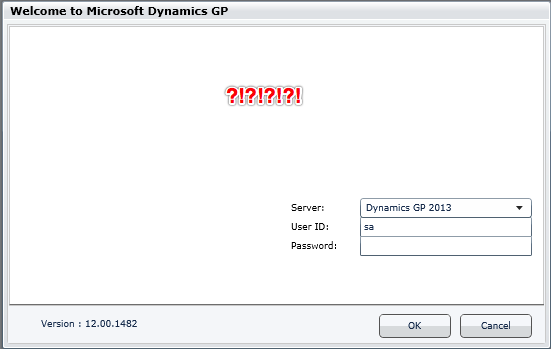
Windows IE:

Snip20131205_13


Mac OS X Safari:

Snip20131205_14


Windows IE:                                               Mac OS X Safari:

Snip20131205_15                     Snip20131205_16

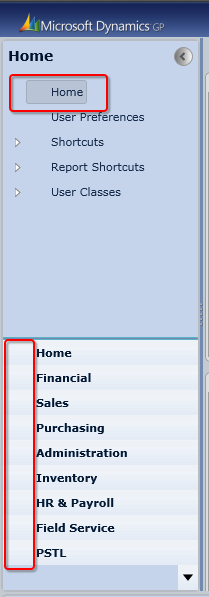
Windows IE:

Snip20131205_17


Mac OS X Safari:

Snip20131205_18

Apparently, there seems to be a rendering issue on showing pictures (and ONLY that I guess).

On the surface, it seems like Silverlight doesn’t render properly on Mac based browsers, while it could work perfectly on Windows. Thinking on this further, it’s only related to images. There could be something that we have to tweak on Silverlight plugin. Not sure what it is exactly at the moment.

Those who have implemented Web Client for customers with Mac, would you please step forward and shed some light on this?

VAIDY


GP2013 Web Client – Test Drive #MSDYNGP


It’s been an awkwardly long time since I had written anything on this blog. Now is the time probably to break that jinx.

I have been working on testing GP2013 Web Client on our environment. I have been constantly keeping myself updated with GP Web Client by reading our community blogs and forums, but never had seen it on my own machine till today.

Below is the snapshot of GP2013 Web on my MacBook Pro; on Mac OS X Safari browser.

Snip20131202_4

All you need to do is to install Silverlight for Safari on Mac. If it’s not there, you would be prompted to download and install.

I am now excited to get my customisations work with it. Will post anything that’s interesting and worth to be shared in coming days.

VAIDY

Microsoft Dynamics GP – Roadmap Refresh


MSDynamicsWorld.com has got the coverage on Microsoft Dynamics GP roadmap refresh.

GP Roadmap 2013

It’s quite exciting as well as stunning to know that we are moving towards service based GP architecture.

VAIDY


GP2013 – Purchase Invoice Inquiry Zoom Bug (Change)


I received a strange support request today from one of my users that PO number is not shown fully on Purchase Invoice Inquiry Zoom window. Just tried to inquire some purchase invoices myself and I got what she mentioned:

Snip20130807_12


If you see above highlighted PO number, it’s not shown fully. This will be the case only if you use GP’s standard PO number sequence or used entire PO length of 17 characters.

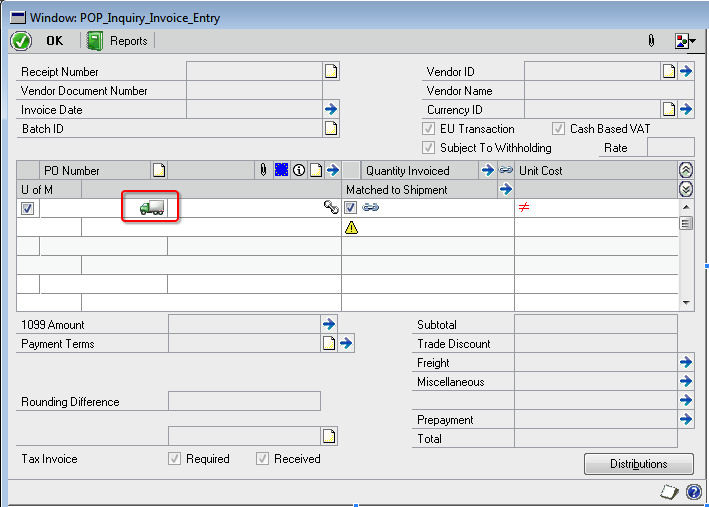
When I checked it on Modifier, I found a nice little icon sitting right next to PO number field, but overlapping it by some millimeters.

Snip20130807_11

This icon denotes whether the PO line item is Drop-Ship or not.

And boy, isn’t that icon looks cute? But unintentionally, it is overlapping on PO number field. Not sure how folks at GP dev team skipped this.

Solution to this issue? Modifier. Use modifier to resize the field, till we get this fixed by GP dev team.

VAIDY