GP 2013 Home Page (Re)Design Horrors


Well, I could understand what you might think after reading the title of this post AND if you had read my previous post on GP 2013 Home Page Redesign.

I did admit that the redesign was kind of great for users. Ian Grieve had commented back with an important #FAIL factor of this redesign.

With that #FAIL factor, I just got one more to crib about. So lets list it:

  • You cannot scroll within a frame. You MUST rely on mouse clicks(or a trackpad). You have no other option. (Thanks Ian, for your feedback with this point).

UPDATE (GP2013 SP1): Looks like this one’s fixed. You can indeed scroll within a frame using a standard mouse scroll wheel or a trackpad’s scrolling functionality. It’s a welcome fix.

  • If you ever want to realign the frames of a module (for instance Manufacturing), you can. But wait, that would stay ONLY TILL THAT SESSION IS ACTIVE. Once you log out from GP and log on back, your realignment is gone. Poof!!!

I am sure it is going to be highly irritating for users who rely mostly on GP home page.

And with that above statement, I now reverse my opinion on my first post.

VAIDY

Caps Lock Reminder – For Microsoft Dynamics GP 2013


I had developed a small customisation module which would alert users while logging on to Dynamics GP with CapsLock key on. You can read more about it here: GP Login Form – Caps Lock Reminder Update.

That customisation was developed using Modifier with VBA. But with Dynamics GP 2013, much emphasis has been given to the new Web Client. Which means, all our VBA code logic won’t be supported by web client.

That said, I have now converted my code from VBA to VS Tools (using C#.Net as programming language). Those who are interested can download it FOR FREE from following link:

CapsLockMessage-12.0.0.1.dll

Instructions to use:

  1. Copy this DLL file and paste it on to GP AddIns folder (can be located inside GP 2013 application folder).
  2. Ask users to log out and log on back.
  3. If you do not need this tool anymore, just remove this DLL from AddIns folder, after all users log out.
  4. This can be used safely in production environment. This tool doesn’t interfere in any of your day-to-day transactional activities. The scope of this is restricted only to GP login form.

Your feedback is always welcome.

VAIDY

Extender Transition Update – From eOne Solutions


eOne Solutions has posted an update on Extender Transition process on their blog. It’s very important for both partners and customers to read it and get an idea about what’s been going on and what to expect in future.

I would like to highlight the points about Pricing Changes, which are highly critical to any customer. Read the post and get informed.

VAIDY

Field Service Setup Menu in Microsoft Dynamics GP 2013


Has anyone noticed a subtle but highly logical change in Microsoft Dynamics GP 2013 menu structure?

Field Service Setup menu was grouped under Project till GP 2010. The path to access Service, Return, Contract setup menus was Microsoft Dynamics GP -> Tools -> Setup -> Project; which quite honestly did not make any sense. You are accessing Field Service setup, but from under the name Project…!?!?!?!?!?

Good folks at MSFT (and/or original developers of Field Service) might have sensed it, so now the setup menu items are logically structured under Field Service.

Snip20130218_1

I am happy to say the least. Because, if you want to access Field Service setup windows from GP home page, it was not possible till GP 2013. Now that’s also been fixed.

Small change, but a BIG difference it has made. Thanks MSFT & Field Service Team, for this.

VAIDY

Document Attachment in Microsoft Dynamics GP 2013


I am a bit late on this topic. We already have many posts (including Feature of the Day – Inside Microsoft Dynamics GP) on this written by several community members. So instead of repeating it again, I am just adding pointers here to those posts.

To just brief what it is: Document Attachment is a new feature in Microsoft Dynamics GP 2013, which would enhance the way we currently deal with document attachments on a record. If you had sensed it right, yes it’s almost like OLE Notes, but much more than that.

This scores above OLE Notes, purely on grounds of three main factors:

  1. It doesn’t restrict itself to 32 bit architecture, like OLE notes container does.
  2. It is compatible with Web Client, but OLE notes is not.
  3. It stores the attachments on company specific SQL tables. You heard it right. It stores on database by harnessing SQL Server’s file stream, if I am not wrong.

More information about this (and how to use) could be read on below posts:

VAIDY

OLE Notes & GP 2013 Web Client – Mariano


It’s a bit hard to take it, but reality being the OLE Notes attachment feature won’t work on GP 2013 Web Client for current technical reasons.

Read his post here: OLE Notes and Microsoft Dynamics GP 2013 Web Client

That brings to us a new feature called Document Attachment in Dynamics GP 2013. This can be used instead of OLE Notes. It looks just perfect for me to start using it instead of OLE. Not just because of the incompatibility with web client, but also due to it’s robust features.

More can be read in my next post and also Mariano’s.

VAIDY

Microsoft Dynamics GP 2013 – Feature Videos


Awesome way to learn what’s new in Microsoft Dynamics GP 2013.

Inside Microsoft Dynamics GP (official GP blog) has posted a list of all Microsoft Dynamics GP 2013 Feature videos.

I personally checked out some videos and it’s highly informative, but have not gone thru’ the entire collection though.

Go ahead and explore the videos. I am sure you will start planning to optimise some of your business processes after seeing these new features.

VAIDY

Inactivate a User – Dynamics GP 2013


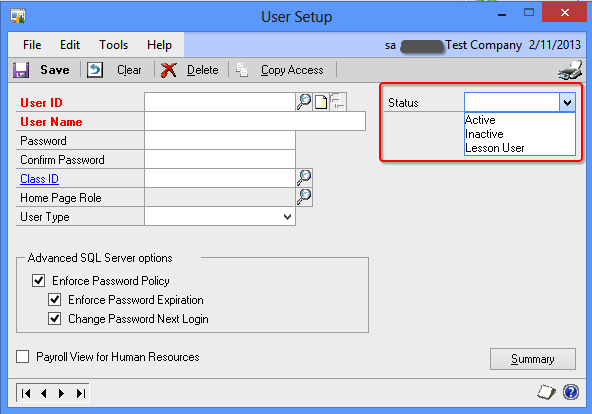
You can now inactivate a user in Dynamics GP 2013 temporarily. This is a feature addition to User Management in GP.

There is a new field called *Status* which is a Dropdown List. Contains 3 statuses namely, Active, Inactive & Lesson User.

Snip20130211_4

When a user status is set to Inactive, that user cannot log on to GP but will retain his/her access when activated again. We can still manage access information of an inactive user. Upon his/her next login, the modified access information will get into effect.

When a user status is set to Lesson User, that user can access ONLY Fabrikam Inc. (sample company).

Cool, isn’t it…!!!

VAIDY

Collections Management for Microsoft Dynamics GP Moves Out To Professional Advantage


Microsoft seems to be in a mood to give back all modules to its original developers. First it was Extender, then it was Audit Trails, Electronic Signatures, Risk Management Suite; now it’s the turn of Collections Management.

Errol Schoenfish, on Microsoft Dynamics GP official blog, announces that Collection Management for Microsoft Dynamics GP transits to Professional Advantage; it’s original developers.

Any licensing and module procurement would be affected only from June 1st, 2013. We have both CustomerSource and PartnerSource links to learn more about this transition.

Interesting…

VAIDY

Extender for GP 2013 – Release Postponed


This is, to some extent, bad news for me at least. I was planning for an early upgrade to GP 2013 for my GP production environment. As 40% of my customisation depend on Extender, it feels so bad that I cannot get Extender for GP 2013 till Early to Mid February 2013. This news has been confirmed by eOne Solutions on their official blog.

Original post here: Delivery Date.

I am disappointed to say the least. But considering the issues that eOne developers are going thru’, especially due to a very late announcement from Microsoft to detach Extender from their OEM arrangements, I empathise with them on their most gruelling time to get things streamlined and meet customers’ expectations.

I shall await their official announcement on Extender’s availability for GP 2013.

VAIDY