DynamicsGPAdm User Account for DynamicsSecurityService (Web Services)


Looks like I am bound to troubleshoot and maintain more today. But since that’s the case, I am having a chance to revisit what I have done while installing and configuring the current GP + CRM + Adapter + WebServices.
Having said that, I just cleared one issue and thought I would share post it.
When we install GP Web Services, a Local User Account called DynamicsGPAdm will be created and it will be added to IIS_WPG and IIS_IUSRS group. 
It was all fine till I found that the Dynamics Security Console did not show the necessary details. All I was seeing is a big red X error message and with that a message saying “Console is corrupted or invalid data, blah blah blah…”. Honestly, I was extremely scared to see this, as I was under the impression that everything was fine. I still believe everything was fine, because my GP10-CRM4 Adapter is working as good as it was for the past 2 months.
I had to revisit what I had done to install and checked all IIS Security & Services Security. Everything was perfect till I saw one glaring gap.
The Local User Account DynamicsGPAdm was created with our Server’s Password Policy enforced on it. That means, typically:
1. This account has to change it’s password when it logs on to the server for the first time. (Never happened till date).
2. Password expires in such-and-such days. (The number of days had in fact exceeded in this case).
3. Must meet the Password Requirements. (It obviously didn’t).
Perfect. I kinda hit it on the nail this time. 
I first changed the password of this User Account to meet the Password Requirements. Next I did as shown below:
Just make sure that once you install Web Services, the DynamicsGPAdm must be configured as above.
Significance of DynamicsGPAdm: This is the account which is configured in the Identity of DynamicsSecurityAdminServiceAppPool IIS Application Pool, which is the base for Dynamics Security Service and Console.
VAIDY

Solution to "File not found: VBA6.DLL" Error Message


The File Not Found: VBA6.DLL issue which I had explained in my previous post has got a solution.

Thanks to Japheth Nolt, who pointed me to this Partner Forum post.

The following are the steps to fix this issue, taken directly from Dynamics GP Partner Forum Post (Link To the Original Post: File Not Found: VBA6.dll):

———-
Important This article contains information about how to modify the registry. Make sure to back up the registry before you modify it. Make sure that you know how to restore the registry if a problem occurs. For more information about how to back up, restore, and modify the registry, click the following article number to view the article in the Microsoft Knowledge Base: 

1. Export all customizations to a .package file.

2. Close Microsoft Dynamics GP.

3. Make a backup of the system registry.

4. Change the following key in the system registry:

KEY_CLASSES_ROOT\TypeLib\{000204EF-0000-0000-C000-000000000046}\4.0\9\win32

to have the path of this: C:\Program Files\Common Files\microsoft shared\VBA\VBA6\VBE6.dll

Note, if on a Windows 2008 Server R2 install the key was this: HKEY_CLASSES_ROOT\TypeLib\{000204EF-0000-0000-C000-000000000046}\4.1\9\win32

5. Delete all VBA files with a file size of 4KB.

6. Rename all VBA files with a file size greater than 4KB.

7. Start GP.

8. Open VBA editor.

9. Check the VBA reference to ensure the path is to the C:\Program Files\Common Files\microsoft shared\VBA\VBA6\VBE6.dll file.

10. Add a window and field to VBA and test the message box code.

11. Verify the message box works.

12. Import all customizations.

13. Verify more than one customization works.

Note, this has only been tested on an Office 32-bit installation. If you have an Office 64-bit installation, you will need to uninstall it and then install the 32-bit version. This will not affect Outlook user profiles.
———-

What I did is the following:

1. I removed all the VBA files from GP Folder in my 32 Bit machine.

2. I performed the steps listed above from #1 to #4 (modifying the registry entry).

3. I launched GP and opened the VBA Editor, to make sure that the Visual Basic for Applications Reference is pointing to the path C:\Program Files\Common Files\microsoft shared\VBA\VBA6\VBE6.DLL.

4. Closed GP. Relaunched it.

5. Imported the VBA Customizations that were exported from 64 Bit machine.

6. My customizations started working.

IMPORTANT NOTE: You must re-reference any 3rd Party plugin references after importing the VBA Packages, in case these 3rd Party plugins sit in Program Files (x86) folder in 64 Bit machine.

Hope this is helpful for people who face this issue.

VAIDY

Are you importing VBA Customizations from 64 Bit to 32 Bit? Beware


This one’s quite baffling. The scenario is this:

1. I have my VBA Customizations on a 64 Bit Live Environment.
2. I wanted to setup a Dev Environment so that I can work on Enhancements and Additions. The Dev Environment is nothing but my laptop and it’s quite obviously 32 Bit.
3. I had DBs restored from Live and GP installed with necessary addons on my laptop.
4. Imported Modifier/VBA Customizations from Live to my laptop. There we go with an error message, which I am yet to solve:

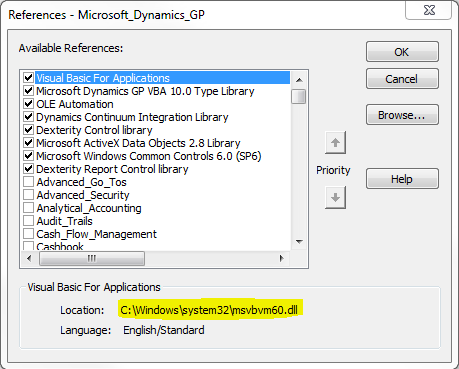
And it took me to the VBA Editor. Since it said “VBA6.DLL is not found”, I wanted to check whether all References are proper. And below is what I found:

See the highlighted path and filename. It’s completely different from what it has to be “VBA6.DLL”.

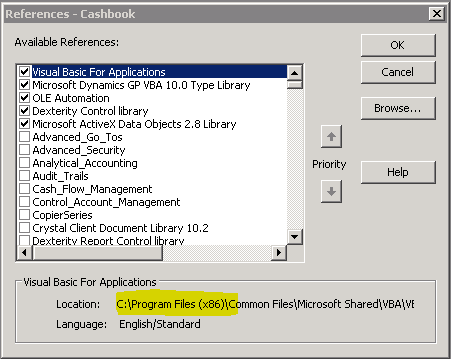
Excellent and a pat on my back. Now why this is happening. I found the reason when I cross checked Live Environment VBA References:

Alright, the issue is this:

1. On a 64 Bit Server, GP and VBA Files are installed on Program Files (x86) folder.
2. Whereas on a 32 Bit machine, GP and VBA Files are installed directly on Program Files folder.

That’s the difference. Once you import and start GP it does work for the first time. Once you close GP and reopen it, it refers to (x86) folder. Since it’s not found, it starts throwing this message.

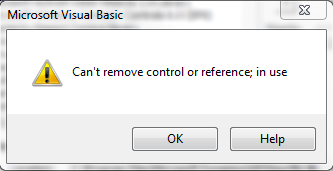
The sad parts: Firstly, I won’t be able to change the path back to Program Files folder manually by clicking on BROWSE in the References window. Secondly, I won’t be able to remove the reference by unselecting it and then reattach the VBA6.DLL reference. It will always throw me an error message like this:

I am in a fix now. We may have some other ways to handle this. I am working on that. There may be a followup post which will explain the methods that can be used to fix this issue.

Meanwhile, if anyone has faced this issue, do share your ideas and how you fixed it. It would save me some time.

UPDATE – 1: The reason explained above is substantiated, when I did another test. I imported 64 Bit Server VBA Customizations onto another 64 Bit Environment, it works. I imported a 32 Bit Server VBA Customization onto another 32 Bit Environment, and it works.

UPDATE – 2: The reason that I had explained in this article, is only partial. There are more to this issue. My next article explains the solution and also contains a link to Dynamics GP Partner Forum post, which led to a fix. Read it here: Solution to “File Not Found: VZBA6.DLL” Error Message.

VAIDY

When to seek a Consultant’s Assistance?


This article, that I read in Njevity’s Blog, is pretty simple and complete.

It explains when a Customer must seek a Consultant’s assistance, baring those who have an in-house ERP Consultant.

Read it here: Things are not as they seem … When to get a Consultant involved!

And if you have more reasons, add it either here in my post as comments or directly on the source site.

VAIDY

Microsoft Dynamics GP10 Service Pack 5 – Available Now


Details of this release is available on David’s, Mariano’s & Jivtesh’s articles, respectively:

1. Microsoft Dynamics GP 10.0 Service Pack 5 – David
2. Microsoft Dynamics GP 10.0 Service Pack 5 now Available – Mariano
3. GP 10.0 SP5 is Out (with lots of AA Fixes) – Jivtesh

David & Jivtesh details us about the core fixes or changes in SP5.

One important point that I have to highlight is: The Incompatibility of SP5 to get upgraded to GP2010 RTM. We have to wait till GP2010 SP1.

People who are planning for a GP2010 Upgrade must tread caution before applying this patch. Go thru’ the SP release notes and FAQs to make sure you really need it for your GP10 environment till you move on to GP2010.

VAIDY

RW_DateToString – David


The first thing a Dex Developer would do once he/she learns Dex programming is to start becoming curious and write their own functions / procedures to meet the requirements.

I am certainly not against it and I myself started off my programming career like that. But we must also understand that when we have in-built functions that can do what we want, we don’t have to lose our time in recreating the same logic.

RW_DateToString function would certainly save us lot of time. And it does have almost all much used formats to display a Date on the report.

David details this function in his article: Display Dates in Any Format On Report.

VAIDY

Currency Values Returned By VBA To A Report – David


Such a weird issue, but since it’s said to be known, we can’t do much about it. But David gives us an alternate option to tackle this.

Read it here: Currency values returned by VBA to a report are multiplied by 10 or 100.

Must read for Developers.

VAIDY

Get The Most Out Of GP Community


David superbly summerizes the most useful resources available for us to look into.

Start from here to enter a world of GP Resources: Getting the most out of your Microsoft Dynamics GP Community.

VAIDY

GPWindow Tells Us Where’s GP Windows Are


GPWindow.com after it’s officially launched, has added one more useful feature: Where’s that GP Window?

It’s good, considering the fact that we cannot remember all GP Windows and it’s paths. Those who want an easy way to know where a GP Window is, go to this link in GPWindow.com and you will find it.

Add it to your GP Shortcuts / Quicklinks, not at all a bad idea. This will give your users, an easy access to the site which is full of information about GP.

VAIDY

DexSense – Intellisense in Dexterity by Tim


Read it on your own to know what it is and how it got visualized:

Intellisense for Dexterity – Ask and You Shall Receive (David)
DexSense: IntelliSense for Microsoft Dexterity (Mariano)

AWESOME product. Not long ago, we were voting for this. Even before we got over that voting, we are having a product with basic and most required functionalities, which does what we want.

Go ahead, get it, test it and give your constructive feedbacks to get this evolving.

VAIDY