Online Services for Microsoft Dynamics GP


This one’s going to be very interesting and widely used features in Microsoft Dynamics GP.

Inside Microsoft Dynamics GP has got a post that explains couple of new Online Services that are going to be available from November 1, 2010.

Those features are:

1. Payment Services: Enables customers to accept electronic payments directly thru’ ERP.
2. Commerce Services: Build and publish new sales catalogs on demand and extend the sales reach across multiple online channels.

This is going to be available for Microsoft Dynamics GP 10.0 SP5 and Microsoft Dynamics GP 2010.

More details here: COMING SOON – Online Services for Microsoft Dynamics GP.

This will be an excellent feature once we understand how it works and how effectively we can use it.

VAIDY

SQL Roles for DYNSA


Nearly a week back, I was facing a weird issue. SDT Advance Options were not working in spite of enabling it.
David Musgrave, as always, came to my rescue and gave me some points to troubleshoot. The following are those points:
1. Is Advance Mode active? YES
2. Have you logged on as SA? NO. I was logged on as DYNSA
3. Does SA has sysadmin rights in SQL? YES it does. But DYNSA did not.
That’s the problem. DYNSA did not have required role(s) on DYNAMICS and Company DBs. It’s always a matter of concern for all SQL Admins to assign this sysadmin role to some user, but it’s not an issue if it’s allocated to DYNSA, since this user is created specifically by Dynamics GP for it’s maintenance.
Once I gave this role to DYNSA, I was able to access Advance Mode in SDT. 
Just make sure that, if you specifically use DYNSA for GP SQL Maintenance, then it must have sysadmin role attached to it.
VAIDY

DexSense – Intellisense For Dexterity – Tool Updated


Before anything, this one’s got to be first.

For all of us, Dexterity Developers, this excellent tool is a boon. This tool has got an update and the new version is v1.8.

David’s article here for more details: Intellisense for Dexterity – DexSense 1.8 Released.
Mariano’s addendum here: Intellisense for Dexterity… the gift that keeps on giving.

Do start using it if you are already not. It certainly saves tons of time in typing.

VAIDY

After a long break – With lots to share


It’s been a painful month long gap since I had posted anything on my blog. In the past month, I was involved in two different tasks:

1. Data Corrections, due to some critical blunders that we found from some wrongly written customizations.
2. GP10 to GP2010 Upgrade – in just 7 active days and 15 days overall.

I was talking to David for an issue that I was facing a week ago and I would like to start from there to seal this vast gap.

And then on, I would like to share the critical points that drove me for the past 1.5 months.

VAIDY

Microsoft Dynamics GP 2010 Service Pack 1 – Available Now


This one’s very much awaited. And it’s out there for us to download.

More details on David’s Blog: Microsoft Dynamics GP 2010 Service Pack 1.

NOTE: Those who are on GP10 SP5 and not able to upgrade to GP2010, can now do that with GP2010 SP1.

Go ahead and upgrade GP with GP2010.

VAIDY

Internet Explorer 9 Beta – For Download


I am damn so impressed. And I am sure, I am not the only one to say so.

Go ahead and download the IE9 Beta. Check it out for yourself. It’s indeed impressive.

Download it here: IE9 Beta Download

UPDATE – 09/17/2010: For all GP Users/Consultants – Per David’s comment on this post, IE9 Beta does not work with GP. Please make sure that your R&D is restricted to your Internet Browsing alone. We must wait till IE9 Major Release. Thanks David.

VAIDY

Microsoft Dynamics CRM 2011 Global Beta – Released


A very quick post; could not resist. Microsoft Dynamics CRM 2011 Global Beta is released.

Awaiting some sessions on it, but I doubt that would happen within this month or even next. I am completely into GP2010 Upgrade.

VAIDY

GP2010 with Management Reporter – VPC Available


Inside Microsoft Dynamics GP has got a post that announces the Availability of GP2010 With MR (Management Reporter) VPC.

It details the VPC and features involved in it.

VAIDY

Lock PO Number Field in PO Entry


There are several reasons for GP Users to disable PO Number field in PO Entry, in order to not override the Next PO Number sequence in POP Setup.

And there are several methods and tools (Dex, VBA, etc) in accomplishing that. I have tried my bit in getting this functionality extended in PO Entry form.

Please find & download the chunk here: Disable PO Number in PO Entry

PRODUCT DETAILS:
1. Version: 10.4.4
2. Name: PO Number Disable
3. Product ID: 1983
3. Dictionary: POD.DIC
4. Forms Dictionary: F1983.DIC
5. Reports Dictionary: R1983.DIC

COMPATIBILITY:
1. Compatible GP Version: Dynamics GP 10.0 SP4

IMPORTANT:
1. This chunk is not a part of Microsoft Dynamics GP Products. This is a Custom Chunk developed by me.
2. I will be more than happy to improve this based on Users Feedback, but I cannot assure that all feedbacks would be met immediately or within a desired time.
3. This particular functionality works only in PO Entry Form.
4. Test this once in your Test Environment before using it on your Live Environment.
5. Please make sure that you have read the Limitations section in this post completely and you have understood that.

FUNCTIONALITY:
1. Once user selects a PO Type (Standard, Blanket, etc) and bring the focus to PO Number field, this chunk will allow GP to generate the Next PO Number from the POP Setup.
2. Then it immediately locks the PO Number field.
3. Then it takes the focus back to Buyer ID field.
4. Once you save the PO, it again releases the field.

LIMITATIONS:
1. Since the PO Number field had to be locked from user changing the PO Number value, users won’t be able to enter any PO Number directly on the PO Number field.
2. For instance, if a user wants to open an existing PO Number which he/she knows readily and does not require a Lookup, this functionality may prevent them from entering that PO Number.
3. In a nutshell, to edit an existing PO, user must use PO Number Lookup at all times.

I will update this post with an upgraded chunk as and when a feedback is addressed. I will also update the link above by adding a Readme File explaining the removal of this product from GP Folder and Dynamics.set.

VAIDY

Cashbook Bank Management & Accounts Receivables – Critical Audit Trail Code Link


I recently worked on an issue reported by one of my Finance Colleagues, whose team takes care of Cashbook Bank Management (CBM) Transactions as process owners.

They post Receipts from CBM and that in turn creates an AR Receipt. They post these AR transactions either by posting the AR Batch having that CBM originated receipt OR sometimes by directly posting that AR Receipt by deleting the Batch Number from that transaction.

A week earlier, they reported an issue:

Couple of receipts were voided in AR after posting it in AR, but it is not showing up in CBM Transaction Enquiry/Void process, for them to apply that void entry in their Bank Book. That means, voiding specific CBM originated AR Cash Receipts is not automatically creating a void link in CBM.


Quite serious and I had no clue whatsoever. I asked them for some samples of those which were voided in AR and getting reflected in CBM as well. Idea is to find THAT difference which prevents the couple of AR Voids not getting shown up.

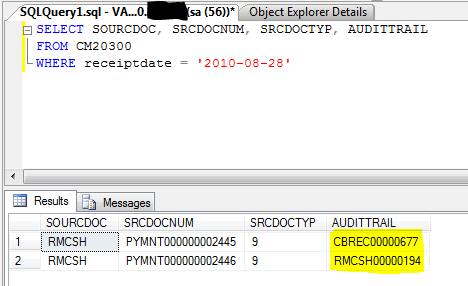
The major and critical difference that I found is as shown below:

The first payment #2445 was voided in AR and it created a void link entry in CBM, whereas the second payment #2446 was voided in AR and it DID NOT created a void link entry in CBM. The difference, after seeing the above screenshot, is quite telling.

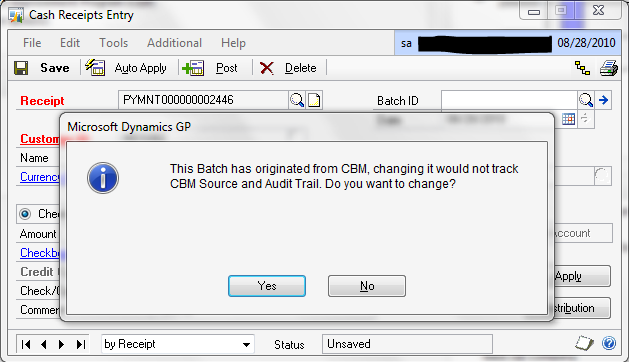
Payment #2445 contains an Audit Trail code which starts with CBREC (denotes a CBM Receipt) and Payment #2446 contains an Audit Trail code which starts with RMCSH (denotes an AR Receipt). Quite ridiculous, we may think, since both are created from CBM. But on a specific occasion, system does warn us as shown below:

The above warning is shown, when we delete the Batch Number from the CBM originated AR Cash Receipt.  If you ignore / confirm this warning message by clicking YES, then the Audit Trail link between CBM & AR Receipts is broken, thereby any future actions on these transactions would never get automatically reflected.

Process Explanation: When we post a CBM Receipt, it creates an AR Cash Receipt in a Batch with Batch Number as the CBM Transaction’s Audit Trail Code, such as CBREC00000677. When you post this AR Batch as it is from AR, this Audit Trail Code link will be established completely on both CBM and AR Tables. When you either void or reverse this AR Cash Receipt in AR, based on the Audit Trail Link, it automatically creates a Void / Reverse entry in CBM.

Normally, for one Cash Receipt in CBM, one AR Batch with CBM Audit Trail Code as Batch Number will be created. But at times, CBM maintains one Audit Trail code for several CBM Receipts (typically this happens when you want to run the CBM Receipt Posting Journals for all receipts at a time, and for that, you do not close the receipt window each time you post an CBM Receipt). In such cases, if the User wants to post only one AR Receipt in a Batch, he/she opens the transaction directly from AR Cash Receipt, REMOVE the batch number from that transaction and post it.

This Batch Removal action triggers the above warning message to the users to confirm whether they are aware of this Audit Trail Link breakage and that they are willingly do it. If the user say YES, it’s broken. You would never be able to reverse this action, at any point of time later.

For those who use CBM for their business processes, GIVE HEED TO THIS WARNING MESSAGE. This warning message is not just a typical GP Warning Message and it does have some serious implication towards how later this particular transaction is going to be treated in GP.

Addendum: Not all warning messages are junk in GP. This particular mindset among users is quite common, as sometimes they really do see some junk messages (Exceptions, DBMS Errors, etc) and they don’t seem to pay attention to Messages at all over a period of time; Partly due to the unwillingness to understand about the Product, Partly due to the misunderstanding from a particular warning message and Partly due to Addons’ / Customizations’ messages created by ISVs, Developers, etc. Once user get a feeling that such messages are a waste to read OR possess least significance, they start avoiding ALL messages. This may result in serious impacts.

My humble advise to all out there: Pay Attention to GP Warning Messages. If you feel like it’s wrongly thrown, contact your Support Consultant / Partner / Report to Microsoft.

BUT DO NOT EVER IGNORE Warning Messages.

VAIDY