Apture Highlights – A Cool New way of Searching within a Website


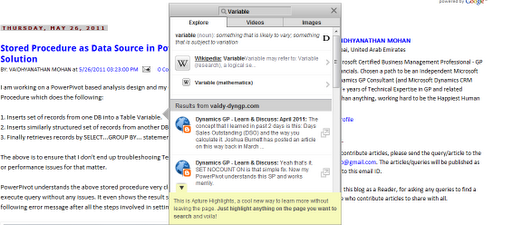
A cool new addition to my website. APTURE HIGHLIGHTS. It works like this:

Just select any word on my blog posts and automatically a small icon that says “LEARN MORE” would appear. Just highlighting on that icon would do wonders as shown below:

Quite an amazing way of searching about something without leaving the actual website. I would recommend this to all our fellow bloggers to try this and get benefitted.
I am so impressed with this and it’s going to be fun to all my blog readers.
VAIDY

Stored Procedure as Data Source in PowerPivot – Issue & Solution


I am working on a PowerPivot based analysis design and my data source is a SQL Stored Procedure which does the following:

1. Inserts set of records from one DB into a Table Variable.
2. Inserts similarly structured set of records from another DB into the same Table Variable.
3. Finally retrieves records by SELECT…GROUP BY… statement based on necessary criteria.

The above is to ensure that I don’t end up troubleshooing Temp table issues or data redundancy or performance issues for that matter.

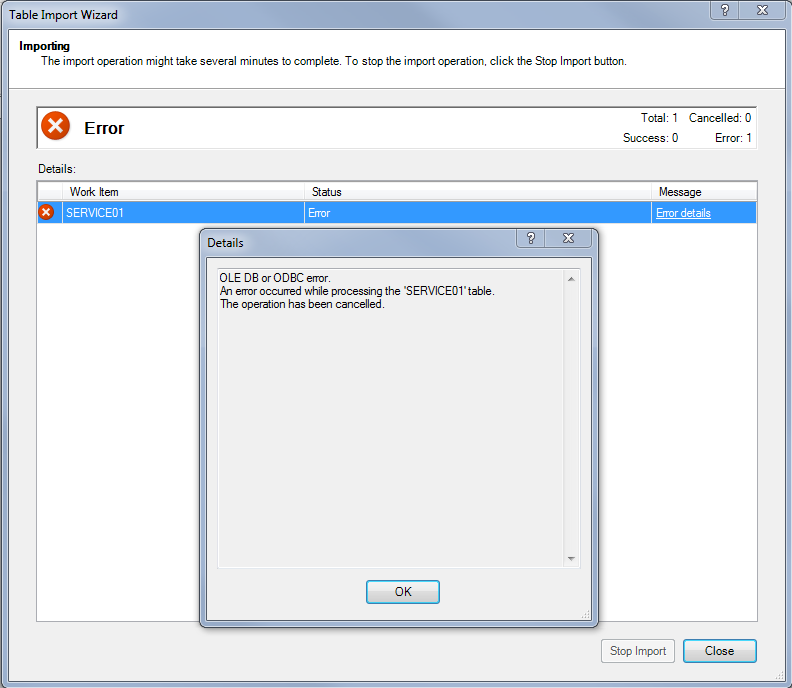
PowerPivot understands the above stored procedure very clearly and it also validates the execute query without any issues. It even shows the result set in preview. But it throws the following error message after all the steps involved in setting up SP as data source:

The above error message is quite less informative. I initially thought Stored Procedures are not properly supported by PowerPivot (how silly I am…!!!). But I just gave myself some more time to search forums as usual. After all, I spent almost a day in getting that Stored Procedure completed with 100% accurate results.
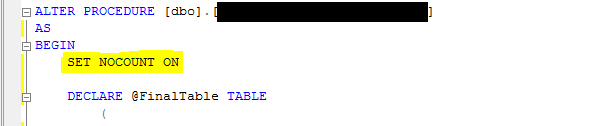
The following is the SIMPLE FIX to that menacing issue:
Yeah that’s it. SET NOCOUNT ON is that simple fix. Now my PowerPivot understands this SP and works merrily.
The Post I got this answer from: PowerPivot and Stored Procedure as a SQL Source.
The answer is given by Microsoft Product Team and that was conveyed by Lisa Liu CSS, a Microsoft Moderator.
The reason for why we ought to set NOCOUNT ON is given in the same post by Devarajan KM. The reason is: Set NOCOUNT to ON so that you get only one result set arrived after execution.
VAIDY

Analytical Accounting Menu Master Table (SY07110) Records Multiplying – Bug & Workaround


This one is another SY07110 (syMenuMstr) table issue.

For the past 1 week, users were complaining about GP slow down as soon as they select a company and click OK. The delay was anywere between 30 seconds to 1 minute, which is quite huge, considering the fact that GP is suppose to get initiated within 3-5 seconds maximum.

We have two different launch files; those users who are not suppose access AA and those who access AA. This delay was reported by only AA users. And that eased my debugging task out.

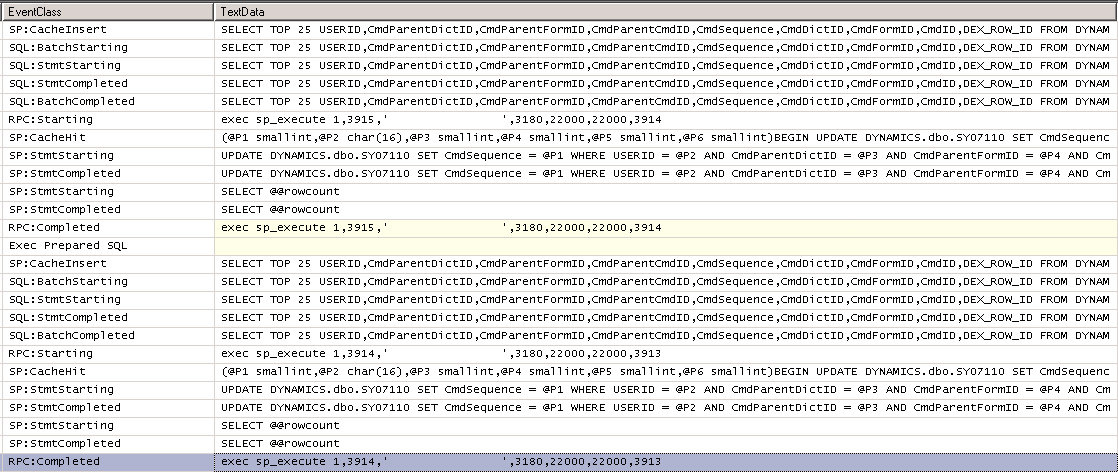
Troubleshooting started by taking a SQL Profile exactly at the time of selecting a company and clicking on OK. After painfully long time, GP got initiated with all Menu and other startup objects. I stopped SQL Profiler and noticed the following piece of SQL query being executed for as many as 143 times, which in total resulted in 4730 records:

The above query is same except some of the fields. But all these SQL SELECTs where targeting the same product; AA (CmdDictID = 3180).
Quite shockingly, I had 4730 records in SY07110 for Dictionary ID 3180, i.e. AA.
So how to solve this? Simple. I took a backup of this table (just for precaution) and executed the following SQL query:
DELETE DYNAMICS..SY07110
WHERE CmdDictID = 3180
It removed all 4730 records for AA module. I then launched GP. Bingo. It’s getting initiated in as long as 3 seconds.
The story does not end here. For the first time SY07110 table gets inserted with 33 records for AA module. As and when a user launch GP, with AA module, it inserts exactly ONE additional row onto SY07110 table.
Now this certainly looks like a bug.
So what’s the solution? Time being, I have to write a scheduled SQL job which will execute the above DELETE query on a weekly or daily basis.
I am not sure who else is currently facing this issue. If any of you people have this issue, then at least you have a workaround.
I am planning to raise a Support Ticket with MSFT team if no one out there gets back to me with a solution and make sure that this is not a bug as such.
VAIDY
Common Support Debugging Tool (SDT) Myths – Fact or Fiction?


I am too late in reading this post from David (how bad I am?). But better late than never, right?

The post lists out some of the common myths circling around the best admin tool GP has ever seen and solves the mysteries. Read it here: Common Support Debugging Tool (SDT) Myths – Fact or Fiction?

Watch out for some cool myths pointed out at the end (original idea behind those is from our own Mark Polino).

David, you got to be an Alien for certain. Not just this tool, but also your futuristic steps that we witnessed not too far in the past.

VAIDY

I Made It To Doug Pitcher’s 100 Most Famous, Awesome and Totally Influential Dynamics People for 2011


Doug Pitcher made my day. Literally. Trust me, there was no exchange of chocolates or those secret video things (as mentioned by him somewhere in his post).

Ok. Let me clarify. This one’s NOT THE OFFICIAL list that was recently released.

But I did make it to Doug’s 100 most famous, awesome and totally influential Dynamics people for 2011. I am in 29th place.

Doug, that’s really an inspiration for me to get myself up and run for that real list. Sometime in future, I would see myself listed. But miles to go before I sleep.

Thanks a ton for considering me in your first list itself.

VAIDY

2011 Top 100 Most Influential Dynamics People


Here’s the list of those who made it to Top 100.

2011 Top 100 Most Influential Dynamics People

And here are some posts related to this, making waves across.

Mohammed R. Daoud – The Most Influential People in Microsoft Dynamics For 2011
David Musgrave – Microsoft Dynamics Top 100 Most Influential People for 2011 published
Mark Polino – 2011 100 Most Influential in Microsoft Dynamics
Mark Polino – Top 100 – Who’s missing?
Mariano Gomez – Microsoft Dynamics Most Influential People: Popularity Vs Influence
Doug Pitcher – Doug Pitcher’s 100 most famous, awesome and totally influential Dynamics people for 2011

Join me in congratulating all those who made it and wishing all who didn’t make it sometime in future.

VAIDY

Required Fields – Additional Tip


This one is a simple tip, yet very useful one. Frank reminds us on where and what would be the problem if we don’t see required fields as we wished to.

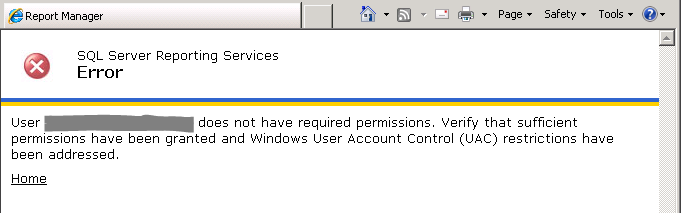
Now, this one is for developers. If it’s a customization that we have developed and on that if users are not able to see required fields as they wish, then you know what the problem is: Set Required property to TRUE without fail for all fields that are suppose to be REQUIRED and make sure that you have linked the prompts (Link Prompt action) for those fields correctly.

VAIDY

Dexterity Script Profile to solve Performance Issue – David


Waiting for 30 seconds after simply clicking a checkbox is indeed a nasty thing.

David explains us on how to solve Performance Issue using Dexterity Script Profile by taking above issue, reported by some customer.

It’s a detailed post with step by step explanations on how he could solve it.

Must read for all consultants and developers.

VAIDY

Microsoft Dynamics GP 2010 – Reporting (By David Duncan & Christopher Liley)


I just added one more treasure on my kit, in the form of a new book called Microsoft Dynamics GP 2010 – Reporting, written by David Duncan (I.B.I.S.) and Christopher Liley (I.B.I.S.), published by Packt Publishing.

I have started reading this book from today and hopefully in a week, I will be able to grab hold of the vast set of chapters.

To give you an overview of what is there inside this book: The book covers everything “reporting” in GP. From Report Writer reports to Smartlist to Excel Reports to SSRS to Analysis Cubes to Management Reporter. Every single thing about GP Reporting.

However, the book does not talk about two things:

1. Crystal Reports and the way you can access crystal reports from GP quite understandably because Crystal Reports is NOT supported out of the box by Dynamics GP. It can be used with the help some 3rd Party solutions, such as GP Report Viewer (from Flexible Solutions) or even a simple code piece written by any Consultant who knows GP, Crystal Reporting and .NET coding.

2. FRx, as this is already been replaced by Management Reporter. There is of course a section in this book where the difference between FRx and Management Reporter is explained.

I shall be writing a review of this book in a week’s time (hopefully). Just could not wait to tell you all that this book really going to be a great treasure for those who wants to understand how effectively GP data can be visualized and analyzed.

Until next post.

VAIDY