Don’t update "Batch Status" thru’ SQL when users are logged on


A user complained about a batch not being able to be posted. The error message is something like this: This batch is currently receiving transactions.

Normally when a user complains about something like this, a GP Administrator or Consultant’s immediate step is to check what the *Batch Status* field holds in SY00500 (Batch Header) table. The legend for this field says:

0 – Available – BATCH_AVAILABLE
1 – Marked to Post – BATCH_POSTING
2 – Marked to Delete – BATCH_DELETING
3 – Marked to Receive – BATCH_RECEIVING
4 – BATCH_DONE_POSTING
5 – BATCH_PRINTING
6 – BATCH_UPDATING
7 – BATCH_POSTING_INCOMPLETE
8 – BATCH_PRINTING_INCOMPLETE
9 – BATCH_UPDATING_INCOMPLETE
10- BATCH_RECURRING_INCOMPLETE
11 – BATCH_POSTED_WITH_ERROR

And quite apparently, in my case, it was 3. i.e. BATCH_RECEIVING. It’s very easy to update this field back to ZERO that denotes BATCH_AVAILABLE, so user can post it.

I could have also done the same thing. But I did not. I just wanted to make sure that this batch indeed did not receive any transactions. How do we identify whether a batch is receiving transactions or not? That I will address in another post.

This one is intended to caution a Consultant or Administrator NOT to update *Batch Status* thru’ SQL for any batch which is marked as BATCH_RECEIVING when users are logged on.

It would break a valid transaction being saved in this particular batch. When a batch receive transactions, GP locks this batch from getting posted only by updating the *Batch Status* field with BATCH_RECEIVING. By changing that from back end, we are risking batch getting corrupted.

Tell the user that he/she has to wait. And wait till users log off from GP. And then check whether the *Batch Status* becomes BATCH_AVAILABLE. In case it is not, then you update it thru’ SQL.

It is worth waiting for sometime than trying to clear a mess. I take this opportunity to insist again: SQL is not ALWAYS an appropriate approach for issues that we face in GP.

UPDATE: David has sent me a link, which quite obviously I missed mentioning here. How did I miss this? We do have a way to release stuck batches without logging off users.

VAIDY

Stuck Receivables Transaction due to Incorrect Amounts


Yesterday, I received a support request from one of our users who tried posting a batch full of receivables transactions and received an error message for one transaction whose distribution amounts did not match document amount.

It was suppose to be a simple task to release this transaction for edit, but due to some reason this transaction got stuck in between. It did not come back to it’s original batch and quite obviously it did not get posted either due to that error.

Following are the steps involved in releasing that transaction:

CHECKS

1. Check whether the transaction is still in RM10301 (RM Sales Work) table.

In my case it was still in RM10301 table.

2. Check the fields BACHNUMB (Batch Number) and BCHSOURC (Batch Source) in RM10301 table for that transaction.

In my case, BACHNUMB contained the USER ID who tried posting the batch; BCHSOURC contained XRM_Sales instead of RM_Sales, since it was in the middle of posting process and got stuck.

3. Check whether a batch with that user’s USER ID is created in SY00500 (Batch Header) table.

In my case, there was indeed a batch with that User ID. Because of which, this user could not open Receivables Transaction Entry window and was receiving the (in)famous error message “A previous transaction level posting… … …”.

CORRECTION STEPS

1. I first created a Receivables batch (I named it as RM-RECOV).

2. Through SQL Server Management Studio, I updated RM10301 table fields BACHNUMB and BCHSOURC as follows:

BACHNUMB = ‘RM-RECOV’
BCHSOURC = ‘RM_Sales’

3. Deleted the batch [USER ID] from SY00500 table, to remove user’s transaction posting session lock.

4. Tried opening that transaction on Receivables Transaction Entry form. Since the batch number RM-RECOV was updated through backend, it did not obviously update batch information. Due to which, I still could not open this transaction.

5. As a final step, I ran Receivables Reconcile Batch Information (Tools => Utilities => Sales => Reconcile). This step updated the amount from that erroneous transaction on to batch RM-RECOV.

After above steps, user was then able to reopen that transaction and edit it.

Bottomline: SQL approach is not always the only option for consultants to clear such issues. We need to perform some crucial application level tasks that would compliment SQL methods.

VAIDY

Analytical Accounting – Budget Vs. Actual


Siva has added one more to his awesome list of AA posts. Check out his SQL View to analyze AA Budget Vs. Actuals.

I am sure this is going to delight people across world who use AA and are dying to see some kind of ways to enhance their AA analysis capabilities.

VAIDY

Analytical Accounting Menu Master Table (SY07110) Records Multiplying – Bug & Workaround


This one is another SY07110 (syMenuMstr) table issue.

For the past 1 week, users were complaining about GP slow down as soon as they select a company and click OK. The delay was anywere between 30 seconds to 1 minute, which is quite huge, considering the fact that GP is suppose to get initiated within 3-5 seconds maximum.

We have two different launch files; those users who are not suppose access AA and those who access AA. This delay was reported by only AA users. And that eased my debugging task out.

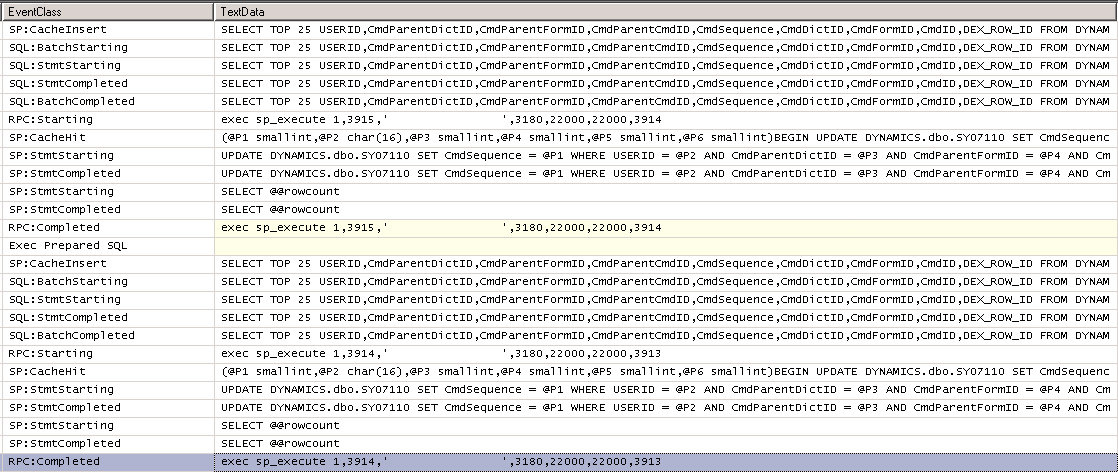
Troubleshooting started by taking a SQL Profile exactly at the time of selecting a company and clicking on OK. After painfully long time, GP got initiated with all Menu and other startup objects. I stopped SQL Profiler and noticed the following piece of SQL query being executed for as many as 143 times, which in total resulted in 4730 records:

The above query is same except some of the fields. But all these SQL SELECTs where targeting the same product; AA (CmdDictID = 3180).
Quite shockingly, I had 4730 records in SY07110 for Dictionary ID 3180, i.e. AA.
So how to solve this? Simple. I took a backup of this table (just for precaution) and executed the following SQL query:
DELETE DYNAMICS..SY07110
WHERE CmdDictID = 3180
It removed all 4730 records for AA module. I then launched GP. Bingo. It’s getting initiated in as long as 3 seconds.
The story does not end here. For the first time SY07110 table gets inserted with 33 records for AA module. As and when a user launch GP, with AA module, it inserts exactly ONE additional row onto SY07110 table.
Now this certainly looks like a bug.
So what’s the solution? Time being, I have to write a scheduled SQL job which will execute the above DELETE query on a weekly or daily basis.
I am not sure who else is currently facing this issue. If any of you people have this issue, then at least you have a workaround.
I am planning to raise a Support Ticket with MSFT team if no one out there gets back to me with a solution and make sure that this is not a bug as such.
VAIDY

Getting Month Numbers between two dates in T-SQL


I literally had to spend around an hour to crack this code, with some little help from my best geek friend, GOOGLE, of course.

Issue is this: I wanted to get Month in Numbers (Jan = 1, Feb = 2, etc.) that exist between two dates. For instance, if my date range is 1-Jan-2011 to 31-Mar-2011, then I should find and retrieve the months Jan, Feb and Mar as 1, 2 and 3 respectively.

After much much toiling and reading some stuff online, the following is what I got for myself:

—–

;WITH Numbers (Number) AS
(SELECT ROW_NUMBER() OVER (ORDER BY OBJECT_ID) FROM
sys.all_objects)
SELECT MONTH(DATEADD(MONTH, Number – 1, ‘2011-01-01’)) Month_Number
FROM Numbers
WHERE Number – 1 <= DATEDIFF(MONTH, ‘2011-01-01’, ‘2011-03-31’)

—–

IMPORTANT: Make sure that you have more than 12 records in sys.all_objects table, which by default SHOULD have.

I hope this code piece is useful for some who have got similar requirement.

VAIDY

T-SQL "UNION" Vs "TABLE variable"


Very recently I learned this. And what a change it has made to all of my SQL based projects! I am sure people who are hardcore SQL programmers would already know this. Thought of sharing this for those who would want to know something interesting.

I had a SQL Stored Procedure that is about to retrieve records of a same table from two different databases. The usual approach was something like below:

SELECT [column_name_1], [column_name_2], [column_name_3], …
FROM [db_name_1]..[table_name]

UNION

SELECT [column_name_1], [column_name_2], [column_name_3], …
FROM [db_name_2]..[table_name]

This was working till these tables contained records less than 30000 rows. And it started taking significantly unacceptable time (like 10-15 seconds). I then thought of creating a temporary table and dump records from one DB then from other. There is a potential issue in that, in the form MULTI-USER environment. When two different users invoke this stored procedure at the same time, this temporary table must cater for both. I was not really sure about how I can address this.

Then came this idea of using TABLE VARIABLE. It’s like a Structure in C++. This is how I modified my stored procedure:

DECLARE @TABLE_NAME TABLE
(
Column_1 DATATYPE,
Column_2 DATATYPE,

)

INSERT INTO @TABLE_NAME (Column_1, Column_2, …)
SELECT [column_name_1], [column_name_2], …
FROM [db_name_1]..[table_name]

INSERT INTO @TABLE_NAME (Column_1, Column_2, …)
SELECT [column_name_1], [column_name_2], …
FROM [db_name_2]..[table_name]

SELECT Column_1, Column_2, …
FROM @TABLE_NAME

After this, the program started taking around 2-5 seconds with more than 50000 records to handle. Not to forget, this program contained several grouping and calculations.

I don’t have to worry about delay and also TEMP TABLE issues that are potentially disastrous. I am still not sure how this is handled in terms of memory allocation. What happens after this program completes it’s process, is also a factor that I am yet to figure out.

But, so far, I have found this as one of the best methods in recent times.

VAIDY

Changing a Smartlist Favorite’s visibility thru’ SQL


Warning: Method shared in this post is NOT supported or advised by Microsoft team. This article explains a SQL method and therefore the intended audience is a GP and SQL Consultant / Developer / Administrator.

Couple of Smartlist Favorites created by an end user, but created it with a wrong visibility: Visible by User ID. What this user should have selected is: Visible by System. Since these favorites are suppose to be accessed by all Users across all Companies.

This end user is currently out and even as SA I could not access the Smartlist Favorites. Easiest and direct approach is to reset this user’s password, modify the smartlist favorite and notify him of the new password. Once this user is back, he/she would change the password.

But, is there any other simplest method for someone like me? A GP & SQL Administrator? Of course, I do.

I can modify a Smartlist Favorite using a simple SQL UPDATE statement, targeting the Smartlist Favorite tables ASIEXP81 and ASIEXP86. Display Name for these tables are Smartlist Favorite Master and Smartlist Favorite Columns Master respectively. Both tables are in DYNAMICS database.

Below are SQL statements that I used to change the visibility:

UPDATE DYNAMICS..ASIEXP81 SET ASI_Favorite_Save_Level = 1, USERID = ”, CMPANYID = 0 WHERE ASI_Favorite_Name = [Favorite_Name_Given_By_That_End_User]

UPDATE DYNAMICS..ASIEXP86 SET ASI_Favorite_Save_Level = 1, USERID = ”, CMPANYID = 0 WHERE ASI_Favorite_Name = [Favorite_Name_Given_By_That_End_User]

In above statements, field ASI_Favorite_Save_Level is the Visibility Type that we set up when we create a Smartlist. Value 1 denotes the first option in that Drop Down, which is SYSTEM. Since I have to set visibility to all users across all companies, all I have to do is to set USERID as an Empty String and Company ID as ZERO.

This will change a particular Smartlist Favorite’s visibility as required.

Simple, isn’t it?

VAIDY

Last Sale By a Customer & Item – Victoria’s SQL View


Victoria‘s latest SQL view retrieves the last sale by customer and an item. With little tweaks here and there, this SQL view will serve us immensely to show various information pertaining to Customer and/or Item sales.

Thanks Victoria for this view. This has come especially when I am working on some dashboards and reporting. It’s surely going to help me deriving some important reports.

VAIDY

GP & Mixed Mode Authentication


I was attending a LinkedIn query from a User who was facing issues with GP Utilities & DB Creations. Upon checking  his environment by a remote-controlled session, I identified that it was SQL Server Authentication issue, which was denying him to even log on to GP Utilities and move further.

It’s very important to understand that GP Application supports only SQL Server Mixed Mode Authentication. What if we accidentally selected (rather left changing the default SQL Authentication option which is) “Windows Authentication”?

With SQL Server 2008 (I have not checked this in SQL Server 2005 and earlier versions), we have a very simple way to change it.

1. Open SQL Server Management Studio (SSMS).
2. Login to the respective SQL Server Instance.
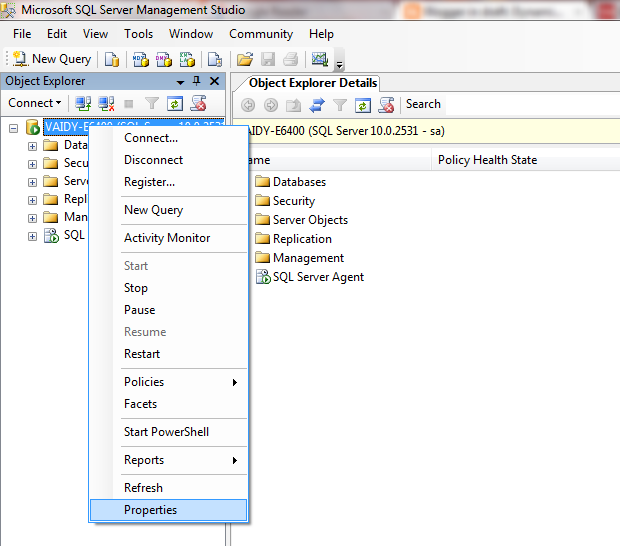
3. On the left pane, right click on the Instance Name and select “Properties”, as shown below:

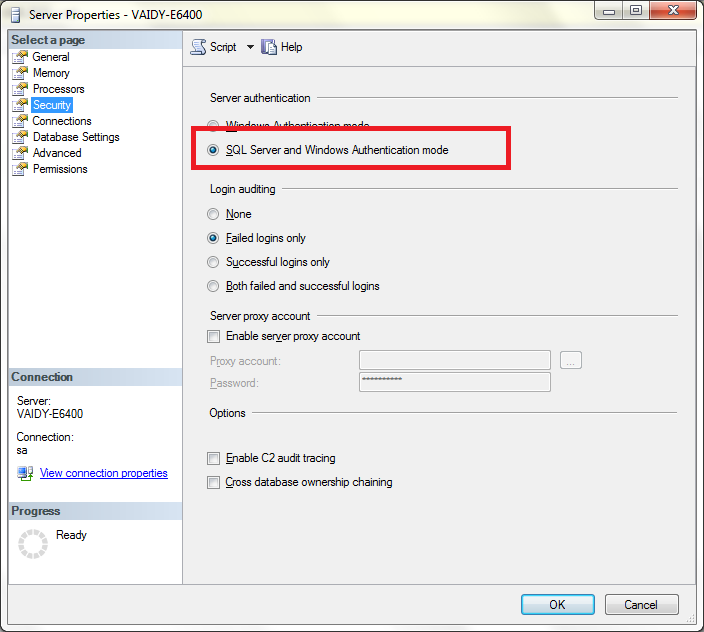
4. Under the Security Page, select “SQL Server and Windows Authentication Mode” as shown below:

5. Click on OK and restart the SQL Server service to effect this change.

Earlier I remember, I had to uninstall and reinstall SQL Server instance had I selected the wrong authentication mode. I think the version was SQL Server 2000.

With SQL Server 2008, you will be saved with an hour or more.

Point to Remember: If you enter “sa” and it’s password correctly and still you are invited with a message that reads like “Login failed”, then make sure that SQL Authentication mode is “SQL Server and Windows Authentication Mode”.

VAIDY

GP2010 – Sales Charts & KPIs – Top Items By Sale Amount – Stored Procedure Bug


I stumbled across a bug (of sorts) in GP2010 SSRS Charts & KPIs for Sales Module.

GP2010 has got default Charts & KPIs designed in SSRS and we have quite hands full of Charts & KPIs which covers most of our basic requirements. One module which is very good in terms of coverage is Sales. Under Sales, we have a Chart & KPI called Top Items By Sale Amount.

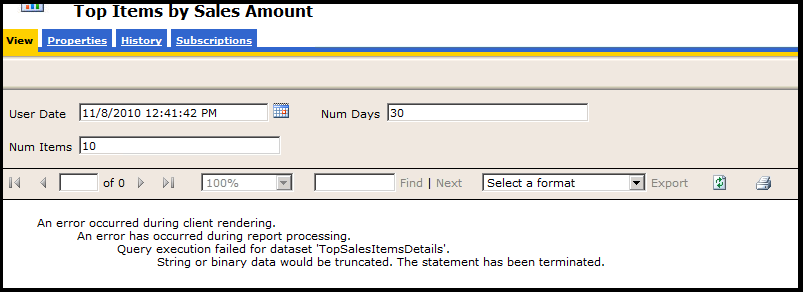
When I ran this report to view the results, I got the following error message:

The error message mentions that there is an extra bit of string data that’s getting forcefully truncated due to size restrictions. This clearly indicates a SQL Error Message. I ran the SQL Profiler furthering the probe. And the issue was rounded in to a Stored Procedure which is run to extract the needed data for this Chart & KPI, which is seeSOPTopTenSalesItemsByPriceMetric.

In that stored procedure, a temporary table is created with a column named ItemNumber which is of size char(18). We all (Consultants/Developers) know that, in GP, size of a Item Number is 31 in SQL.

So, this SSRS Chart & KPI will fail if any Item Number exceeds the size 18 in variably, which is a bug in this Stored Procedure.

FIX: I ALTERed this stored procedure to resize this particular temporary ItemNumber column to char(31) and report retrieved the details excellently.

VAIDY