OFF-TOPIC: Batch Print Multiple Files in Mac OS X Without Opening Them – Jesse Chapman @jessechapman


One of my users use Mac OS X Mavericks and his major concern was to batch print files in a folder without opening each one of them. He somehow (?!?!?!) trusted my expertise in Mac OS to find a solution.

My best friend, Google, came to my rescue again. I got this gem of a post by Jesse Chapman (sorry Jesse, I tried getting a profile page of yours, but could only get your twitter page) on his blog wait, really? that saved my day.

Read it here: How to batch print multiple files in Mac OS X without opening them.

Though the post is for Mac OS Snow Leopard, it still works charmingly on Mavericks. Thanks a bunch, Jesse.

Upside; I am now considered an expert in Mac OS by at least one Mac user in this world :-D. Downside; I may get more support requests with Mac OS :-P.

But hey, I am not even complaining.

VAIDY
OFF-TOPIC: Show Hidden Files & Folders in Mac OS X Mavericks


I had been struggling with this for sometime. I wanted to create a USB installer for Mavericks and was not able to get thru’ a step where I had to show hidden files and folders.

In Windows OS, it’s a simple step which is available graphically to either show or hide hidden files and folders. But in Mac OS X, for some reason, this has to be achieved by typing a command on Terminal. Following is the command that is required to enable showing hidden files and folders:

defaults write com.apple.finder AppleShowAllFiles TRUE
killall Finder

So, those who struggle to get it done, above is your key to unlock this.

VAIDY

RIP Google Reader: 10/21/2005 – 06/30/2013


You will forever remain my most favourite RSS reader.

I am searching for words to express my sadness after I read the news of Google retiring (i.e. killing) Google Reader. Let me just borrow the most important statements from that post and publish here:

We have just announced on the Official Google Blog that we will soon retire Google Reader (the actual date is July 1, 2013). We know Reader has a devoted following who will be very sad to see it go. We’re sad too.

There are two simple reasons for this: usage of Google Reader has declined, and as a company we’re pouring all of our energy into fewer products. We think that kind of focus will make for a better user experience.
Then what about that *devoted following*? Is it just a foolish bunch who had immense faith in Google Reader than even Google’s own management and team?
Google; you have rights to develop or kill your products. But trust me, you have lost that immensely devoted followers of your product. Soon enough, you would be pressing your own self-destruction button and get lost.
I’m deeply sad, to understate my mindset.
VAIDY

OFF-TOPIC: Increase Productivity By Adding Shortcuts To “Send To”


I often copy my chunk file on to GP application folder as part of my development work, so I must keep two explorer windows open always. Copy from my development folder and paste it on to GP application folder. Difficult and frustrating (at times) to shuttle between two folders every time.

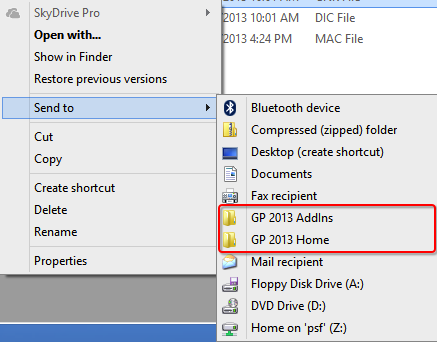
Not anymore; I just created new shortcuts to Send To menu as shown below:

Snip20130213_2

Just select my chunk file from my development folder, invoke Send To menu and send it straight to GP application folder. Awesome, isn’t it? It is, indeed. It saves almost 15-30 minutes a day depending how many times you perform copy paste with same source and destination folders.

Follow the steps explained in this blog post: How to add SkyDrive shortcut into your ‘Send To’ Menu.

The post discusses on how to add a shortcut for Skydrive, but it’s the same steps that you have to follow for any shortcut (internally on your computer or an external location).

I assure you that this trick alone would save you tremendous amount of time and effort in a day.

VAIDY

OFF-TOPIC: Snip For Mac OS X – A Snipping Tool Alternative


This is another off-topic. But I wanted to highlight this most handy application called Snip, developed by Tencent Technology (Shenzhen) Company Limited and is also available on Mac App Store.

Snip20130209_1

Those PC users, who also used to be Snipping Tool dependants, and then became Mac OS user, would love to have an application in Mac OS X which would compensate Snipping Tool’s absence.

I used to crib about the lack of an application that I would use to do screen capturing and post-processing those captures. This tool Snip, which I came to know very recently, has done what other applications on Mac platform couldn’t.

We have built-in capturing commands in Mac OS X, such as SHIFT+CMD+4 (to capture a portion of screen), but those commands would simply take the screenshot and immediately save it on your desktop. You then have to reopen it on some other graphics tool to post-process it, such as narrating or simply painting on some text which you do not want to show to others.

This tool is amazingly simple and does exactly what you need. It just sits on that menu bar with a customisable keyboard shortcut to invoke a screen capture.

Go to the official website (link is provided in the beginning of this post) and know more about it.

Trust me, you would most certainly fall in love with this application, if you do tons of screen capturing on your day-to-day Mac OS usage.

UPDATE: There is one more app that is FREE on Mac App Store; named Share Bucket. I think it’s a serious competitor for all currently available apps.

VAIDY

OFF-TOPIC: MacBook, Mac OS & Wired Memory


I got a new MacBook Pro couple of days back and needless to say, I am more than excited to use it.

I have been a Mac OS user for the past 1 year, as I had already replaced my personal computing machine from an old warrior named Lenovo N300 to an amazing MacBook Air. Been driven by that experience, I had always been yearning for my work computer to get changed to a MacBook too.

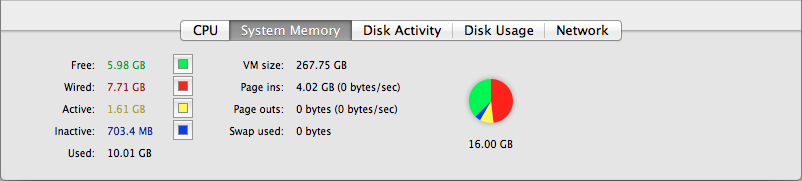
This topic is more about how Mac OS utilises the System Memory (RAM) to it’s fullest advantage and how it keeps any MacBook machine highly efficient. When we look at the Activity Monitor (equivalent to Task Manager on Windows OS), you would find something like below:

Screen Shot 2013-01-15 at 5.48.57 AM


I was so intrigued by the term Wired Memory as all other terms made some sense to my H/W & OS expertise. Checked with my friend (who else but Google), and he as usual returned several results. One post stood out from all other.

A post written by Alex on his blog Bits about Bytes shed some light on this. Read the post here: Is my Mac using too much memory???

It’s a very old post (posted precisely in the year 2007), but an amazing post about the topic which I was interested in. In case some people like me, who has shifted to Mac OS (or going to shift), I thought this post would be for them and would be useful to know about your Mac.

Happy “Mac”ing.

VAIDY

OFF-TOPIC: Setup Exchange Email on Android & Other Mobile OS


This one is totally irrelevant to Dynamics GP. But I thought I would share this piece of information, which nowadays is very relevant.

Most of the people struggle to configure Microsoft Exchange email on their smartphones, if it is based on Android or other OS platforms (such as Nokia Symbian).

This post from Muhammed Shiyas, Set Up Exchange E-Mail on an Android Mobile Phone and Nokia Symbian OS, explains step by step on how to configure the Microsoft Exchange email on such phones.

VAIDY

OFF TOPIC: Why Windows Close Button Is On The Right Corner?


That’s pretty interesting stuff out there in The Old New Thing blog.

I got to read about why the close button of Windows is on the right corner?. In addition to the article, you got to read the comments which are as interesting (and funny, if I may say) as the article itself.

The idea behind the right corner placement is Fitt’s Law.

Read it on the source blog. I bet, it’s worth.

VAIDY

OFF TOPIC: Please Do Not Learn To Code


This is an interesting post on Coding Horror site.

Jeff Atwood expresses his thoughts on why we should not advocate learning to code for the sake of learning how to code.

Quite nice post up there for a read.

VAIDY

OFF TOPIC: Why I can’t use the File Sharing wizard?


Alright… Another off-topic one, but is worth sharing. This post again shows how much Customers are aware about technology and go that extra mile to get educated on systems/software that they use.

The Old New Thing has got a post which explains a flaw in Windows Vista (yeah I can hear you yelling at me as soon as you heard that word) and Windows Server 2008, but got fixed in Windows 7 (are you OK now?) and Windows Server 2008 R2.

The post is about why you can’t use File Sharing wizard if you exclude inheritable permissions from a folder’s parent.

Just in case, people are wondering why this thing never work on Windows Vista (ok ok, that’s the last time I would utter that word) and Windows Server 2008, you have one more reason to dump *you know what*.

VAIDY