The moment you cross Microsoft Dynamics GP 2013 Login window and reach Company Selection window, you would realise that it is now uncluttered with Password field being removed.

Looks pretty and clean to me. How about you all?
VAIDY
The moment you cross Microsoft Dynamics GP 2013 Login window and reach Company Selection window, you would realise that it is now uncluttered with Password field being removed.
Looks pretty and clean to me. How about you all?
VAIDY
Much has been written, discussed and thought about Microsoft’s strategy on moving Extender licensing and support to it’s original developer, eOne Solutions, from GP 2013.
It was first highlighted by Victoria Yudin on her blog; Big announcement for Microsoft Dynamics GP’s Extender module. It was soon followed by several posts from all GP community. Having said and done all, eOne has clarified an important thing to all customers and partners.
If you wish to Opt-In (explanation of what it is all about is there on the post), please read this post from eOne Solutions: Opt-In eXtender Customers. This is a very important post for all those use Extender and time to get it done if you are planning your GP 2013 upgrade in near future.
VAIDY
I received an email from one of my users seeking my help in clearing this issue. While posting an invoice, this error message popped up:

Upon running the Edit List for this invoice, I realized that it was due to an imbalance in Markdown Amount and corresponding distribution line. Below was the error report that I got:

There seemed to be Markdown entered on one or more line item(s), but there was no distribution line for that amount. But the issue was not THAT simple and didn’t stop there.
When I ran thru’ all line items, none contained a Markdown. Now that’s the problem. After some minutes of thinking, I realized something must be stranded on header record’s Markdown field, for which GP requires a Markdown distribution line, but since line items do not contain any Markdown, it’s not creating one. Strange.
I decided to query the records from SOP10100 (SOP Header) and SOP10200 (SOP Line) to understand the issue. Below is what I found:
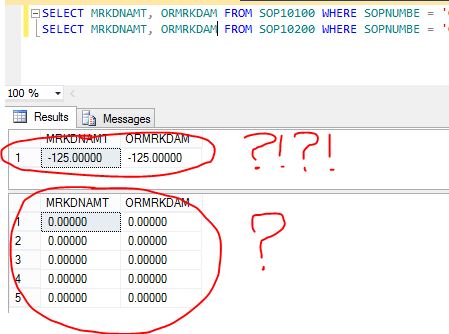
SERIOUSLY…?!?!?!?!
But yes, that was the issue. And most baffling thing is, when I tried to reconcile this sales document, this major mishap didn’t get cleared at all.
Obvious solution for this abnormal situation is as follows:
1. Take backup of this SOP10100 record.
2. Update Markdown fields with ZERO.
3. Reconcile this sales document again to see if the above update had caused any imbalance.
Happy new year and happy troubleshooting…!!!
VAIDY

UPDATE: Author of this book, Leslie Vail, has got a post on her blog (Dynamics Confessor Blogspot). Link now added here to her own post: Published at last! Developing Microsoft Dynamics GP Business Applications.
I had the privilege to be a part of the technical reviewing of this amazingly informative book: Developing Microsoft Dynamics GP Business Applications.
This book is penned by one of the most experienced GP personality and multiple times MVP, Leslie Vail. Packt Publishing has published this book.
I strongly recommend this book to all GP developers/consultants who would like to know how to develop anything with regards to Dynamics GP; be it a new feature addition, a feature modification or just a cosmetic enhancement.
Thanks Leslie Vail for this wonderfully written book with every single important concept being covered.
VAIDY
Microsoft Dynamics GP Support & Services blog has given the two direct upgrade paths, in case you are looking for: Upgrade Paths to Microsoft Dynamics GP 2013!
Quite crucial information that we must remember.
VAIDY
My comeback post MUST have to be this.
Microsoft announced the general public availability of Microsoft Dynamics GP 2013 RTM on 19th December 2012. This has been the biggest release yet, with more than 140 new features. ONE single feature that stands out of all is GP Web Client.
Below are the posts covering this release:
David Musgrave: Microsoft Dynamics GP 2013 Released to Manufacturing, Microsoft Dynamics GP 2013 now available for download.
Mariano Gomez: Microsoft Dynamics GP 2013 Released to Manufactuting (RTM)
Mark Polino: Microsoft Dynamics GP 2013 is now available!
Second link against David’s name would lead you to links to Dynamics GP 2013 RTM downloads (both from PartnerSource and CustomerSource).
I have started preparing to take my company on to the new version. Excited to say the least. Will share each and every interesting & critical upgrade information as and when I progress.
VAIDY
It’s this time, everyone of us (GP Community) would be eagerly waiting for. Like every Apple/Microsoft product announcement event. For me, this is much more exciting; way more exciting than anything else.
Inside Microsoft Dynamics GP blog has started the much awaited series: Microsoft Dynamics GP 2013 Feature of the Day.
Enjoy reading the series (and be educated on upcoming version & it’s new features).
VAIDY
With the release of Microsoft Dynamics GP 2010 SP3, MSFT GP development team has fixed one of the nagging bugs which got introduced in Microsoft Dynamics GP 2010 R2.
The following posts would explain what exactly that issue is:
Error When Switching Back To Microsoft Dynamics GP From Report Writer (Ian Grieve)
Rest assured that this bug is now fixed with the release of Gp 2010 SP3.
VAIDY
David Musgrave informs us about the release of Microsoft Dynamics GP 2010 Service Pack 3. Read his post and plan for the upgrade.
Got to plan my Saturday accordingly now. 🙂
VAIDY
David Musgrave has posted on his blog about Technology Adoption Program (TAP) for Microsoft Dynamics GP 2013.
Partners can nominate their customers who satisfy the criteria of TAP. Customers those who would like to get nominated may want to contact their Partners.
The idea behind this program is to identify those customers who are ready and willing to test Microsoft Dynamics GP 2013 Beta, deploy GP 2013 on their production environment (with MSFT support, of course) and work closely with Microsoft to mold GP 2013 before it reaches the RTM release.
But, customers who are outside North America won’t be able to participate in this program. Microsoft is specifically looking for customers who are from North America.
More information can be read from David’s post (link given in the beginning of this post).
VAIDY
 Dynamics GP - Learn & Discuss