I have been getting this query on WHY EXTENDER INFORMATION ON A SOP QUOTATION DOES NOT GET TRANSFERRED TO THE CORRESPONDING ORDER?
Well, there is obviously no logical reason behind it. Given the fact that SOP User Defined values are getting transferred from Quote to Order to Invoice, we expect the same thing from Extender Information also. Point substantiated.
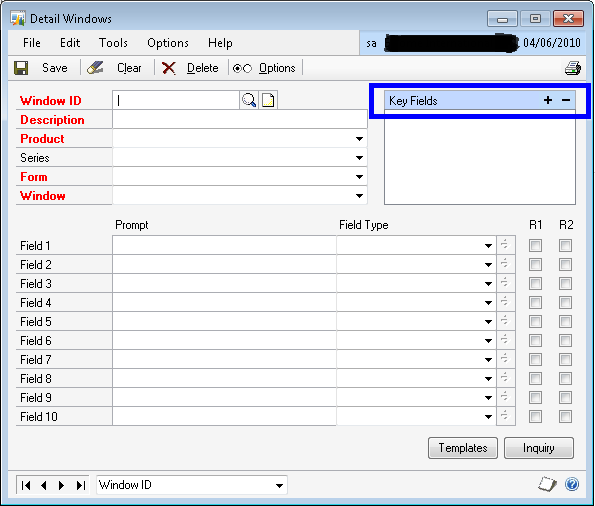
But why Extender Information does not get transferred? There is a technical reason behind it. Extender Information is created based on the Key Fields that we are setting up in the Extender Window/Detailed Window definition form as shown below (
COLOR BLUE BOX):
Most of the times, when a Consultant / End User create an Extender Information Window (or Detail Window) for an SOP Document, the Key Fields are typically “SOP Type” and “SOP Number”. When the user enters some information for an SOP Document, Extender saves this information in it’s table for the Key Value . For instance, if your SOP Document Type is Quotation, then SOP Type is 1. And if your SOP Document Number is STD-QT-123456, then the Extender Key Fields combination is:
STD-QT-1234561 {Last character “1” stands for SOP Type Quotation}.
When you convert this Quotation to an Order, a new SOP Document Number and SOP Document Type is created. For instance the above Quotation may get transferred to an Order of SOP Type 2 and SOP Document Number STD-OD-333333. Obviously for this SOP Order, the Extender Key Field combination would be:
STD-OD-3333332 {Last character “2” stands for SOP Type Order}
Extender does not understand the new Key Fields combination and it does not show up when you open that Extender Information Window (or Detail Window), as the information for the Quotation is for different Key Fields combination.
Hope the above explanation is clear.
Now, you may ask me another question: GP also does the same thing. Converts a Quotation to an Order with different SOP Type and SOP Number, but it still retains the SOP User Defined values. Why can’t Extender do the same thing?
For that query, I do not really have an answer both technically and logically.
But for now, that’s how Extender works.
UPDATE: You can’t really say that this is Extender’s drawback. Simply, Extender is a generic Addon for GP, which leverages the functionality. Having said that, Extender people cannot really write a specific code like what I explained above. Which does not make sense for developers to release a product with such process specific code. Moreover, Key Fields combination on SOP Documents can be anything along with SOP Type and SOP Number. Sometimes even without that. We really don’t know. Now, read the remaining part of this post.
For All Consultants out there: Be very clear on this point and design your solutions accordingly. Make sure that your Customers understand this point as well.
Let me not end this article on a negative remark.
Extender does give us a beautiful feature, which is Extender Inquiry. This makes sure that when you post a transaction which has an Extender Information, it is also shown when you inquire that transaction. And best part is that, you can either edit it even after posting or you can keep it Read-Only.
Nonetheless, Extender IS a very good tool for all Customers out there. It’s us Consultants, to decide on how effectively we are going to utilize it for Customers’ needs.
VAIDY




 Dynamics GP - Learn & Discuss