OFF-TOPIC: Word for Mac 2011 – Print Area Cut Off Issue & Solution


It’s high time I blog about this. Those who are on Mac and use MS Word for Mac, this is going to be real time saver.

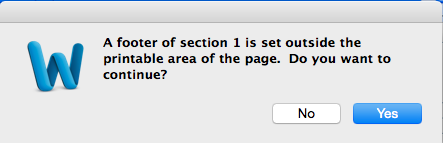
Let me brief the issue first. Whenever I create a document with a header/footer and when I try to save this document as PDF, I use to get following message:

Screen Shot 2014-12-17 at 12.33.11 PM

If I continue with “Yes”, it will cut the footer off and give me an incomplete document.

As usual, googled this and got too many solutions/workarounds, but only one solution actually helped me. It’s a YouTube video uploaded by Matt Fuller:

Thanks Matt.

VAIDY

Customising the Company Login window series – Visual Studio Tools revisited – Visual C#


Nice post up there on David’s Winthrop blog on how to customize Company Login window using VS Tools. via @WinthropDC

WinthropDC's avatarWinthrop Development Consultants Blog

David Meego - Click for blog homepageJust before I left Microsoft, I was writing a series of blog articles about Customising the Company Login window so that you could see the full company name in the drop down list for long company names.

I had shown how to achieve the customisation with Dexterity and with Visual Basic for Applications, but was having problems getting it to work from Visual Studio Tools.

View original post 543 more words

Average Days To Pay Calculation – History & Open (SQL Script)


In my previous post, Average Days to Pay Calculation (SQL Code), I had provided a SQL stored procedure that calculates a customer’s ADTP for a given point of time (between two dates). While this was perfect, it does not include fully applied but open invoices.

Some of the readers (particularly Tim and Steve Pena) requested to amend the script to consider open invoices that are fully applied. An invoice remains open even after fully applied only when we do not run paid transaction removal (PTR). I wanted to work on this script as soon as possible, but somehow I could not.

Better late than never, isn’t it?

Please find the link below to download the SQL procedure that calculates a customer’s ADTP for a given point of time, but looks at both history (RM30101) and open (RM20101) tables, take invoices that satisfy following criteria:

  • Invoices that are fully applied.
    • If invoices are in history table, by default, current transaction amount would be zero.
    • If invoices are in open table, then take those invoices whose receivable outstanding amount is zero.
  • Invoices that are not voided.
  • Invoices that have a document amount, meaning non-zero.

I have verified this script against some sample customers for whom, invoices were either in history (RM30101) or in open (RM20101) or in both.

As always, feedbacks are welcome.

RM_AverageDaysToPay.sql

VAIDY

12 Ways to become a better CRM Developer


Nice post up there on Ben Hosking’s CRM Blog…

Hosk's avatarHosk's Dynamic Blog

Now and again I get asked how to become a better CRM Developer, so I thought I would create a blog to point people towards and here it is.

1.  Decide you want become a better Developer

Improving and becoming a better CRM Developer is a state of mind/attitude, you have to want to get better, you have to strive to be better every day.

It’s like trying to get someone to read a book you like, you can’t make them read that book no matter how good you say it is, it’s only when the person wants to read it.

2.  Make a plan

A plan is like a map, if you don’t use a map it’s very difficult to get to where you want to go.  A plan is the same for careers and learning skills, you need to identify the skills you want to learn and make…

View original post 985 more words

Microsoft Dynamics GP 2015 RTM – Available Now


With more than 120 new features, Microsoft Dynamics GP 2015 RTM is now available to download for partners.

Screen Shot 2014-12-02 at 6.55.03 PM

Quite obviously, a PartnerSource account is required to get the new version.

Excited to see GP 2015 being released earlier than expected. Will get to learn about all new features soon.

VAIDY

CBM Cash Receipt AA Journal Issue & Resolution


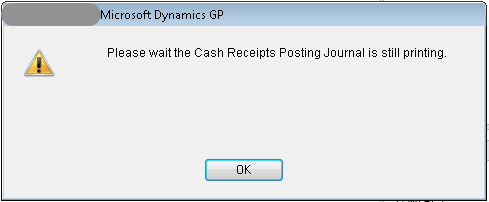
Couple of days back, a user reported an issue. When she tried to open CBM Cash Receipts window, following message appeared:

Screen Shot 2014-11-25 at 5.48.52 PM

For all other users, when they posted any Cash Receipt, an Analytical Accounting Journal report would open with some entries on it; particularly with 5 cash receipts. User, who reported the issue, confirmed that the records shown on AA journal report were posted by her and only after posting them, the above error message appeared.

Since the report is AA journal, I first checked the AA Sub Ledger tables (AAG20000 series) and confirmed that the entries shown on the AA journal report are present without any issues. If I get rid of the above error message, things would be normal and this particular user can continue with her entries. Task on hand is to find out AA journal report tables and see the stuck/orphaned records and clear them.

Issue: Records got stuck on AAG50000 (AA Sub Ledger Report Header), AAG50001 (AA Sub Ledger Report Distribution) and AAG50002 (AA Sub Ledger Report Assignment) tables.

Resolution: Remove them. Simple. What you MUST note here is that all records (including genuine ones) would be present on these tables. You MUST note down AA Sub Ledger Header ID of the ones that are stuck and use below query to delete records.

DELETE AAG50000 WHERE aaSubLedgerHdrID IN (<aaSubLedgerHdrID>,<aaSubLedgerHdrID>,...) 
DELETE AAG50001 WHERE aaSubLedgerHdrID IN (<aaSubLedgerHdrID>,<aaSubLedgerHdrID>,...) 
DELETE AAG50002 WHERE aaSubLedgerHdrID IN (<aaSubLedgerHdrID>,<aaSubLedgerHdrID>,...)

Replace <aaSubLedgerHdrID> with respective AA Sub Ledger Header ID of the stuck records.

NOTE: Always take a backup of records before you delete.

VAIDY
OFF-TOPIC: Create a Reminder From Mac OS X Mail.app Emails


I have been looking for a solution/workaround to get this functionality on my Mac’s Mail.app. The issue is that Apple’s Mail.app do not have the simple yet handy feature of creating a reminder out of an email, like how Outlook does.

But I did not want to get out of Apple’s ecosystem, that comprises of Mail, Reminders and iCal. This is basically a great combination.

Searching for a solution, I stumbled upon this article by Michael Kummer; How to create a Reminder from an E-Mail.

I am not that good at Apple Script. But this one is brilliant and does what I need precisely. Till apple adds this functionality out-of-box, this script will do.

As a side-note, check out his blog for more informative and interesting posts. His bio: Michael Kummer.

Thanks Michael for this detailed post.

VAIDY

David Musgrave Leaves Microsoft – Launches Winthrop Development Consultants


Yes and it’s not an April Fool post. It’s October, for god’s sake.

This morning, David Musgrave announced his departure from Microsoft officially to all of us and reasons behind this move. Sad to see Microsoft’s recent strategies that includes (but not limited to) removing Dynamics GP certifications, laying off 14% of total workforce, etc.

Good News: he has relaunched Winthrop Development Consultants, which was earlier Winthrop Dexterity Consultants. He is staying with Dynamics GP community. We will continue to see his blog posts on GP development on his new blog address: Winthrop Development Consultants Blog.

David, in my humble opinion, it’s good this way. And it is most certainly a huge and irreparable loss to Microsoft. Welcome back to the world outside Microsoft.

If there is one thing that cannot be changed by anyone or anything: you will always be my foremost inspiration.

Wish you all the best…!

VAIDY

Dynamics CRM 2013 – Access Denied “SecLib::AccessCheckEx failed” – Error & Resolution #MSDynCRM


It’s been a long time since I had blogged anything out here. Partly due to working on various projects simultaneously.

This post is about one CRM issue faced by one of our CRM users. He was trying to qualify a lead and it was not happening. Following error message was thrown:

Screen Shot 2014-08-06 at 12.40.12 PM

Following is the log file, which explained in detail about this issue:


<s:Envelope xmlns:s=”http://schemas.xmlsoap.org/soap/envelope/”><s:Body><s:Fault><faultcode>s:Client</faultcode><faultstring xmlns:xml=”http://www.w3.org/XML/1998/namespace&#8221; xml:lang=”en-US”>SecLib::AccessCheckEx failed. Returned hr = -2147187962, ObjectID: 919e14d1-6489-4852-abd0-a63a6ecaac5d, OwnerId: 3c8fcb46-39f6-4618-80eb-9c12f9f9a021,  OwnerIdType: 8 and CallingUser: 610b8b50-46e6-e311-80bb-00155d071101. ObjectTypeCode: 4703, objectBusinessUnitId: 3271f8a6-83d8-e311-80ba-00155d071101, AccessRights: ReadAccess </faultstring><detail><OrganizationServiceFault xmlns=”http://schemas.microsoft.com/xrm/2011/Contracts”><ErrorCode>-2147187962</ErrorCode><ErrorDetails /><Message>SecLib::AccessCheckEx failed. Returned hr = -2147187962, ObjectID: 919e14d1-6489-4852-abd0-a63a6ecaac5d, OwnerId: 3c8fcb46-39f6-4618-80eb-9c12f9f9a021,  OwnerIdType: 8 and CallingUser: 610b8b50-46e6-e311-80bb-00155d071101. ObjectTypeCode: 4703, objectBusinessUnitId: 3271f8a6-83d8-e311-80ba-00155d071101, AccessRights: ReadAccess </Message><Timestamp>2014-08-06T08:42:07.844046Z</Timestamp><InnerFault><ErrorCode>-2147187962</ErrorCode><ErrorDetails /><Message>SecLib::AccessCheckEx failed. Returned hr = -2147187962, ObjectID: 919e14d1-6489-4852-abd0-a63a6ecaac5d, OwnerId: 3c8fcb46-39f6-4618-80eb-9c12f9f9a021,  OwnerIdType: 8 and CallingUser: 610b8b50-46e6-e311-80bb-00155d071101. ObjectTypeCode: 4703, objectBusinessUnitId: 3271f8a6-83d8-e311-80ba-00155d071101, AccessRights: ReadAccess </Message><Timestamp>2014-08-06T08:42:07.844046Z</Timestamp><InnerFault xmlns:i=”http://www.w3.org/2001/XMLSchema-instance&#8221; i:nil=”true” /><TraceText xmlns:i=”http://www.w3.org/2001/XMLSchema-instance&#8221; i:nil=”true” /></InnerFault><TraceText xmlns:i=”http://www.w3.org/2001/XMLSchema-instance&#8221; i:nil=”true” /></OrganizationServiceFault></detail></s:Fault></s:Body></s:Envelope>


Upon checking those terms on CRM forums and blogs, following post, by Simon Harvey of Rule30, helped me on how to approach this issue: Fixing a SecLib::AccessCheckEx failed error in CRM.

My user’s issue was that he was not having access to read “Process” at the organization level. I had previously set it up to “User” level. After changing the access level as follows, he was able to qualify leads without any issues.

Screen Shot 2014-08-06 at 1.28.24 PM


Most important thing here is that when you query your ObjectTypeCode and corresponding Object Name for code 4703, it will return the name as WorkFlow. Note that on Security Role setup, it’s nothing but Process.

Happy troubleshooting.

VAIDY

Simulate DEX_ROW_ID in a SQL View Using ROW_NUMBER() – #MSDYNGP


I have a requirement in which I have to access a SQL view from within my customisation dictionary, in order to create a custom lookup for users to select a value based on an Extender form and an Extender lookup. Easiest option is to create an Extender view (which in turn creates a SQL view for us).

Now, this is the view that I am suppose to refer to from my custom dictionary. Dexterity allows us to refer to any SQL object by simply create a TABLE definition and mention the SQL object (table or view) name as the physical name.

Dex View

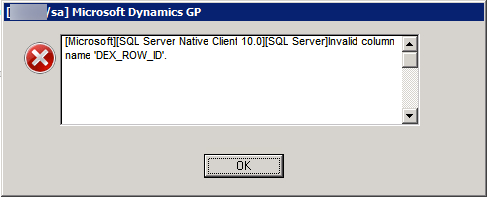
Everything looks perfect till you actually see below error messages at runtime:

Dex View - Error 1

Dex View - Error 2

Error message is quite obvious; you do not have DEX_ROW_ID in that SQL view that you are referring to. Every single Dexterity table must have DEX_ROW_ID at the backend. It cannot afford to not have one.

So how am I going to resolve this? By simply adding a record number dynamically to the SQL view created by Extender. How to do that? By adding the T-SQL function ROW_NUMBER(). This is how I achieved it:

ROW_NUMBER USAGE


Definition of ROW_NUMBER() can be found here: ROW_NUMBER (Transact-SQL).

A simple yet powerful SQL function has given me the power to do what I wanted in no time. Oh, and my custom lookup referring to this view is working like a charm. Users are happy and so am I.

VAIDY