Scrolling Window, VBA & DUOS


I started with DUOS and related concepts in Modifier/VBA. I have been interested in VBA more nowadays, and I am fairly new to DUOS concepts. I wanted to learn more about DUOS and how to use it for realtime requirements.

While all examples I looked into for DUOS concepts were dealing with adding fields to a Header side of GP Forms (Customer Maintenance, for instance), I was curious about knowing how to implement DUOS on a Scrolling window of a GP form. I worked on a very simple yet good sample Modifier/VBA/DUOS Customization which involved GL Transaction Entry form.

I wanted to add one more Description field to the GL Journal Entry Account Lines. So, in addition to Distribution Reference and Account Description, one more Description called Account Line Comments needed to be added.

Below is the complete approach:

1. GL Transaction Entry was modified to add the new field called “Line Comment” and a label “Acct. Line Comment” on the Header part.
2. I decided to use both “Journal Entry” and “Sequence Line” as the combination for the DUOS ObjectID.
3. To add the “Sequence Line” to the VBA Editor, it has to be made available on the UI. Once it is added to VBA editor, it can be pulled out of the UI as it was, originally.
4. Coding was done once the fields “Journal Entry”, “Sequence Line” and the newly added “Line Comment” were added to the VBA Editor.


For more detailed explanation on this sample, you can download this Document, Sample Modifier VBA DUOS Customization – GL Trx Entry.pdf.

Any development without small gaps is not quite possible. I did trap certain simple issues in my unit testing.

1. Always, for any scrolling window, there should be a value (such as Sequence Line, Line Sequence Number, etc.) that is setup as the unique value to identify one specific line record. In my sample customization, I had to consider the Journal Entry from Header and Sequence Line from Scrolling Window as a combination to uniquely identify my Line Record.

2. Whenever a user enters a Account Line, a DUOS record will be created on SY90000 with an ObjectID @^ (in my sample). For instance, my first Account Line for a Journal Entry #3255 will be 3255@^100.

3. We have a function in VBA DUOS called DUOSObjects.Remove(), for which the parameter will be the ObejctID. So whenever a User deletes an Account Line, the corresponding DUOS record should be deleted. We do not have any automatic handler which will delete the DUOS record when an Account Line is deleted.

4. There is no event in VBA, something line LineDelete, which will handle a Scrolling Window Line Delete event.

I thought I was in a fix. I then asked this to David (Thanks David, for pointing this out to me). He instructed me to write the code on the Line Delete message “Are you sure you want to delete?”. This message is shown whenever we delete any Scrolling Window Line. That’s what I did and with some more code additions.

You can get this Sample Customization package from this link: GLJournalDUOSSample.package.

Do go thru’ this sample code and send in your feedbacks on any changes / additions / any other methods. I hope sincerely that this helps someone out there, who has started with DUOS, just like me.

Vaidy

How to call a Report Writer report in GP – David


Terrific article. Thanks David, in the first place, to lend this information on How to Call a Report Writer report in GP. This is just among the others of what a Developer would have dreamed of knowing.

I used to check it out by starting a Dex Script Log, whenever I run a report. This would have not just the “run report” statement but also the entire script calls. But this piece of precious information from David, would ease our task out.

I am certainly delighted to read this article, and if anyone out there has not yet gone thru’ this one, do it without fail.

Vaidy

Article on VSTools Form Behavior – MDaoud


This one is a good article on how to place your VSTools form to the center of the screen, with respect to the Screen Resolution.

Pretty good R&D, I would say. As not many would have this on mind when they develop a Customization till they actually get a feedback from the clients. And as Daoud mentioned on this article, the clients will certainly be so annoyed if they see a GP screen showing up in the Top-Left corner all of a sudden.

A must-to-refer article from Mohammad Daoud.

Vaidy

GP Articles Raining across Blogosphere


I have been out of action for nearly 10 days, due to some very important personal reasons & also some gruelling job commitments. And what I found, after I checked the GP Blogosphere today, is the raining Articles.

It’s as much as 50+ articles, 50+ valuable articles for sure. I admit, I should not have left my notebook. :-

Well, I just hope sincerely that I can catch up with what is happening as on today. I also have drafted some really interesting tasks for publishing. Planning to get these things posted in another 2 days.

Until next post…

Vaidy

Leveraging Dynamics GP Expertise – Mark Polino


Mark Polino explains us, why Dynamics GP Expertise is needed and why we should stay focussed when things are not in good shape at this moment. Read this article: Need to Leverage Microsoft Dynamics GP Expertise. To say the least, I gained a bit more confidence once I read this article, as a GP Consultant with 5+ years experience. It’s not just that. We get a sense of satisfaction that we are an Expert on a product which has got a good reputation among the Global Users.

I am just a little late in commenting on this article, but always, better late than never.

Vaidy

eConnect – Configured Identity Incorrect Error


This one is another important eConnect Error message and its details. Thanks to the ZSL GP Team, for providing me the details to publish.

The team developed an Integration Tool for GP using eConnect v10.0. The tool was tested rigorously on a typical local environment and an apparently fresh environment. The tool was then released to the client and the installation did not have any issues.

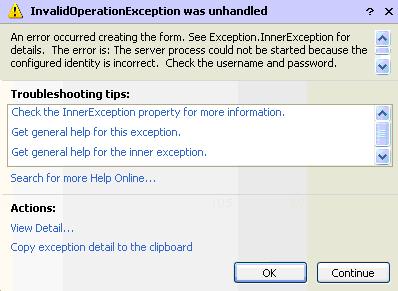
Finally, the tool was given a test run on Client’s environment and the following error message took everyone by surprise:


Cause: The User Account, with which the eConnect was installed on the DB Server, got removed from the Domain, by the time they installed this tool. And apparently, the eConnect COM+ Component Services Identity was configured with the same User Account. Now whenever the Integration Tool interacts with eConnect COM Service, the Deleted User Account would have been referred to and since it does not exist, this error was thrown up.

Solution: The eConnect COM Service Identity was set to the option “System Account”. This would instruct the Integration Tool to use the current logged on User Account.

Now, I have some important points to highlight/stress based on this:

1. You can always stress the System Admin of any Client, to create one Domain User Account specifically for eConnect COM Service, with the credentials never expire and does not require any Password Enforcement. This is mandatory, as most of the times, the Integration on a Client’s place is going to be scheduled to run when there is no OR less activities on GP, some time in the midnight or some time in the weekend. In such cases, this would become a serious trouble to the clients, when they come back the next working day to find that the transactions had never been integrated for some issue which is irrelevant to them. When I say irrelevant, it is irrelevant to GP data. The System Admin need not reveal this to anyone else in his/her organization or even to you, once this is deployed. If anything to be troubleshot, you can always reconfigure the identity for that moment, and then ask the System Admin to reset it with the previous User Account.

2. If the System Admin does not approve of creating a new and separate User Account, then setup the eConnect COM Service Identity to “System Account”.

3. For your sake, please handle all possible Exceptions while developing a tool or a product which uses eConnect. I have seen people handle one common Exception, which is System.Exception. But this does not cover all exceptions. There are more: eConnect Exception, SQL Exception, and much more. Well, I am not a .NET developer by profile, so please do correct me if I have mentioned something wrong. But I do know that there are more specific exceptions (what we call Inner Exceptions) that need to be handled. So be more attentive and handle those exceptions.

4. When you document the Installation & Configuration of your tool, never miss detailing the eConnect Runtime Installation and Configuration, if the client do not have it running already. If the client do have it already, just mention that this needs to be confirmed. This does not take any special effort, but certainly have a clear cut instruction for both you and the client, for reference in future.

Vaidy

Altering a Table From Dex


I got an interesting query from a guy on how to alter a table without using any SQL statements from within Dexterity.

As per the Dexterity Guide, a table cannot be altered from within Dexterity, that means only thru’ Dex coding. If you’re converting tables stored in a SQL database, you must use pass-through SQL to perform the conversion.

Having said that, we can do it from Dexterity but calling a SQL Stored Procedure which will contain the necessary SQL Statements for that table alteration.

1. Make the necessary table changes on Dex Dictionary.

2. Write a SQL Stored Procedure like below (The SQL SP is written on SQL Server 2005 DB and uses SQL 2005 syntaxes):

/* Drop the SP if it exists */
IF EXISTS (SELECT * FROM sys.objects WHERE object_id = OBJECT_ID(N’[dbo].[Custom_Tables_Alteration]‘) AND type in (N’P‘, N’PC‘))
DROP PROCEDURE [dbo].[Custom_Tables_Alteration]
GO

/* Create the SP */
CREATE PROCEDURE Custom_Tables_Alteration
AS
BEGIN

/* This statement will move the records from the actual table that needs to be altered to a Temp Table */
SELECT * INTO [custom_table_temp] FROM [custom_table]

/* This statement will truncate the table before it is being altered and then alter the table based on the changes that you have done on Dex Dictionary */
TRUNCATE TABLE [custom_table]
ALTER TABLE [custom_table]… … …

/* This statement will move back the records from the Temp table to the Altered Table */
INSERT INTO [custom_table]([field1], [field2], …, [fieldn]) SELECT [field1], [field2], …, [fieldn] FROM [custom_table_temp]

/* This statement will grant the necessary privileges to the DYNGRP Role */
GRANT SELECT, INSERT, UPDATE, DELETE ON [custom_table] TO DYNGRP
END
GO

3. Write a Dex Trigger on a Successful Company Login, to execute this SQL Stored Procedure, by using call sproc statement. NOTE: This has to be executed only if the user logged on is SA. And we should design this in such a way that it does not alter the table as and when you log on to GP as SA. That’s very important. Well, there are so many ways using which we can validate this.

So that’s it. We are good to go with the new table definition.

Now the points that we need to understand:
1. We should take care of the relevant Table Alteration on both Dex Dictionary and SQL.
2. We should take care of the removed fields and the data which were stored on that field before this alteration.
3. If a field is added to the table and is defined as NOT NULL, then we should make sure that we include that field on the INSERT INTO … SELECT … statement in the above stored procedure and assign a relevant value (either a ZERO or an empty string ”, not NULL STRING).

This is just one way of doing the Table Alterations. There can be more. I would update this post as and when I get something better than this.

Vaidy

Accounting Coach – Place to Learn Accounting


I got to know about a Website which teaches Account Principles, called Accounting Coach, from the Top 50 Accounting Blogs listed in Biz.Edu. Thanks to Bill Kennedy’s article on his blog Energized Accounting.

You would be amazed and feel happy that you finally found a better place to kick-start and enhance your Accounting Skills. And the reason I am posting this on GP Blog: You will be a better consultant if and only if you know the functionality of an ERP product along with Accounting Principles.

Take a glance at it. I am sure you will not be left dissatisfied.

Vaidy

Njevity’s Blog


It happened today that I got acquainted to this blog, Njevity’s Blog. And I should admit that it has caught my interest to read more from.

Articles are not just about GP or any of the MS Dynamics product, but whatever comes to Njevity’s mind, I believe. For instance, I read this article: Sometimes I Get My Best Ideas In The Shower. Hey come on, that’s for me as well. I am sure there could be many more out there. Sometimes even blogs can take a break and take us through some fun moments.

There are these MS Dynamics related articles with very important and rare informations on this blog. Do read it. You will agree with my words.

Vaidy

Next Document Number Retrieval


This has always been a question from many developers. How to retrieve the Next [Document] Number programmatically and how to increment it?

GP does the following whenever a Document Number is retrieved from Next [Document] Number setup and eventually create/leave that document:

1. Retrieve the Next [Document] Number from the respective module setup table.
2. Increment the Next [Document] Number on that table, immediately after it populates the number on the respective form.
3. While saving the document/posting, it does not do anything to the Next [Document] Number on the setup table. It’s just a document posting process.
4. While deleting the record, it decrements the Next [Document] Number, if and only if, no other user has created another document using the immediate Next [Document] Number, or even opened the respective Document Entry form to create one. If there is any other User Activity on this, GP does not do any kind of decrement.

Having said that, the consequent queries from all developers/consultants would be:

1. What will happen to the stranded [Document] Numbers?
2. Can we reuse it?
3. Can we instruct GP to reuse it?

To my knowledge, the answers are:

1. Stranded [Document] Numbers are left stranded, as far as GP is concerned.
2. YES, we can reuse it, but the Users should know which number, to their best knowledge, is stranded. The numbers can be reused, once we setup an option, kind of “Override Document Number” or something like that.
3. We currently do not have some kind of setup which will manage the Stranded Numbers and automatically instruct GP to reuse them. It would be great to know any such 3rd party product in the market, but at least, GP does not have it as an in-built functionality.

I believe, I have been correct on the above explanations to the best of my knowledge. In case, there is anything that is not correct, something to add to or something which I am still not aware of, please do update me.

Vaidy