Microsoft SQL Server 2012 – Performance Dashboard Reports


In March 2012 (precisely 6th March 2012), Microsoft made available SQL Server 2012 Performance Dashboard Reports which can be used to identify whether there is a current bottleneck on the system, and if so, capture additional diagnostic data that may be required to resolve it.

More information on this can be read from the download page: Microsoft SQL Server 2012 Performance Dashboard Reports.

One point worth to be highlighted is that this doesn’t require Reporting Services to be installed.

It’s a very crucial and important tool for any database administrator.

VAIDY

Report Writer Series – Kuntz Consulting


Report Writer has been considered by most of the clients as static and bland reporting tool, due to it’s look & feel and it’s rigidity in terms of modifying the reports.

But, Report Writer is an amazing reporting tool, if only people know how it’s structured technically and how to bend it for our requirements. I am not certainly talking about customers. It’s the consultants’ responsibility to convince customers by demonstrating the power of Report Writer.

Over at Kuntz Consulting blog, series of posts are to be read to understand Report Writer as a tool and how to use it for our betterment. Following are the posts that are already been posted:

  1. Report Writer Demystified – Part 1 – Dictionaries & Launch Files
  2. Report Writer Demystified – Part 2 – Other Considerations
  3. Report Writer Series – Formatting Text
  4. Report Writer Series – Don’t Settle for Ugly Reports – Part 1
  5. Report Writer Series – Don’t Settle for Ugly Reports – Part 2
  6. Report Writer Series – Toolbox Tips
  7. Report Writer Series – Drawing Options Tips
  8. Report Writer Series – Sections

And it’s only going to get more on this series.

Worth reading for all those who would want to know about this silent performer, that is Report Writer.

VAIDY

Dynamics GP Developer Insight – Web Client Window Ribbon – Part 2


With some examples, Rushi Patel explains us about how the Web Client ribbon is customized for our real time needs.

Read it here at Developing For Dynamics GP blog post: Dynamics GP Developer Insights – Web Client Window Ribbon Part 2.

I am more excited to get my hands on GP 2013 development after reading such posts. It’s going to be delightful.

VAIDY

Cashbook Bank Transfer Error: Date entered is not a current period for checkbook [Checkbook ID]


This was a menace for the past 4 days, to say the least.

I was reported of this issue, where a user when trying to enter a bank transfer for a checkbook, on a date in previous month, he got this error message (in the title of this post) as shown below:

The above message occurred only for one particular checkbook and not for others.

First step was to ensure the fiscal period was not closed. It was not.

Second step was to ensure that they had not run the reconciliation for this checkbook, so genuinely it had closed the period. It was not.

Third step was to run check links for Checkbook Master, to ensure that things are fine with Checkbook ID master record. It was perfect.

Fourth step was to take SQL Profile and see where exactly this message pops up. When I took twice, the results were different. Due to Analytical Accounting. But that I never got to know since, my focus was more on CB tables.

I referred to the ONLY AVAILABLE forum post, Date Entered is not for Current Period for CashBook, which was way back in year 2010. No solution was provided though.

I decided to take the SQL profile again, but this time without Analytical Accounting to avoid extra lines on the trace file. I took the profile twice and both matched line by line.

The last table where the buck stopped was CBINT605 (Reconciled Amounts) on DYNAMICS database. When I queried this table manually, following was the result:

As you see above, there was a record for this checkbook ID, with a date 30-Apr-2012. Due to which, if you enter any date on or before 30-Apr-2012, it fails.

I checked the user again to ensure that he had not run any reconciliation for this checkbook. He assured that he didn’t, but he also mentioned that he was demonstrating this process to a user, but did not complete it. Bad. Demonstrating on a live company is very bad.

I took a backup of this table and then deleted this record.

Now, my checkbook accepts any date for it’s bank transfer entry.

MORAL OF STORY #1: Messages never lie. If there is a message, it will most probably be correct.

MORAL OF STORY #2: Never ever do any R&D on live company. Never ever demonstrate anything on a live company. That’s why test companies are for.

VAIDY

Adding more comment lines to POP Purchase Order – Mariano


Mariano’s latest post explains how to add more comment lines to POP Purchase Order report. The idea is to split the comment text into 80 characters sized fields and then displaying it on separate report sections. I leave you here so you could refer to this awesome piece of post from Mariano. It’s a step-by-step guide on how to do this.

David, way back in 2011, demonstrated a similar approach on his post about adding more comment lines on SOP Documents. It’s worth to remind that post now.

VAIDY

OFF TOPIC: Please Do Not Learn To Code


This is an interesting post on Coding Horror site.

Jeff Atwood expresses his thoughts on why we should not advocate learning to code for the sake of learning how to code.

Quite nice post up there for a read.

VAIDY

Moving Dynamics ERP to the Cloud? Avoid the Lightning


Quite an informative and the most relevant post about Cloud ERP environment.

Andrew Snook, Fastpath Inc., explains us why and how to take necessary precaution before deciding on moving our Dynamics ERP on to the cloud.

It’s very important and informative. Must read for all those who have got a serious thought about cloud ERP.

NOTE: For those who are new to this portal; you may have to register yourself on to this site to read the complete post. It’s a member-only site, but the membership is free of cost.

VAIDY

Dynamic Future – Vote: Reprint Outstanding Check Prints Report from Bank Reconciliation


Third feature feedback introduced by Mark Polino on his blog; vote for Reprint Outstanding Check Prints report from Bank Reconciliation.

VAIDY

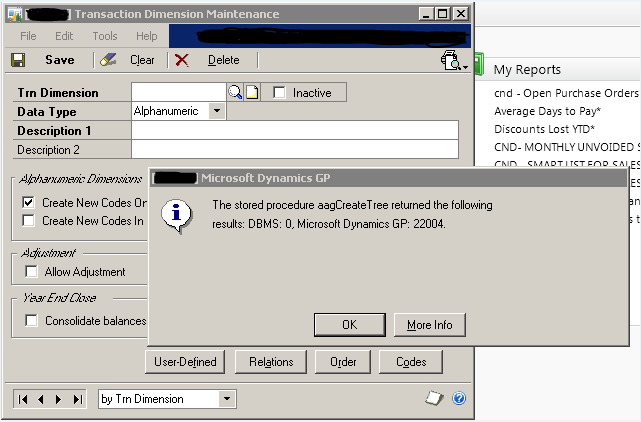
Analytical Accounting “aagCreateTree” Dimension Creation Error Message & Reason


I received an email from one of the users with an attachment that displayed an error message while trying to create a new Analytical Accounting Dimension. Below is the screenshot that I received:

Upon debugging the stored procedure aagCreateTree, I realized that another stored procedure named aagGetCompanyStatus returned this error number 22004.

This stored procedure validates the version of Analytical Account and the status of particular company, from where you are trying to create a dimension. In my case, there was no record of this company at all.

I finally realized that Analytical Accounting company information was missing on table AAG00104 in DYNAMICS database. I am not sure how and why this could be missing, unless I forgot to run the AA company setup routines (which I did, to my best knowledge).

Solution: I had to rerun the AA company setup options again and recreate the records.

Just in case, someone faces this issue, make sure that you check AA company setup records.

VAIDY

Doug Pitcher’s OFFICIAL 100 Most Famous, Awesome & Totally Influence People for 2012


Ahhh… How does it feel when you don’t even dream to be even nominated on one Top Influential People list, but win a place in another?

I feel heavenly. I have made it to Doug Pitcher’s OFFICIAL Most Famous, Awesome & Totally Influence People for 2012. That’s second year on the row.

I’m thrilled.

VAIDY