Doug Pitcher’s OFFICIAL 100 most famous, awesome and totally influential Dynamics people for 2013


That’s 3rd in a row… Yippee…

I have made it to Doug Pitcher’s OFFICIAL 100 most famous, awesome and totally influential Dynamics people for 2013.

Thank you, Doug. I’m honoured to say the least. I would do my best to be one among this awesome people forever.

VAIDY

Most Influential People in Microsoft Dynamics for 2013


The official list on DynamicsWorld UK has been published.

The Most Influential People in Microsoft Dynamics for 2013

Some of the GP experts who made it this year:

  1. Mark Polino – #20
  2. Jon Rivers – #30
  3. Mariano Gomez – #42
  4. Frank Hamelly – #46
  5. Victoria Yudin – #74
  6. David Musgrave – #89
  7. Leslie Vail – #90
  8. Richard Whaley – #94

Congratulations all of you who have made it.

Now, let me wait for official *other* list by Doug Pitcher.

VAIDY

Microsoft Dynamics GP 2013 Service Pack 1 – Released


Over at Microsoft Dynamics GP Support & Services blog, announcement of Microsoft Dynamics GP 2013 Service Pack 1 release has been posted.

The post also details everything about this SP and you would want to read it thoroughly to understand this release and its significance.

VAIDY

Refresh Application Navigation – Support Debugging Tool (SDT)


Are you serious about your Dynamics GP as ERP and are you serious about retaining it till GP becomes completely irrelevant to your business requirements? Contact your partner NOW and get Support Debugging Tool (SDT).

Let me come to the topic now. Earlier, before SDT happened to all of us, when I created a menu item using Extender, I had to restart GP to get this new menu item effected. What’s there in that? It’s something common in GP, isn’t it?

How about creating a menu item using Extender, but instead of restarting GP, just click on an option to get this new menu item immediately effected? Magic? Nope, it’s a reality now. With Support Debugging Tool (SDT), you can.

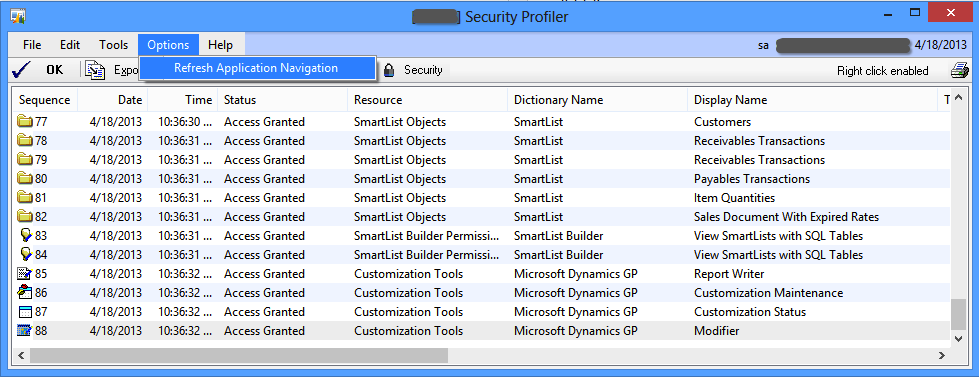
Open Security Profiler of SDT, and select the menu item Refresh Application Navigation, as shown in below screenshot:

Snip20130418_1


This does exactly what happens when you log on to a company. Cool, isn’t it?

Now, reach out to your partner (if you are a customer) OR download this gem from above SDT portal link (if you are a developer/consultant/partner) and install it on your customers’ GP environment.

This post is to show you a very simple yet tremendously useful feature of SDT. Trust me, there are hundreds of such terrific features available in SDT which will ease your life and earn you reputation as smart consultant.

Find time to appreciate the people who made this SDT possible (and made it a FREE tool for all); David Musgrave & Team. There is a voting going on DynamicsWorld to select Top 100 Influential Microsoft Dynamics People and David’s on page 4. Go ahead and vote for him. Without him and his team, Dynamics GP would be just a mere ERP product, like any other.

VAIDY

Doug Pitcher’s Official 100 Most Famous, Awesome & Totally Influential List


Doug never posted preview of his own Top 100 Most Famous, Awesome & Totally Influential list. Not for the past 2 years.

But this year, he has done just that. Read his post: “Doug Pitcher’s OFFICIAL 100 most famous, awesome and totally influential Dynamics people for 2013” is almost here. He has got some criteria this year. I believe, I’d probably be clearing those with ease :-D.

Meanwhile, in DynamicsWorld.co.uk, they have announced all nominees and voting has started. Look at that here: DynamicsWorld’s Top 100 list.

I am so happy that this year, David Musgrave has been nominated. It makes more sense when he’s part of such a list. Not just him; all our renowned experts (Mariano, Mark, Eric Ernst, Leslie, Victoria, Jivtesh, Steve, Richard and many more) have got nominated.

Go and cast your votes now.

VAIDY

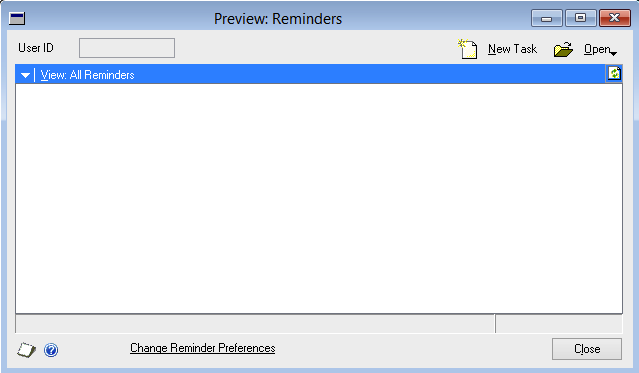
Where is my Custom Reminder window to add reminders to my GP home page?


I was reported with a very vague issue: user could not create a custom reminder from a smartlist. He received an error message as follows:
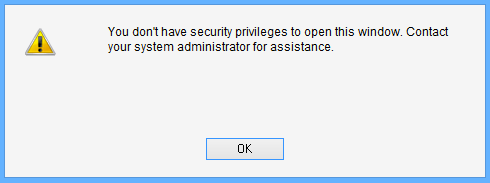
Snip20130417_3

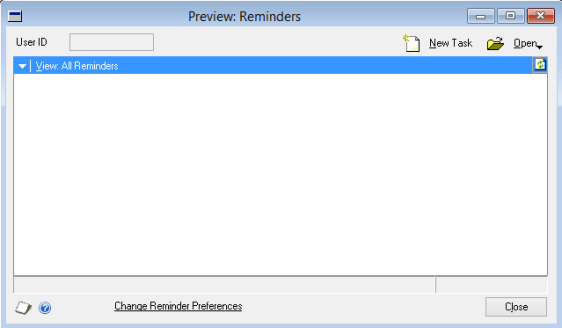
Basically, below is the window which user is trying to open:

Snip20130417_5

Ideally, you would think that this window is a part of Microsoft Dynamics GP dictionary. But it is NOT. It is a part of Smartlist dictionary.

But trick here is, you cannot see this window listed on when you try to assign this window a particular Security Task using Security Task Setup window. Then, how? How would I give access to this window?

After around an hour or so, with several script logs and profilers misleading me, I found one interesting statement on SQL Profiler trace, that was executed when the user tried opening that window:

Snip20130417_6

Exactly after this SQL statement, the above error message was thrown at the user. Which means, I must focus my troubleshooting efforts on this table; DYNAMICS..SY10000. This table is simply called User Security.

When user tried to open Custom Reminder window, system checked this table and see whether this user has got access to a window whose resource ID is 1452 in dictionary 0 (which is nothing but product Microsoft Dynamics GP) inside company ID 1 (which is my production GP company).

I was always thinking about something in Smartlist (which is, without any doubt), but system was checking something else in a different dictionary altogether. I wanted to see the window in Microsoft Dynamics GP dictionary which is of resource ID 1452. Opened the DYNAMICS.DIC on Dexterity and checked it, only to realise with disbelief that it was referring to following window:
Snip20130417_7

I did not understand first. Why would it check something totally irrelevant from what user wanted to open? Why would it check access to this window, when opening a window in different dictionary? I have no answer to these questions.

But I just thought I would take a chance. I checked this user’s security task setup and found that Reminders window was not assigned. I assigned that window for this user as shown below:

Snip20130417_8

Tested whether he could open Custom Reminder. To my utter disbelief, IT DID.

So, if somebody is facing same issue and has already lost almost all your hair, here you have, a solution that would bring upon peace.

VAIDY
Comparing the Total Cost of Ownership (TCO) of On-premise vs. SaaS – Derek Singleton @ Software Advice


This is a guest post, authored by Derek Singleton at Software Advice.

As Cloud technologies continue to evolve, more and more software buyers are seriously evaluating software as a service (SaaS) solutions against on-premise offerings. While there are many factors that influence which deployment model is best for any particular business (e.g., ability to manage IT internally and speed of deployment) the cost of the system is often a key factor. But comparing the true cost of a Cloud-based system against an on-premise system can be time-consuming and is often a complex undertaking.

For instance, most buyers understand that on-premise licenses are typically purchased with a large, upfront investment and SaaS licenses are purchased for a relatively cheaper subscription price. But many forget to consider the total cost of ownership (TCO) of their investment. That is, they don’t look beyond the licensing costs to consider how other factors such as the need to customise the software and integrate it with existing applications can influence the TCO of their software purchase.

Even then there are intricacies like maintenance and support and training requirements that can make creating an apples-to-apples comparison of the TCO on-premise and Cloud software difficult. If you’re not a seasoned veteran in modelling all these costs, comparing them can become overwhelming.

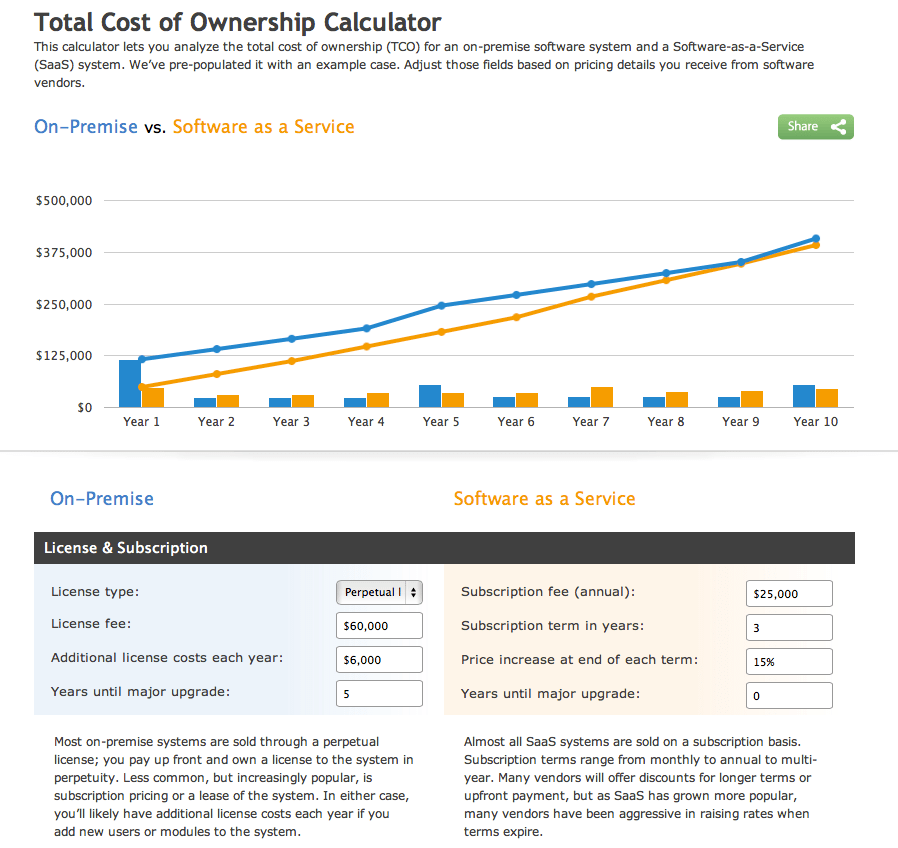
To help buyers ballpark the true costs of each software model, I recently created an interactive TCO calculator at Software Advice–where we help buyers with software pricing–that buyers can use to compare SaaS against on-premise software over a 10-year ownership period.

Snip20130329_2

The calculator models annual and cumulative costs over this time period and shows buyers at which year of ownership the TCO of a SaaS system will equal that of an on-premise solution, based on user inputs. Although the data comes pre-populated with an example case, users can override every value to see the impact that changing any particular value will have on the TCO as a graph at the top of the calculator automatically refreshes after each update.

While the calculator is useful for getting you in a ballpark, it’s important to note that any business will still have to perform their due diligence to come up with an accurate figure that reflects their unique needs and situation. And there are several influencing factors (e.g. organic business growth) that no general calculator can accurately model. In any case, it’s worth checking it out to get an idea of which system seems right for your business. Check it out here.

Where is my Extender Detail Window in Extender 2013?


With Extender 2013, we have whole lot of surprises on how it got enhanced. One biggest enhancement/change to Extender is the way it treats Extender Detail Window (that is the name till previous version).

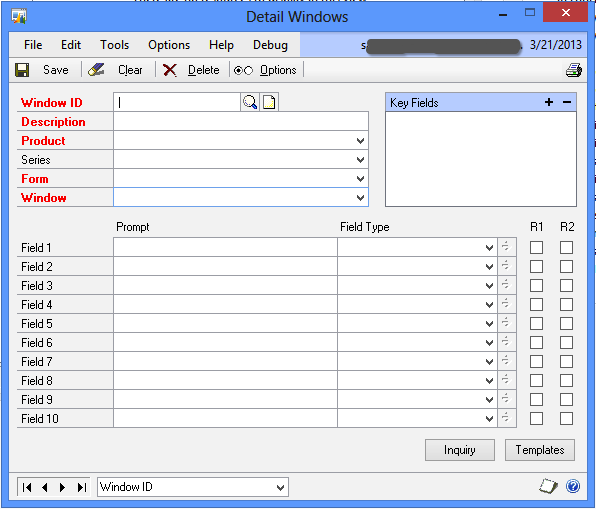
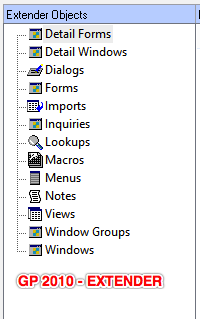
Previous version’s Detail Window definition looked as follows:

Snip20130321_3


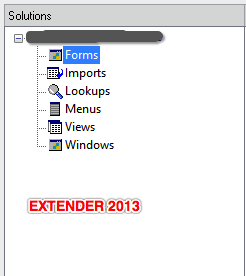
Not any more… There is no such option called Detail Window. From now on, every window is called, well simply, a Window.

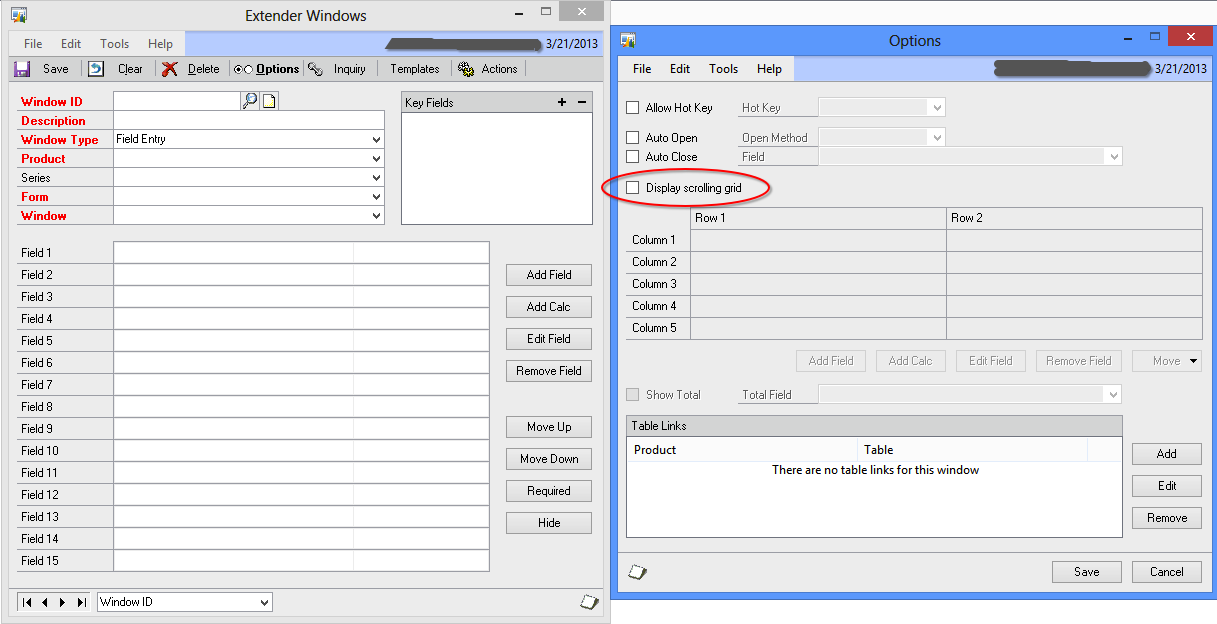
So where is the option to setup whether it’s a multiple row entry (grid) or not? Here it is:

Snip20130321_4

Just select option “Display scrolling grid” and you are good to go.

Clearly, eOne developers have done an immense cleanup work on Extender’s design. Overall, classification of Extender resources itself is now shrunken as follows:

Snip20130321_5   Snip20130321_6

Interesting changes; I have not gone thru’ all changes/enhancements yet. I will be posting more on all those interesting and critical changes.

So far, thumbs up to eOne Team, for their efforts.

VAIDY

Extender 2013 Has Arrived – Thanks eOne


Awesome news to me this afternoon…

eOne Solutions has released Extender 2013 for Dynamics GP 2013 today (late yesterday for some regions). Read their official blog post here: Extender Delivered.

Instructions on how to get the new version and license keys can be obtained from either your Partner or eOne directly. Shoot an email to them and they would be more than happy to guide you.

Let me continue with my customisations’ upgrade. Hectic times ahead.

VAIDY

RIP Google Reader: 10/21/2005 – 06/30/2013


You will forever remain my most favourite RSS reader.

I am searching for words to express my sadness after I read the news of Google retiring (i.e. killing) Google Reader. Let me just borrow the most important statements from that post and publish here:

We have just announced on the Official Google Blog that we will soon retire Google Reader (the actual date is July 1, 2013). We know Reader has a devoted following who will be very sad to see it go. We’re sad too.

There are two simple reasons for this: usage of Google Reader has declined, and as a company we’re pouring all of our energy into fewer products. We think that kind of focus will make for a better user experience.
Then what about that *devoted following*? Is it just a foolish bunch who had immense faith in Google Reader than even Google’s own management and team?
Google; you have rights to develop or kill your products. But trust me, you have lost that immensely devoted followers of your product. Soon enough, you would be pressing your own self-destruction button and get lost.
I’m deeply sad, to understate my mindset.
VAIDY