Book Review: Microsoft Dynamics GP 2013 Implementation – Victoria Yudin


Over the past year, I got the privilege of being a reviewer of books written by Dynamics GP Experts/MVPs. I wished writing about these books once they got published, but it never happened till now. Here we go.

To begin with, this post is my views of an all important book:

Microsoft Dynamics GP 2013 Implementation
Snip20131203_6

This book is written by Victoria Yudin, founder of Flexible Solutions, a GP expert and an MVP (an award that she holds on to for past 9 consecutive years). She’s been an ultimate inspiration to entire GP community and it simply makes sense to buy this book the moment you realise that it’s been written by her.

In addition to that, what makes this book so valuable is the content without doubt and the way implementation concepts are structured and explained. Following is the way the entire book is structured:

  • Chapter 1: Application Structure & Licensing
  • Chapter 2: Planning – Business Requirements
  • Chapter 3: Planning – Dynamics GP System
  • Chapter 4: Planning – Infrastructure
  • Chapter 5: Installation of SQL Server, Dynamics GP and Integration Manager
  • Chapter 6: System and Company Setup
  • Chapter 7: Module Setup – General Ledger, Bank Reconciliation, Payables and Receivables
  • Chapter 8: Module Setup – Inventory, SOP and POP
  • Chapter 9: Populating Initial Data
  • Chapter 10: Training, Tools and Next Steps
  • Appendix: General Ledger Account Categories

Chapter 1 discusses in detail about application structure and licensing of GP. A lot has been changed with GP 2013 in terms of licensing. Microsoft has moved some of the important modules to respective original developers. You may not know that from this book, but you would completely understand how new Perpetual Licensing now work and how to plan your requirements (with regards to modules) in advance. 

Chapters 2 – 4 discusses in detail about how to PLAN your implementation; from visualising your requirements to the infrastructure that you would require.

Chapter 5 discuss in detail about how to install all applications required for your ERP environment, from the database that is SQL Server till the tool to integrate your initial data, that is Integration Manager.

By the time we finish reading first 5 chapters, purpose of this entire book is almost realised. 3 chapters are dedicated only to discuss Planning your implementation and that, in my opinion, is what matters in any implementation. You know your requirements very well and you have a finalised plan, you are 75% done with your implementation already.

Chapters 6 – 8 discusses in detail about how to setup and configure your GP with all core modules’ (System, Company, GL, BR, RM, PM, IV, SOP, POP) setup covered. Though, each ERP implementation is different depending on specific business requirements, concept of how and where to setup what remains same throughout.

Chapter 9 discuss about how to populate initial data onto your new GP environment. What amount of data and for what modules, depend on your own business requirements. But what is covered in this book is more than enough to give you the confident start to your new ERP. Integration of core masters (GL, Customers, Vendors & Items) and transactions (GL, RM, PM & IV) is explained.

Chapter 10 explains and emphasise the importance of otherwise mute topic; Training. I am not sure how many implementation team out there give importance to training the users. My mentors used to tell me; you win an implementation only when you win the customer and you win your customer only when they get comfortable and confident about their new ERP. Now catch here is, you may not necessarily agree to what is discussed in this chapter, simply because there is no hard and fast rule on how to train users. But having been in this industry for more than 20 years, met lot of customers and done many implementations, Victoria’s thoughts will surely add value to what you already know.

This book is an excellent reference material for those who are going to be part of a GP 2013 implementation. Go for it. Click on the book logo (or the link given just above that logo) to buy this book from Packt Publications.

As a totally pleasant coincidence, Ian Grieve has written his review about this book on his blog, AzureCurve. And I am in total agreement with his views.

To the author, Victoria Yudin: You have been an inspiration and a mentor to so many of us. A book from you is always going to be wealth of information. I feel privileged and proud to be one of the reviewers of this book. Thanks for constantly inspiring me to continue with what I do.

VAIDY

GP2013 Web Client – Test Drive #MSDYNGP


It’s been an awkwardly long time since I had written anything on this blog. Now is the time probably to break that jinx.

I have been working on testing GP2013 Web Client on our environment. I have been constantly keeping myself updated with GP Web Client by reading our community blogs and forums, but never had seen it on my own machine till today.

Below is the snapshot of GP2013 Web on my MacBook Pro; on Mac OS X Safari browser.

Snip20131202_4

All you need to do is to install Silverlight for Safari on Mac. If it’s not there, you would be prompted to download and install.

I am now excited to get my customisations work with it. Will post anything that’s interesting and worth to be shared in coming days.

VAIDY

OFF-TOPIC: Show Hidden Files & Folders in Mac OS X Mavericks


I had been struggling with this for sometime. I wanted to create a USB installer for Mavericks and was not able to get thru’ a step where I had to show hidden files and folders.

In Windows OS, it’s a simple step which is available graphically to either show or hide hidden files and folders. But in Mac OS X, for some reason, this has to be achieved by typing a command on Terminal. Following is the command that is required to enable showing hidden files and folders:

defaults write com.apple.finder AppleShowAllFiles TRUE
killall Finder

So, those who struggle to get it done, above is your key to unlock this.

VAIDY

Microsoft Dynamics GP – Roadmap Refresh


MSDynamicsWorld.com has got the coverage on Microsoft Dynamics GP roadmap refresh.

GP Roadmap 2013

It’s quite exciting as well as stunning to know that we are moving towards service based GP architecture.

VAIDY


My Blog Is Back & Working


Dear All Readers,

Most of you might have noticed that my blog suddenly stopped working and was redirecting to some junk “This domain is on back order.” page.

I sincerely apologize to all who would have got disappointed for not being able to refer what you wanted to on my blog.

I’m happy & relieved to say that my blog is now back and is working perfectly.

Kindly continue your support and refer to my blog for whatever you want about Microsoft Dynamics GP. I promise I would ensure that this bad phase never happens again in future.

VAIDY

GP2013 – Purchase Invoice Inquiry Zoom Bug (Change)


I received a strange support request today from one of my users that PO number is not shown fully on Purchase Invoice Inquiry Zoom window. Just tried to inquire some purchase invoices myself and I got what she mentioned:

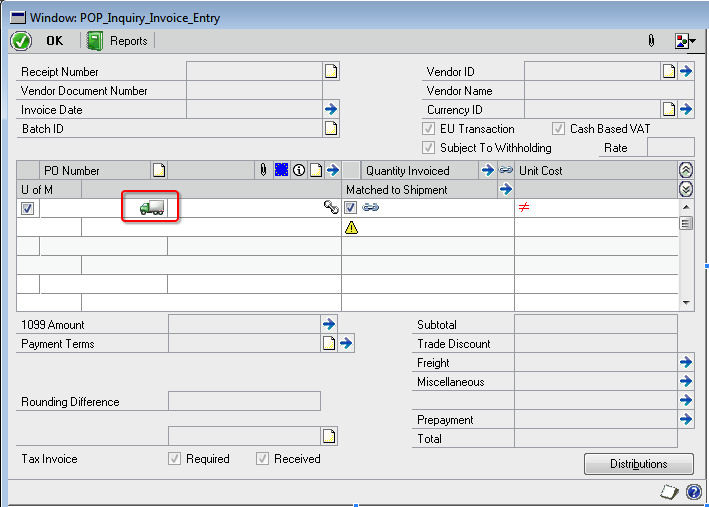
Snip20130807_12


If you see above highlighted PO number, it’s not shown fully. This will be the case only if you use GP’s standard PO number sequence or used entire PO length of 17 characters.

When I checked it on Modifier, I found a nice little icon sitting right next to PO number field, but overlapping it by some millimeters.

Snip20130807_11

This icon denotes whether the PO line item is Drop-Ship or not.

And boy, isn’t that icon looks cute? But unintentionally, it is overlapping on PO number field. Not sure how folks at GP dev team skipped this.

Solution to this issue? Modifier. Use modifier to resize the field, till we get this fixed by GP dev team.

VAIDY

syExcelReports Table & SQL Server Native Client 10.0 – Thanks Aaron Berquist


While upgrading our GP from GP2010 SP3 to GP2013 SP1, DYNAMICS database upgrade stopped unexpectedly with GP crashing without any information for me to debug.

But it stopped exactly at table syExcelReports and crashed. Without spending anymore time, I just went and checked my ODBC DSN setup, as explained by Aaron Berquist on his blog High Dynamics Range. Expectedly, the ODBC DSN driver was not pointing to SQL Server Native Client 10.0.

For some reason, GP fails to process upgrade further if your DSN driver is NOT native client 10.0 or above.

Those who upgrade your GP to latest version, please check DSN before you start database upgrade using GP Utilities.

VAIDY

Quick Tip: Debugging Visual Studio Tools – Developing For Dynamics GP


Awesome tip up there on Developing For Dynamics GP blog on how to debug VS Tools For Dynamics GP.

I am late in blogging about this post. But NOW is the time, as this post just saved my 1/2 day. Seriously. Not kidding. I was stuck with one SQL query execution. There were records to be retrieved, but my code didn’t. After 5-10mins of frustrated troubleshooting, I remembered this post. I should have done that immediately then, but I didn’t.

I setup my VS Tools project to launch GP as instructed on this post and within 2 minutes I could find the issue.

This one deserves to be there on Microsoft Dynamics GP Cookbook (technical).

VAIDY

Microsoft Dynamics GP 2013 SP2 – Release Schedule Announced


Over at Microsoft Dynamics GP official blog, Errol sheds light on Microsoft Dynamics GP 2013 SP2 release schedule.

Along with that, he also lists on new features this release would have. Pretty interesting, especially on Web Client front.

I’m excited.

VAIDY

Integration Manager – Troubleshooting & Testing Tips: Dynamics GP Support & Services Blog


Highly informative post on Dynamics GP Support & Services blog on Common Tips and Issues when Troubleshooting and Testing Integrations in Integration Manager.

I have never read such an expansive post on Integration Manager (IM) ever. Mariano touches specific issues, David (and his technical team) on his blog shares specific topics. But this one’s so very expansive and one stop guide to IM issues and tips.

Bookmark this for your future reference.

VAIDY