OFF-TOPIC: Windows 10 and Microsoft File Transfer Manager (FTM) Issues (UPDATE)


Vaidhy Mohan's avatarDynamics GP - Learn & Discuss

This is my first post from Perth, WA. It’s been an excellent journey and so far so good. More about my Perth life later.

This is something that I never experienced before. When you download any file from PartnerSource or CustomerSource, Microsoft would let you do that only through it’s File Transfer Manager program. If you have that installed already, any download initiation would first invoke this program and then let you set the path/folder to take in that download and etc.

However, when I tried to do that from my new Windows 10 machine, the FTM did not open. I tried to figure that out, but later remembered this same issue happening on my Windows 8.1 machine.

Basically, from Windows 8.1, for some reason, calling the FTM from Internet Explorer worked only on a 32 bit Internet Explorer.

Looks like Microsoft has not fixed that yet. If you are wondering why your FTM…

View original post 55 more words

#BPST Announcing Batch Posting Service Toolkit for Microsoft Dynamics GP


This is going to add tremendous value to many customers out there who integrate transactions to GP.

WinthropDC's avatarWinthrop Development Consultants Blog

David Meego - Click for blog homepageToday, I am proud to announce the upcoming release of a new product from Winthrop Development Consultants.

Welcome to Batch Posting Service Toolkit for Microsoft Dynamics GP for versions GP 2010 (v11.0), GP 2013 (v12.0 including R2) and GP 2015 (v14.00 including R2).

View original post 307 more words

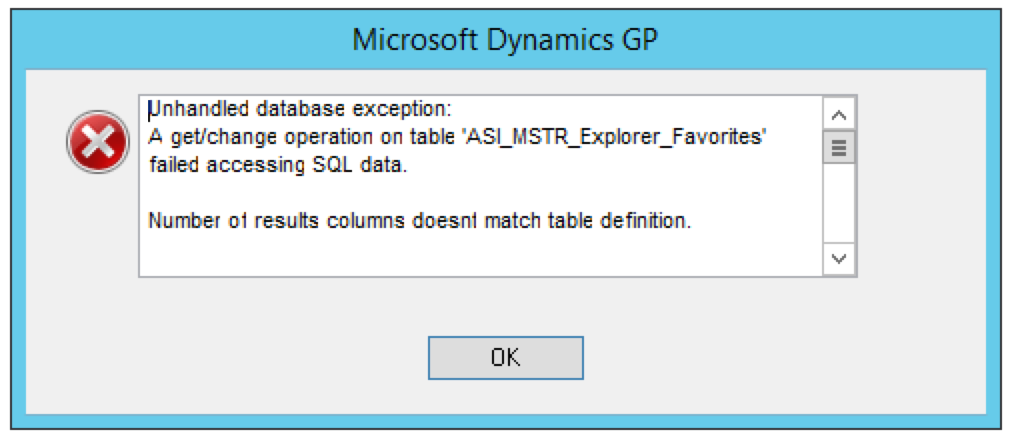
GP2015 R2 Upgrade – “ASI_MSTR_Explorer_Favorites: Number of results columns doesn’t match table definition”


There were couple of exceptions related to GP2015 R2 that I wished to share here. One would be discussed here and other one on the next post.

After upgrading to GP2015 R2, while doing a routine testing, following error message was thrown while trying to open Smartlist:

Screen Shot 2015-07-31 at 6.53.32 PM

Full message as follows:

Unhandled database exception:
A get/change operation on table ‘ASI_MSTR_Explorer_Favorites’ failed accessing SQL data.

Number of results columns doesnt match table definition.

Number of results columns doesnt match table definition.

EXCEPTION_CLASS_DB
DB_ERR_SQL_DATA_ACCESS_ERR

Debugging this error took me to the table Smartlist Favorites Master (ASIEXP81). Strange, however, that number of columns indeed matched.

I remembered this issue happening in GP 10 and GP 2010. Suggested solutions were to run GRANT.SQL on all databases and changing ODBC provider to SQL Native Client. However, in my case, both were already done and confirmed.

To avoid any further delay or issue(s), I decided to backup the records from ASIEXP81, recreate the table using GP SQL Maintenance and push the records back from the backup table.

Resolution: Drop and create the table Smartlist Favorites Master (ASI_MSTR_Explorer_Favorites, ASIEXP81) using GP SQL Maintenance.

Only that, I did not have to reinsert the records. When I opened the Smartlist after recreating the table, it automatically populated all records. Strange, again. But it worked.

Word of caution: Always take backup before you do anything with the data.

VAIDY

#GPPT Welcome to the GP Power Tools Public Beta


#MSDYNGP #GPPT David has released GP Power Tools public beta. Fun time ahead.

WinthropDC's avatarWinthrop Development Consultants Blog

David Meego - Click for blog homepageToday, I am announcing a free public beta of GP Power Tools for Microsoft Dynamics GP versions 11.0 (GP 2010), 12.0 (GP 2013) and 14.0 (GP 2015).

As you know, I have been working extremely hard on getting GP Power Tools for Microsoft Dynamics GP ready for release and now it is time to get some feedback.

GP Power Tools is the next generation replacement for the Support Debugging Tool.

Read on for more details …

View original post 294 more words

Positive Thoughts for Leslie Vail


My thoughts and wishes for Leslie. Get well soon and guide us as usual.

WinthropDC's avatarWinthrop Development Consultants Blog

David Meego - Click for blog homepageThis is a shout out for my great friend Leslie Vail. Leslie is a Microsoft Most Valuable Professional (MVP) for Microsoft Dynamics GP and has been a stalwart of the Microsoft Dynamics GP community for many years. She also known as the Dynamics Confessor on her Dynamics Confessions Blogspot.

Between you and me, she does not like it when I mention that she worked with Great Plains Accounting before Great Plains Dynamics 1.0 was even released. So don’t mention it to anyone.

Well, Leslie needs our help.

View original post 249 more words

Visual Studio Integration Toolkit replaces Menus for Visual Studio Tools


Great news for Dynamics GP developers/consultants. Menus for Visual Studio Tools has reborn with a new name “Visual Studio Integration Toolkit”.

WinthropDC's avatarWinthrop Development Consultants Blog

David Meego - Click for blog homepageGreat news for Visual Studio developers.

Winthrop Development Consultants are pleased to announce the release of the Visual Studio Integration Toolkit for Microsoft Dynamics GP (VSIT).

The Visual Studio Integration Toolkit replaces Menus for Visual Studio Tools and is now available for Microsoft Dynamics GP 2010, Microsoft Dynamics GP 2013 (including GP 2013 R2) and also for Microsoft Dynamics GP 2015.

View original post 218 more words

Where is the Support Debugging Tool for Microsoft Dynamics GP 2015?


David has been working on to gain SDT’s ownership from Microsoft (rightfully) and here is what he had to say:

WinthropDC's avatarWinthrop Development Consultants Blog

David Meego - Click for blog homepageHello everyone

As most of you know I am the developer of the Support Debugging Tool for Microsoft Dynamics GP (SDT).

The SDT has been provided free of charge to Partners and Customers (via their partners) in the Dynamics community since its release in September 2008. The tool and its feature set have come a long way from the public release of build 9 for GP versions 8.0, 9.0 and 10.0.

View original post 547 more words

Customising the Company Login window series – Visual Studio Tools revisited – Visual C#


Nice post up there on David’s Winthrop blog on how to customize Company Login window using VS Tools. via @WinthropDC

WinthropDC's avatarWinthrop Development Consultants Blog

David Meego - Click for blog homepageJust before I left Microsoft, I was writing a series of blog articles about Customising the Company Login window so that you could see the full company name in the drop down list for long company names.

I had shown how to achieve the customisation with Dexterity and with Visual Basic for Applications, but was having problems getting it to work from Visual Studio Tools.

View original post 543 more words

12 Ways to become a better CRM Developer


Nice post up there on Ben Hosking’s CRM Blog…

Hosk's avatarHosk's Dynamic Blog

Now and again I get asked how to become a better CRM Developer, so I thought I would create a blog to point people towards and here it is.

1.  Decide you want become a better Developer

Improving and becoming a better CRM Developer is a state of mind/attitude, you have to want to get better, you have to strive to be better every day.

It’s like trying to get someone to read a book you like, you can’t make them read that book no matter how good you say it is, it’s only when the person wants to read it.

2.  Make a plan

A plan is like a map, if you don’t use a map it’s very difficult to get to where you want to go.  A plan is the same for careers and learning skills, you need to identify the skills you want to learn and make…

View original post 985 more words

My Blog Is Back & Working


Dear All Readers,

Most of you might have noticed that my blog suddenly stopped working and was redirecting to some junk “This domain is on back order.” page.

I sincerely apologize to all who would have got disappointed for not being able to refer what you wanted to on my blog.

I’m happy & relieved to say that my blog is now back and is working perfectly.

Kindly continue your support and refer to my blog for whatever you want about Microsoft Dynamics GP. I promise I would ensure that this bad phase never happens again in future.

VAIDY