Microsoft Dynamics GP 2013 – System Requirements


Microsoft had released the System Requirements for Dynamics GP 2013, that includes GP Web Client requirements as well. The system requirements page can be found here: System Requirements for Microsoft Dynamics GP 2013.

While I leave it to you to get informed about entire details, it’s worth to brief you about what are NOT supported:

  1. Windows XP all editions
  2. Windows Server 2003 all editions
  3. Internet Explorer 7.0
  4. Microsoft Office 2007
  5. Microsoft SQL Server 2005 all editions
  6. Windows SharePoint Services 3.0
  7. Microsoft Office SharePoint Server 2007
  8. Office Communicator 2007

So start planning for the future of GP.

VAIDY

Cashbook Bank Transfer Error: Date entered is not a current period for checkbook [Checkbook ID]


This was a menace for the past 4 days, to say the least.

I was reported of this issue, where a user when trying to enter a bank transfer for a checkbook, on a date in previous month, he got this error message (in the title of this post) as shown below:

The above message occurred only for one particular checkbook and not for others.

First step was to ensure the fiscal period was not closed. It was not.

Second step was to ensure that they had not run the reconciliation for this checkbook, so genuinely it had closed the period. It was not.

Third step was to run check links for Checkbook Master, to ensure that things are fine with Checkbook ID master record. It was perfect.

Fourth step was to take SQL Profile and see where exactly this message pops up. When I took twice, the results were different. Due to Analytical Accounting. But that I never got to know since, my focus was more on CB tables.

I referred to the ONLY AVAILABLE forum post, Date Entered is not for Current Period for CashBook, which was way back in year 2010. No solution was provided though.

I decided to take the SQL profile again, but this time without Analytical Accounting to avoid extra lines on the trace file. I took the profile twice and both matched line by line.

The last table where the buck stopped was CBINT605 (Reconciled Amounts) on DYNAMICS database. When I queried this table manually, following was the result:

As you see above, there was a record for this checkbook ID, with a date 30-Apr-2012. Due to which, if you enter any date on or before 30-Apr-2012, it fails.

I checked the user again to ensure that he had not run any reconciliation for this checkbook. He assured that he didn’t, but he also mentioned that he was demonstrating this process to a user, but did not complete it. Bad. Demonstrating on a live company is very bad.

I took a backup of this table and then deleted this record.

Now, my checkbook accepts any date for it’s bank transfer entry.

MORAL OF STORY #1: Messages never lie. If there is a message, it will most probably be correct.

MORAL OF STORY #2: Never ever do any R&D on live company. Never ever demonstrate anything on a live company. That’s why test companies are for.

VAIDY

Moving Dynamics ERP to the Cloud? Avoid the Lightning


Quite an informative and the most relevant post about Cloud ERP environment.

Andrew Snook, Fastpath Inc., explains us why and how to take necessary precaution before deciding on moving our Dynamics ERP on to the cloud.

It’s very important and informative. Must read for all those who have got a serious thought about cloud ERP.

NOTE: For those who are new to this portal; you may have to register yourself on to this site to read the complete post. It’s a member-only site, but the membership is free of cost.

VAIDY

Analytical Accounting “aagCreateTree” Dimension Creation Error Message & Reason


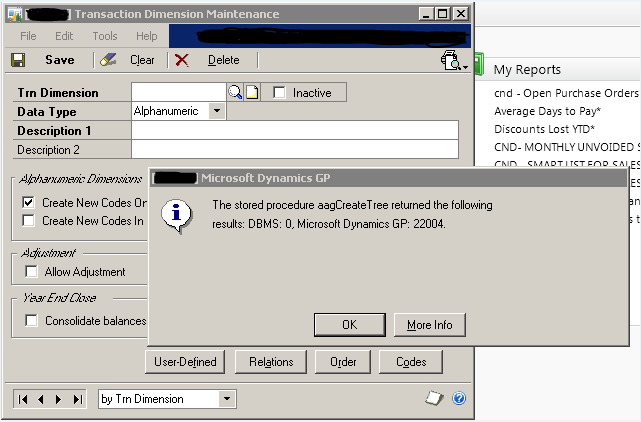
I received an email from one of the users with an attachment that displayed an error message while trying to create a new Analytical Accounting Dimension. Below is the screenshot that I received:

Upon debugging the stored procedure aagCreateTree, I realized that another stored procedure named aagGetCompanyStatus returned this error number 22004.

This stored procedure validates the version of Analytical Account and the status of particular company, from where you are trying to create a dimension. In my case, there was no record of this company at all.

I finally realized that Analytical Accounting company information was missing on table AAG00104 in DYNAMICS database. I am not sure how and why this could be missing, unless I forgot to run the AA company setup routines (which I did, to my best knowledge).

Solution: I had to rerun the AA company setup options again and recreate the records.

Just in case, someone faces this issue, make sure that you check AA company setup records.

VAIDY

Why consultants shouldn’t post Dynamics GP batches on a client’s system?


I second Christina’s point. Never ever, you consultant, post any transaction on a client’s system. Whatever it is. Be it correction entry or a backlog entry or a real time transaction or even a test entry to demo.

I learned that lesson very long back, around 5 years back, when I was in my infancy on consultancy. Like Christina, my lesson was also very bitter. And then, I never did that ever in my life.

VAIDY


Choosing a Development Tool for Microsoft Dynamics GP


Microsoft had published a white paper on choosing a development tool for Microsoft Dynamics GP, at the time of GP 2010 release.

Though it’s pretty old, it’s still valid even now to refer to this white paper.

Download it here: Microsoft Dynamics GP 2010 White Paper – Choosing a Development Tool

Soon, we would all be getting ready for Microsoft Dynamics GP 2013 and I am sure, this white paper would still be valid. 🙂

VAIDY

Prevent Users from Keying Incorrect Document Dates in GP 2010


Awesome tool and I would say, its need of the hour.

Now, I read this post on Microsoft Dynamics GP Support Blog on a tool that comes with Professional Services Tools Library (PSTL) to Prevent Users from Keying Incorrect Document Dates in GP 2010.

But unfortunately, scope of this tool is limited to following transaction entries:

  1. Payables Transaction Entry
  2. Receivables Transaction Entry
  3. Invoice Entry
  4. PM Manual Payment Entry
  5. SOP Entry
  6. IV Transaction Entry
  7. Cash Receipts Entry

I would have expected this to have even more reach, especially on POP side. Today, just today, I received a bunch of PO Invoices being posted on a wrong date. I would have loved to have this tool on my environment had this covered much more types of transactions.

However, this is still very good than reinventing this by developers or partners.

VAIDY

Adding Customer Item User-defined Fields to SOP Invoice – Mariano


Another excellent post up there on Mariano’s blog, which explains how to add customer item user-defined fields to SOP invoice.

The customization is done using Support Debugging Tool (SDT) to achieve this.

There is an interesting point which Mariano mentions there, which is not about the topic itself, but about how clients have started demanding things from us, consultants, which shows how much clients are aware nowadays.

Modifier with VBA would have been the BEST and easy option for any developer or consultant for this functionality. But looks like the client was strictly against it because *it’s not supported on Microsoft Dynamics GP 2013 Web Client*. 🙂

But that demand indeed had led to another superb piece of customization using SDT.

VAIDY

eConnect Vs GP Web Services – Chris Roehrich


This is an awesome post from Chris Roehrich on Developing For Dynamics GP blog.

The post explains very neatly (and in detail) about the differences between eConnect for GP and Web Services for GP.

And which one to use or not to, is up to you after you read this post. There are some interesting short discussion on the comments section, so do read the comments as well.

That’s an excellent post, Chris. That surely would have answered several questions from users/consultants across the world.

VAIDY

Item Decimal Places Currency & Inventory Adjustments


Q: From where does the Inventory Adjustment entry retrieve a product’s Decimal Places Currency value?

A: When we create a product, this value will be defaulted from the Functional Currency of that company. While entering an Inventory Adjustment for this product, the decimal places currency value will then be retrieved from the product master record.

I realized this when I faced an issue couple of days back. I got a requirement where, I have to facilitate an automated program that will replicate a product information (Master, Quantities/Site, Vendors, Currencies & Price List) from one company to another. Of course, with necessary changes that are specific to the destination company.

It worked merrily till both companies had functional currencies with same number of decimal places. I had to extend this program on to another company, whose functional currency supports 3 decimal places. Now you might have realized the issue. My program, quite honestly, was written with a hardcoded value of 2 decimal places.

When I created some products on my new company using this program, I could not enter Inventory Adjustments with 3 decimal places. It was always 2. Upon spending some time on this, I realized what I have mentioned at the start of this post. You cannot override this at all.

So those who write customization like what I have explained above, beware of all such nuances which will play very crucial role in day-to-day transactions.

VAIDY