Extender for GP 2013 – Release Postponed


This is, to some extent, bad news for me at least. I was planning for an early upgrade to GP 2013 for my GP production environment. As 40% of my customisation depend on Extender, it feels so bad that I cannot get Extender for GP 2013 till Early to Mid February 2013. This news has been confirmed by eOne Solutions on their official blog.

Original post here: Delivery Date.

I am disappointed to say the least. But considering the issues that eOne developers are going thru’, especially due to a very late announcement from Microsoft to detach Extender from their OEM arrangements, I empathise with them on their most gruelling time to get things streamlined and meet customers’ expectations.

I shall await their official announcement on Extender’s availability for GP 2013.

VAIDY
GP2013 Module Homepage Redesigned


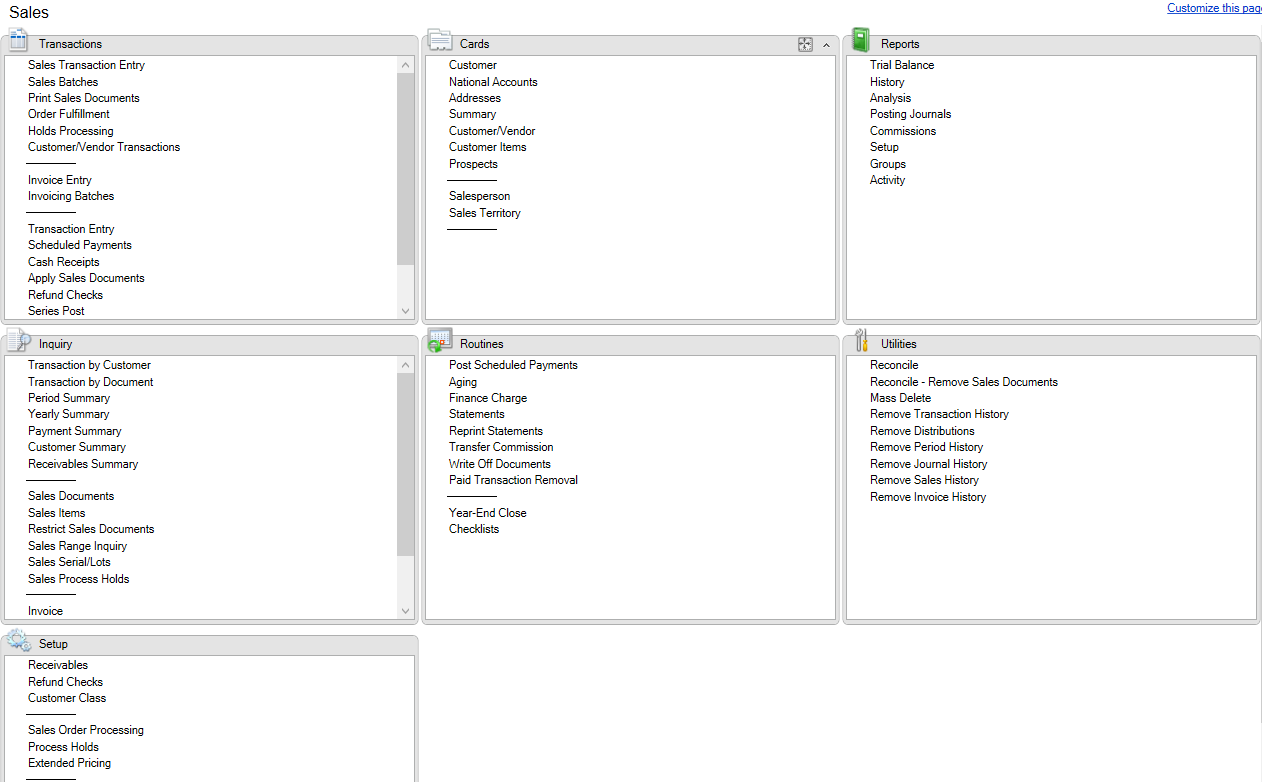
Another important and notable change that we have in GP 2013 is the module homepage being amazingly redesigned, much to users’ delight.

GP2013 Module Homepage Redesigned


As compared to previous versions of GP (from 9), what you will see here is the complete menu without any collapse/expand functionality, but with a scrolling option within that small rectangle frame; which means you don’t have to scroll to the bottom of GP itself, but just scroll down within that frame, so you don’t have to scroll up/down to access other frames.

If you are trying to open Receivables Batches, I just have to scroll down on Transactions frame. When I am done, I won’t have to scroll up/down again to reach out to open Receivables Statements.

Cool, isn’t it? If you are heavy user of modules homepage for your day-to-day tasks, this is going to increase your productivity most certainly.

VAIDY

GP 2013 Company Selection Screen – Uncluttered


The moment you cross Microsoft Dynamics GP 2013 Login window and reach Company Selection window, you would realise that it is now uncluttered with Password field being removed.

GP2013 Company Selection


Looks pretty and clean to me. How about you all?

VAIDY

Extender Customers Opt-In Process


Much has been written, discussed and thought about Microsoft’s strategy on moving Extender licensing and support to it’s original developer, eOne Solutions, from GP 2013.

It was first highlighted by Victoria Yudin on her blog; Big announcement for Microsoft Dynamics GP’s Extender module. It was soon followed by several posts from all GP community. Having said and done all, eOne has clarified an important thing to all customers and partners.

If you wish to Opt-In (explanation of what it is all about is there on the post), please read this post from eOne Solutions: Opt-In eXtender Customers. This is a very important post for all those use Extender and time to get it done if you are planning your GP 2013 upgrade in near future.

VAIDY

OFF-TOPIC: MacBook, Mac OS & Wired Memory


I got a new MacBook Pro couple of days back and needless to say, I am more than excited to use it.

I have been a Mac OS user for the past 1 year, as I had already replaced my personal computing machine from an old warrior named Lenovo N300 to an amazing MacBook Air. Been driven by that experience, I had always been yearning for my work computer to get changed to a MacBook too.

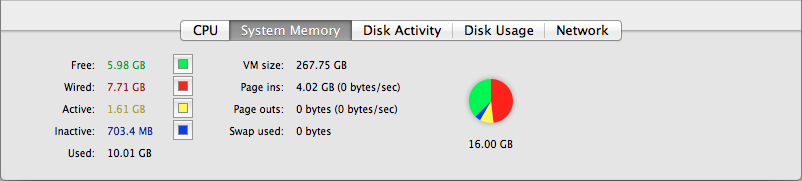
This topic is more about how Mac OS utilises the System Memory (RAM) to it’s fullest advantage and how it keeps any MacBook machine highly efficient. When we look at the Activity Monitor (equivalent to Task Manager on Windows OS), you would find something like below:

Screen Shot 2013-01-15 at 5.48.57 AM


I was so intrigued by the term Wired Memory as all other terms made some sense to my H/W & OS expertise. Checked with my friend (who else but Google), and he as usual returned several results. One post stood out from all other.

A post written by Alex on his blog Bits about Bytes shed some light on this. Read the post here: Is my Mac using too much memory???

It’s a very old post (posted precisely in the year 2007), but an amazing post about the topic which I was interested in. In case some people like me, who has shifted to Mac OS (or going to shift), I thought this post would be for them and would be useful to know about your Mac.

Happy “Mac”ing.

VAIDY

My Blog Theme Experiments


I have been testing and trying a lot of themes for my blog. For the past one month, I would have changed almost 10 themes. All of that is purely because of keeping my blog plain and simple to read.

I request all my blog readers to bear with me till I finalise a theme soon. If someone do not like any theme or like any one, please immediately contact me with your feedback using “Contact” form on my blog.

Thank you so much all for your continued support and interest on my blog.

VAIDY

Move Expired SOP Quotes To History – Leslie Vail


Leslie Vail has posted an article at a time when I am currently working on closing down thousands and thousands of SOP quotes which users failed to close down. It’s about a SQL Script which moves all expired SOP quotes to history.

(Some really lame) reasons I use to hear for not closing down quotes:

1. We don’t know when that quote would be materialised.

Seriously? Gotta be kidding me. If it’s a quote of age 2+ years and you still don’t know whether it would get materialised or not, then something is wrong fundamentally.

2. If it’s voided, we won’t be able to copy the line items of that quote.

Wrong. You can. Copying line items from an SOP document is very much possible, even if it’s transferred or voided.

3. We don’t know whether the comments that we had added specific to that quote would be available for us to reuse it.

Answer is a positive YES. You can reuse the comments, because comments are NOT stored on that document but on Comments Master. Just select the ID and there it is. Unless, you have edited that comment on the document. But again, come on, it’d take 5 mins for you to inquire the voided one, copy the comment text and paste it on new one.

And so on…

VAIDY

Dynamics CRM Connector V2 RU2 supports Microsoft Dynamics GP 2013 Already


So that’s so relieving to know that we do not have to wait to get a compatible Microsoft Dynamics Connector for Microsoft Dynamics GP 2013.

The current version V2 RU2 supports Microsoft Dynamics GP 2013 already. Check out this post on official Connector blog: Connector for Microsoft Dynamics V2 RU2 supports Microsoft Dynamics GP 2013.

VAIDY