Congratulating MVPs


I would like to take this opportunity to congratulate MVPs from our community:

1. Mariano Gomez (GP) – 4th consecutive year
2. Jivtesh Singh (GP) – Debut MVP
3. Dave Berry (CRM) – 2nd consecutive year

And all those who got awarded this time for their tremendous achievements and contributions.

I wish all many more success and accolades to come thru’.

VAIDY

"Unknown error 0 – 800AC351 occurred saving the project file" – Error & Solution


My last post discussed about an error message faced by users once GP2010 R2 upgrade was over. This post gives you a solution for that.

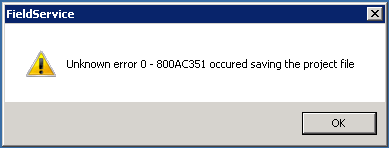
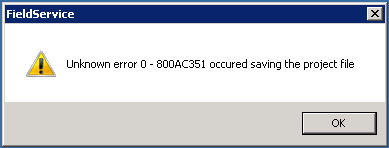
The following error message was faced by users when they log off from GP:

Initially I thought it was occurring only on “sa” login. But couple of users today reported the same error when they logged off from GP.

When I analyzed this further, I realized that users who have access to Field Service processes in GP alone were getting this error message. Those who do not have access never reported this issue at all.

That made me to think about next step in solving this. No one has reported this issue yet, thus leaving me in the lurch.

I finally found a solution for this menace.

SOLUTION:

1. I logged off all users from GP environment, as it is Terminal Server environment for us.
2. Launched GP and opened Visual Basic editor.
3. Opened Field Service VBA project.
4. Did some harmless edits (like adding some comments, etc.).
5. Opened the “References” wizard.
6. Unselected all references and selected it back.
7. Compiled the entire project to check whether I am getting any error message.
8. Saved VBA project.
9. Logged off from GP.

Surprisingly (but expectedly) the error message never appeared again.

Those who are looking for some solution for this menace, here it is for you.

VAIDY

Unknown error 0 – 800AC351 occurred saving the project file – Error Message


Has anyone faced this error message?

I recently found this error message after upgrading to GP2010 R2, though it doesn’t have any impact towards other users’ sessions and even the customizations.

This happens only for an “sa” login. Very strange error message.

UPDATE 1: This is happening for all users who have access to Field Service module. If you see the above message, the error is thrown by Field Service VBA project.


UPDATE 2: Issue is resolved. Please read my next post to know better about this message.

VAIDY

Don’t update "Batch Status" thru’ SQL when users are logged on


A user complained about a batch not being able to be posted. The error message is something like this: This batch is currently receiving transactions.

Normally when a user complains about something like this, a GP Administrator or Consultant’s immediate step is to check what the *Batch Status* field holds in SY00500 (Batch Header) table. The legend for this field says:

0 – Available – BATCH_AVAILABLE
1 – Marked to Post – BATCH_POSTING
2 – Marked to Delete – BATCH_DELETING
3 – Marked to Receive – BATCH_RECEIVING
4 – BATCH_DONE_POSTING
5 – BATCH_PRINTING
6 – BATCH_UPDATING
7 – BATCH_POSTING_INCOMPLETE
8 – BATCH_PRINTING_INCOMPLETE
9 – BATCH_UPDATING_INCOMPLETE
10- BATCH_RECURRING_INCOMPLETE
11 – BATCH_POSTED_WITH_ERROR

And quite apparently, in my case, it was 3. i.e. BATCH_RECEIVING. It’s very easy to update this field back to ZERO that denotes BATCH_AVAILABLE, so user can post it.

I could have also done the same thing. But I did not. I just wanted to make sure that this batch indeed did not receive any transactions. How do we identify whether a batch is receiving transactions or not? That I will address in another post.

This one is intended to caution a Consultant or Administrator NOT to update *Batch Status* thru’ SQL for any batch which is marked as BATCH_RECEIVING when users are logged on.

It would break a valid transaction being saved in this particular batch. When a batch receive transactions, GP locks this batch from getting posted only by updating the *Batch Status* field with BATCH_RECEIVING. By changing that from back end, we are risking batch getting corrupted.

Tell the user that he/she has to wait. And wait till users log off from GP. And then check whether the *Batch Status* becomes BATCH_AVAILABLE. In case it is not, then you update it thru’ SQL.

It is worth waiting for sometime than trying to clear a mess. I take this opportunity to insist again: SQL is not ALWAYS an appropriate approach for issues that we face in GP.

UPDATE: David has sent me a link, which quite obviously I missed mentioning here. How did I miss this? We do have a way to release stuck batches without logging off users.

VAIDY

Resizing left pane in Smartlist – Frank Hamelly


Frank, thank you very much for getting this from Microsoft Team. We all are grateful, as I know the pain in scrolling horizontally for each Smartlist item.

Alright, for all GP users and consultants out there. You all better download this from Frank’s site. This is going to be most likable thing.

Here it is: Resize the left pane in Smartlist.

VAIDY

Support Debugging Tool (SDT) Build 15 Released


Support Debugging Tool (SDT) Build 15 has been released with crucial list of fixes, tons of features and enhancements. By seeing the list I could understand that plenty of efforts would have gone in to get this build up.

I recommend everyone to update your environment with this new build to avail it to it’s fullest.

More about this release: Support Debugging Tool Build 15 Released.

VAIDY

Access data from other companies from Dexterity


David walks us thru’ how we can access data from other companies from a Dexterity code.

I have never written a code like this in my 8 years of experience. That said, I have not met any requirements that challenged me to write such code. With this, David has eased my (our) efforts in finding how it can be done.

Thanks David.

VAIDY

Sales Quote Line Item Cancellation


I recently took a training for users on GP SOP. Training was a success. There were couple of users who are already into GP for quite sometime now (4 years precisely).

Interestingly, when I was explaining about Quantity Quoted Vs. Quantity To Order Vs. Quantity Cancelled, one user said they had never used Quantity Cancelled at all to record any line item cancellation. That was quite a surprise to me.

Consider this scenario: A customer enquires about couple of products and we prepare a quote and send it to them. Out of two products, they confirm only one and we are to transfer this quote with only product. There are three ways we can adapt:

1. Delete that unwanted product line on the quote and transfer this quote to an order (Bad Approach).
2. Transfer the quote in totality and from Sales Order delete that unwanted product line. (Bad Approach).

Above two approaches do not give us the fair picture on quote conversion. Considering the fact that GP SOP do not maintain a revision history of each document, it’s not advisable to follow above steps.

3. Cancel the quantity, by removing “Quantity To Order” and entering “Quantity Cancelled”. Transferring this quote will not transfer unwanted product to Sales Order.

By doing this you are retaining originally quoted products list and transferring only those which your customer wanted, also for your self-assessment on how you have performed in winning the quotations. Most recommended approach.

Of course, we would be forced to add/remove product lines from Sales Order for some reasons. But at least, quote conversion would give us facts at the time when we won the quote for that particular customer.

UPDATE: Siva has written a post which expands my post into different modules and how we can maintain records for better and painless auditing.

VAIDY

Check Links for Analytical Accounting in Microsoft Dynamics GP 10 & 2010


Inside Microsoft Dynamics GP blog has got a post that cautions us about two important things:

1. Don’t run Check Links process for AA at this time on versions GP10 and GP2010.

2 Apply latest Service Packs or Hotfixes for Microsoft Dynamics GP (versions 10 and 2010) to get AA related latest fixes.

More on this here: Information about Check Links for Analytical Accounting in Microsoft Dynamics GP.

VAIDY

Auto Assign Serial / Lot Numbers on SOP Document


When do we select this option in SOP Setup? Is there any valid requirement that would arise so we setup SOP that on a Sales Document, Serial/Lot numbers automatically get assigned?

I am talking about *Auto-Assign Serial Numbers* and *Auto-Assign Lot Numbers* options in Sales Order Processing Options Setup window.

As a normal practice, I would always keep it unselected. I would like to make sure that I handpick items with specific serial numbers so I won’t let the system pick recent ones first and retain old ones.
Simply speaking, I would always want to sell old items first to make sure that I don’t leave it in my stock as unsold. Like a FIFO.
There are prominently two queries that arise on my mind:
1. How GP automatically takes Serial/Lot numbers for a particular item, if we select the above options? Does it follow FIFO approach or does it randomly pick some serial/lot number?
2. Is there a practical scenario where we require these options selected?
I would be grateful to receive your inputs as comments.
Thanks in advance.
VAIDY