syExcelReports Table & SQL Server Native Client 10.0 – Thanks Aaron Berquist


While upgrading our GP from GP2010 SP3 to GP2013 SP1, DYNAMICS database upgrade stopped unexpectedly with GP crashing without any information for me to debug.

But it stopped exactly at table syExcelReports and crashed. Without spending anymore time, I just went and checked my ODBC DSN setup, as explained by Aaron Berquist on his blog High Dynamics Range. Expectedly, the ODBC DSN driver was not pointing to SQL Server Native Client 10.0.

For some reason, GP fails to process upgrade further if your DSN driver is NOT native client 10.0 or above.

Those who upgrade your GP to latest version, please check DSN before you start database upgrade using GP Utilities.

VAIDY

Quick Tip: Debugging Visual Studio Tools – Developing For Dynamics GP


Awesome tip up there on Developing For Dynamics GP blog on how to debug VS Tools For Dynamics GP.

I am late in blogging about this post. But NOW is the time, as this post just saved my 1/2 day. Seriously. Not kidding. I was stuck with one SQL query execution. There were records to be retrieved, but my code didn’t. After 5-10mins of frustrated troubleshooting, I remembered this post. I should have done that immediately then, but I didn’t.

I setup my VS Tools project to launch GP as instructed on this post and within 2 minutes I could find the issue.

This one deserves to be there on Microsoft Dynamics GP Cookbook (technical).

VAIDY

Integration Manager – Troubleshooting & Testing Tips: Dynamics GP Support & Services Blog


Highly informative post on Dynamics GP Support & Services blog on Common Tips and Issues when Troubleshooting and Testing Integrations in Integration Manager.

I have never read such an expansive post on Integration Manager (IM) ever. Mariano touches specific issues, David (and his technical team) on his blog shares specific topics. But this one’s so very expansive and one stop guide to IM issues and tips.

Bookmark this for your future reference.

VAIDY

Where is my Custom Reminder window to add reminders to my GP home page?


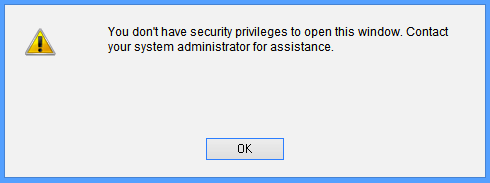
I was reported with a very vague issue: user could not create a custom reminder from a smartlist. He received an error message as follows:

Snip20130417_3

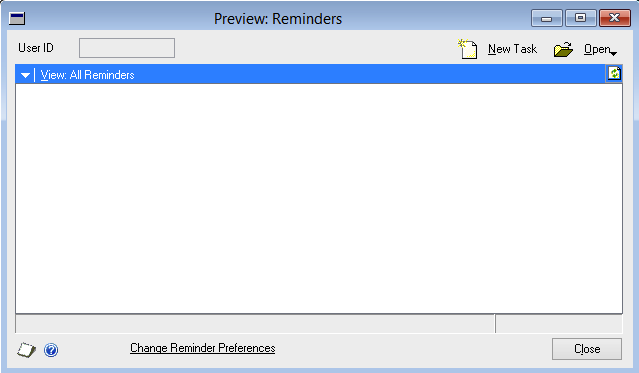
Basically, below is the window which user is trying to open:

Snip20130417_5

Ideally, you would think that this window is a part of Microsoft Dynamics GP dictionary. But it is NOT. It is a part of Smartlist dictionary.

But trick here is, you cannot see this window listed on when you try to assign this window a particular Security Task using Security Task Setup window. Then, how? How would I give access to this window?

After around an hour or so, with several script logs and profilers misleading me, I found one interesting statement on SQL Profiler trace, that was executed when the user tried opening that window:

Snip20130417_6

Exactly after this SQL statement, the above error message was thrown at the user. Which means, I must focus my troubleshooting efforts on this table; DYNAMICS..SY10000. This table is simply called User Security.

When user tried to open Custom Reminder window, system checked this table and see whether this user has got access to a window whose resource ID is 1452 in dictionary 0 (which is nothing but product Microsoft Dynamics GP) inside company ID 1 (which is my production GP company).

I was always thinking about something in Smartlist (which is, without any doubt), but system was checking something else in a different dictionary altogether. I wanted to see the window in Microsoft Dynamics GP dictionary which is of resource ID 1452. Opened the DYNAMICS.DIC on Dexterity and checked it, only to realise with disbelief that it was referring to following window:

Snip20130417_7

I did not understand first. Why would it check something totally irrelevant from what user wanted to open? Why would it check access to this window, when opening a window in different dictionary? I have no answer to these questions.

But I just thought I would take a chance. I checked this user’s security task setup and found that Reminders window was not assigned. I assigned that window for this user as shown below:

Snip20130417_8

Tested whether he could open Custom Reminder. To my utter disbelief, IT DID.

So, if somebody is facing same issue and has already lost almost all your hair, here you have, a solution that would bring upon peace.

VAIDY

Visual Studio Tools for Dynamics GP – A Weird Flaw/Limitation


I must first admit that I faced this issue (or may be flaw…!?!?!?!) only now after all these years of VS Tools development expertise.

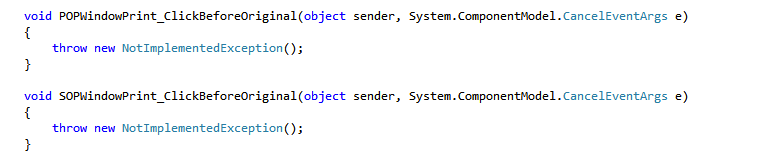
The issue is this: I want to write a custom code on two events; SOP Entry Print Button and POP Entry Print Button. When I initialise the event method for SOP Entry Print Button, following is how it generates the code:

Snip20130221_4

And the event method gets created as follows (if you use TAB to create the methods automatically):

Snip20130221_5

After above, when I try to initialise an event method for POP Entry Print Button, following is how it generates the code:

Snip20130221_6

When you try to press TAB to create the event method automatically, it takes you to previously created method.

Because, print buttons on both windows (SOP Entry & PO Entry) have same name technically, which is WindowPrint, VS Tools doesn’t understand both are from different windows and it just goes on to refer to one single method instead of two.

But you are not stuck there forever. Simple solution is to manually name your method initialisation with logical names, like below:

Snip20130221_7

And like below:

Snip20130221_8

Visual Studio Tools for Dynamics GP does not restrict you from using only names that it suggest.

VAIDY

Fixed Assets Depreciate Button Disabled For User – Solution


This issue was a bit tricky but not THAT tricky, though.

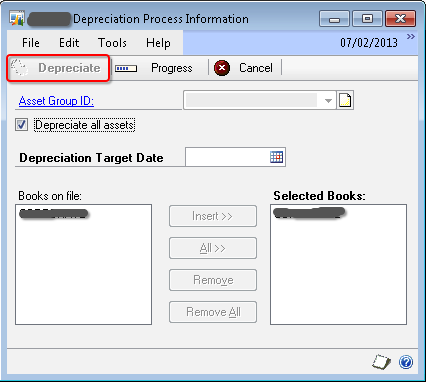
One of the users reported to me that he was not able to run depreciation because when he opened the Depreciation Process Information window (Microsoft Dynamics GP -> Tools -> Routines -> Fixed Assets -> Depreciate), the Depreciate button was disabled. Below was the screenshot that he sent to me (disabled button is highlighted in RED box):

Depreciate Window


Reason: After quite a bit of analysis (Dex Script Log & SQL Profiling using SDT), I found that there is a table where FA module temporarily records the depreciation activity initiated by any user and will retain that record the process is complete.

User confirmed to me that last time when he ran the depreciation process, it got stuck at the time of printing the results.

Solution:

The table which records the activity is FA40203 (display name: Book Setup for Depreciation). The table contains three fields: User ID, FA Book Index & FA Book ID.

I took a backup of this table (a simple T-SQL SELECT * INTO…) and removed that stranded activity record for that user.

User confirmed that he could then start depreciation process.

Its always good to start a day with some brainy troubleshooting. But not certainly good for users to start with an issue, though.

VAIDY

Infamous “Sales distribution amount is incorrect” Error


I received an email from one of my users seeking my help in clearing this issue. While posting an invoice, this error message popped up:

SDE-01


Upon running the Edit List for this invoice, I realized that it was due to an imbalance in Markdown Amount and corresponding distribution line. Below was the error report that I got:

SDE-02

There seemed to be Markdown entered on one or more line item(s), but there was no distribution line for that amount. But the issue was not THAT simple and didn’t stop there.

When I ran thru’ all line items, none contained a Markdown. Now that’s the problem. After some minutes of thinking, I realized something must be stranded on header record’s Markdown field, for which GP requires a Markdown distribution line, but since line items do not contain any Markdown, it’s not creating one. Strange.

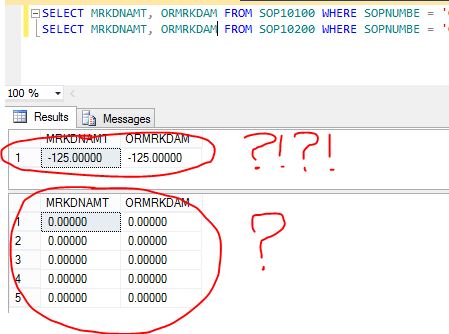
I decided to query the records from SOP10100 (SOP Header) and SOP10200 (SOP Line) to understand the issue. Below is what I found:

SDE-03

SERIOUSLY…?!?!?!?!

But yes, that was the issue. And most baffling thing is, when I tried to reconcile this sales document, this major mishap didn’t get cleared at all.

Obvious solution for this abnormal situation is as follows:

1. Take backup of this SOP10100 record.

2. Update Markdown fields with ZERO.

3. Reconcile this sales document again to see if the above update had caused any imbalance.

Happy new year and happy troubleshooting…!!!

VAIDY

DBCC SHRINKFILE


There is an amazingly simpler yet highly informative post up on TECHNET portal, which proved very handy this morning.

My systems admin reported to me that our SharePoint server ran out of storage for some reason unknown to him, but he could identify that it was SQL Server program files folder which consumed 80% of storage.

I immediately knew what could be the reason. It’s those crazy log files problem. To truncate and clear these overeating log files, I had to use this command: DBCC SHRINKFILE.

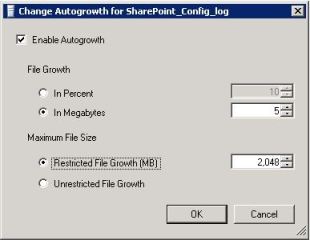
SP-Log-FileGrowth

Once I cleared out all unnecessary file space from these log files, I had to setup the File Growth and Maximum File Size (shown in the screenshot beside):

Never for a DB log file, we should setup the file growth as “In Percent”. This would prove disastrous over a period of time. Instead, always set it up to “In Megabytes” and enter a least sensible value; in my case I had set it up to 5MB.

For a DB Log file, 2GB should be reasonable amount of file space to hold the logs. To learn more about Log files, read this post on TECHNET: The Transaction Log (SQL Server).

We must understand one thing, that shrinking the DB log has got it’s own impact.

VAIDY

Performance Issue with Received/Not Invoiced Report in POP


Angela Ebensteiner (Technical Lead, Microsoft Dynamics) share a fix on Microsoft Dynamics GP Support blog for the performance issue with Received Not Invoiced report in Purchase Order Processing (POP).

To brief you here on why this performance issue occur, it’s because of huge pile of PO records staying on POP open tables, even after they are closed. When you run the report, it goes through each and every record on POP open table, due to which you got to wait for some time till query processing finishes.

Fix is to remove completed POs from open tables to history, which we have a standard utility available in GP.

VAIDY

Cashbook Bank Transfer Error: Date entered is not a current period for checkbook [Checkbook ID]


This was a menace for the past 4 days, to say the least.

I was reported of this issue, where a user when trying to enter a bank transfer for a checkbook, on a date in previous month, he got this error message (in the title of this post) as shown below:

The above message occurred only for one particular checkbook and not for others.

First step was to ensure the fiscal period was not closed. It was not.

Second step was to ensure that they had not run the reconciliation for this checkbook, so genuinely it had closed the period. It was not.

Third step was to run check links for Checkbook Master, to ensure that things are fine with Checkbook ID master record. It was perfect.

Fourth step was to take SQL Profile and see where exactly this message pops up. When I took twice, the results were different. Due to Analytical Accounting. But that I never got to know since, my focus was more on CB tables.

I referred to the ONLY AVAILABLE forum post, Date Entered is not for Current Period for CashBook, which was way back in year 2010. No solution was provided though.

I decided to take the SQL profile again, but this time without Analytical Accounting to avoid extra lines on the trace file. I took the profile twice and both matched line by line.

The last table where the buck stopped was CBINT605 (Reconciled Amounts) on DYNAMICS database. When I queried this table manually, following was the result:

As you see above, there was a record for this checkbook ID, with a date 30-Apr-2012. Due to which, if you enter any date on or before 30-Apr-2012, it fails.

I checked the user again to ensure that he had not run any reconciliation for this checkbook. He assured that he didn’t, but he also mentioned that he was demonstrating this process to a user, but did not complete it. Bad. Demonstrating on a live company is very bad.

I took a backup of this table and then deleted this record.

Now, my checkbook accepts any date for it’s bank transfer entry.

MORAL OF STORY #1: Messages never lie. If there is a message, it will most probably be correct.

MORAL OF STORY #2: Never ever do any R&D on live company. Never ever demonstrate anything on a live company. That’s why test companies are for.

VAIDY