Stored Procedure as Data Source in PowerPivot – Issue & Solution


I am working on a PowerPivot based analysis design and my data source is a SQL Stored Procedure which does the following:

1. Inserts set of records from one DB into a Table Variable.
2. Inserts similarly structured set of records from another DB into the same Table Variable.
3. Finally retrieves records by SELECT…GROUP BY… statement based on necessary criteria.

The above is to ensure that I don’t end up troubleshooing Temp table issues or data redundancy or performance issues for that matter.

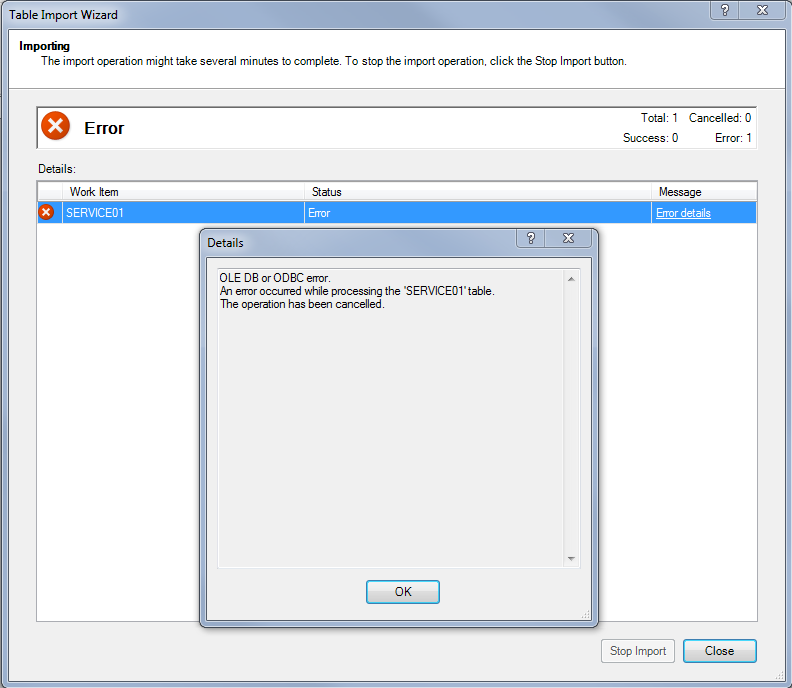
PowerPivot understands the above stored procedure very clearly and it also validates the execute query without any issues. It even shows the result set in preview. But it throws the following error message after all the steps involved in setting up SP as data source:

The above error message is quite less informative. I initially thought Stored Procedures are not properly supported by PowerPivot (how silly I am…!!!). But I just gave myself some more time to search forums as usual. After all, I spent almost a day in getting that Stored Procedure completed with 100% accurate results.
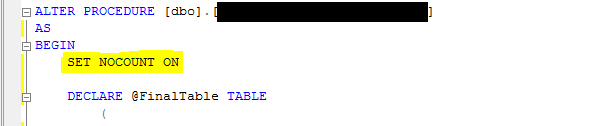
The following is the SIMPLE FIX to that menacing issue:
Yeah that’s it. SET NOCOUNT ON is that simple fix. Now my PowerPivot understands this SP and works merrily.
The Post I got this answer from: PowerPivot and Stored Procedure as a SQL Source.
The answer is given by Microsoft Product Team and that was conveyed by Lisa Liu CSS, a Microsoft Moderator.
The reason for why we ought to set NOCOUNT ON is given in the same post by Devarajan KM. The reason is: Set NOCOUNT to ON so that you get only one result set arrived after execution.
VAIDY

Getting Month Numbers between two dates in T-SQL


I literally had to spend around an hour to crack this code, with some little help from my best geek friend, GOOGLE, of course.

Issue is this: I wanted to get Month in Numbers (Jan = 1, Feb = 2, etc.) that exist between two dates. For instance, if my date range is 1-Jan-2011 to 31-Mar-2011, then I should find and retrieve the months Jan, Feb and Mar as 1, 2 and 3 respectively.

After much much toiling and reading some stuff online, the following is what I got for myself:

—–

;WITH Numbers (Number) AS
(SELECT ROW_NUMBER() OVER (ORDER BY OBJECT_ID) FROM
sys.all_objects)
SELECT MONTH(DATEADD(MONTH, Number – 1, ‘2011-01-01’)) Month_Number
FROM Numbers
WHERE Number – 1 <= DATEDIFF(MONTH, ‘2011-01-01’, ‘2011-03-31’)

—–

IMPORTANT: Make sure that you have more than 12 records in sys.all_objects table, which by default SHOULD have.

I hope this code piece is useful for some who have got similar requirement.

VAIDY

T-SQL "UNION" Vs "TABLE variable"


Very recently I learned this. And what a change it has made to all of my SQL based projects! I am sure people who are hardcore SQL programmers would already know this. Thought of sharing this for those who would want to know something interesting.

I had a SQL Stored Procedure that is about to retrieve records of a same table from two different databases. The usual approach was something like below:

SELECT [column_name_1], [column_name_2], [column_name_3], …
FROM [db_name_1]..[table_name]

UNION

SELECT [column_name_1], [column_name_2], [column_name_3], …
FROM [db_name_2]..[table_name]

This was working till these tables contained records less than 30000 rows. And it started taking significantly unacceptable time (like 10-15 seconds). I then thought of creating a temporary table and dump records from one DB then from other. There is a potential issue in that, in the form MULTI-USER environment. When two different users invoke this stored procedure at the same time, this temporary table must cater for both. I was not really sure about how I can address this.

Then came this idea of using TABLE VARIABLE. It’s like a Structure in C++. This is how I modified my stored procedure:

DECLARE @TABLE_NAME TABLE
(
Column_1 DATATYPE,
Column_2 DATATYPE,

)

INSERT INTO @TABLE_NAME (Column_1, Column_2, …)
SELECT [column_name_1], [column_name_2], …
FROM [db_name_1]..[table_name]

INSERT INTO @TABLE_NAME (Column_1, Column_2, …)
SELECT [column_name_1], [column_name_2], …
FROM [db_name_2]..[table_name]

SELECT Column_1, Column_2, …
FROM @TABLE_NAME

After this, the program started taking around 2-5 seconds with more than 50000 records to handle. Not to forget, this program contained several grouping and calculations.

I don’t have to worry about delay and also TEMP TABLE issues that are potentially disastrous. I am still not sure how this is handled in terms of memory allocation. What happens after this program completes it’s process, is also a factor that I am yet to figure out.

But, so far, I have found this as one of the best methods in recent times.

VAIDY