GP2013 Module Homepage Redesigned


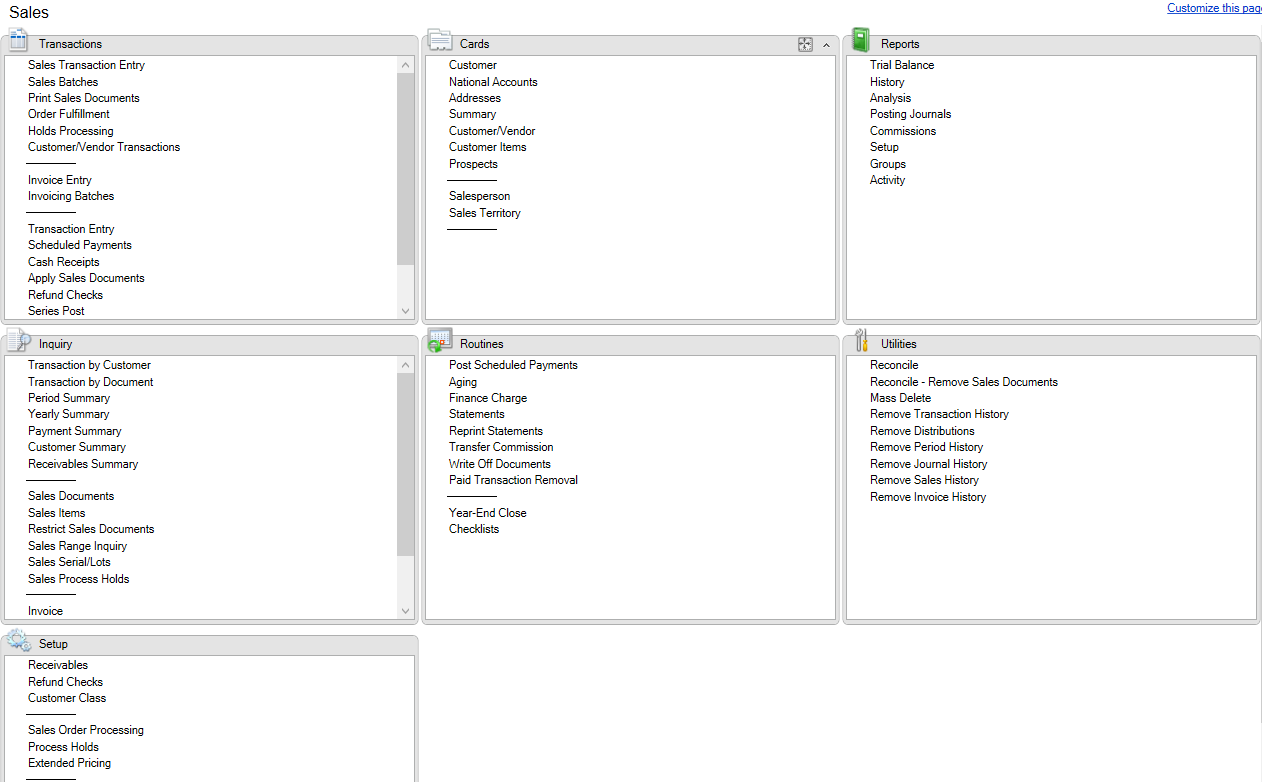
Another important and notable change that we have in GP 2013 is the module homepage being amazingly redesigned, much to users’ delight.
GP2013 Module Homepage Redesigned


As compared to previous versions of GP (from 9), what you will see here is the complete menu without any collapse/expand functionality, but with a scrolling option within that small rectangle frame; which means you don’t have to scroll to the bottom of GP itself, but just scroll down within that frame, so you don’t have to scroll up/down to access other frames.

If you are trying to open Receivables Batches, I just have to scroll down on Transactions frame. When I am done, I won’t have to scroll up/down again to reach out to open Receivables Statements.

Cool, isn’t it? If you are heavy user of modules homepage for your day-to-day tasks, this is going to increase your productivity most certainly.

VAIDY

Extender Customers Opt-In Process


Much has been written, discussed and thought about Microsoft’s strategy on moving Extender licensing and support to it’s original developer, eOne Solutions, from GP 2013.

It was first highlighted by Victoria Yudin on her blog; Big announcement for Microsoft Dynamics GP’s Extender module. It was soon followed by several posts from all GP community. Having said and done all, eOne has clarified an important thing to all customers and partners.

If you wish to Opt-In (explanation of what it is all about is there on the post), please read this post from eOne Solutions: Opt-In eXtender Customers. This is a very important post for all those use Extender and time to get it done if you are planning your GP 2013 upgrade in near future.

VAIDY

Move Expired SOP Quotes To History – Leslie Vail


Leslie Vail has posted an article at a time when I am currently working on closing down thousands and thousands of SOP quotes which users failed to close down. It’s about a SQL Script which moves all expired SOP quotes to history.

(Some really lame) reasons I use to hear for not closing down quotes:

1. We don’t know when that quote would be materialised.

Seriously? Gotta be kidding me. If it’s a quote of age 2+ years and you still don’t know whether it would get materialised or not, then something is wrong fundamentally.

2. If it’s voided, we won’t be able to copy the line items of that quote.

Wrong. You can. Copying line items from an SOP document is very much possible, even if it’s transferred or voided.

3. We don’t know whether the comments that we had added specific to that quote would be available for us to reuse it.

Answer is a positive YES. You can reuse the comments, because comments are NOT stored on that document but on Comments Master. Just select the ID and there it is. Unless, you have edited that comment on the document. But again, come on, it’d take 5 mins for you to inquire the voided one, copy the comment text and paste it on new one.

And so on…

VAIDY

Dynamics CRM Connector V2 RU2 supports Microsoft Dynamics GP 2013 Already


So that’s so relieving to know that we do not have to wait to get a compatible Microsoft Dynamics Connector for Microsoft Dynamics GP 2013.

The current version V2 RU2 supports Microsoft Dynamics GP 2013 already. Check out this post on official Connector blog: Connector for Microsoft Dynamics V2 RU2 supports Microsoft Dynamics GP 2013.

VAIDY

Infamous “Sales distribution amount is incorrect” Error


I received an email from one of my users seeking my help in clearing this issue. While posting an invoice, this error message popped up:

SDE-01


Upon running the Edit List for this invoice, I realized that it was due to an imbalance in Markdown Amount and corresponding distribution line. Below was the error report that I got:

SDE-02

There seemed to be Markdown entered on one or more line item(s), but there was no distribution line for that amount. But the issue was not THAT simple and didn’t stop there.

When I ran thru’ all line items, none contained a Markdown. Now that’s the problem. After some minutes of thinking, I realized something must be stranded on header record’s Markdown field, for which GP requires a Markdown distribution line, but since line items do not contain any Markdown, it’s not creating one. Strange.

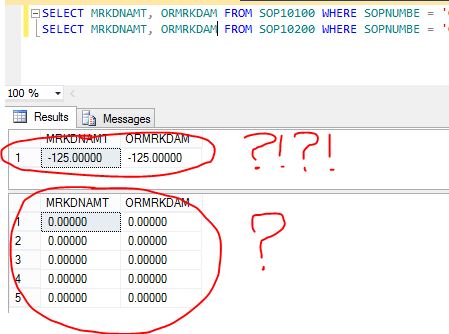
I decided to query the records from SOP10100 (SOP Header) and SOP10200 (SOP Line) to understand the issue. Below is what I found:

SDE-03

SERIOUSLY…?!?!?!?!

But yes, that was the issue. And most baffling thing is, when I tried to reconcile this sales document, this major mishap didn’t get cleared at all.

Obvious solution for this abnormal situation is as follows:

1. Take backup of this SOP10100 record.

2. Update Markdown fields with ZERO.

3. Reconcile this sales document again to see if the above update had caused any imbalance.

Happy new year and happy troubleshooting…!!!

VAIDY

Developing Microsoft Dynamics GP Business Applications – Book By Leslie Vail


DMDGBA

UPDATE: Author of this book, Leslie Vail, has got a post on her blog (Dynamics Confessor Blogspot). Link now added here to her own post: Published at last! Developing Microsoft Dynamics GP Business Applications.

I had the privilege to be a part of the technical reviewing of this amazingly informative book: Developing Microsoft Dynamics GP Business Applications.

This book is penned by one of the most experienced GP personality and multiple times MVP, Leslie Vail. Packt Publishing has published this book.

I strongly recommend this book to all GP developers/consultants who would like to know how to develop anything with regards to Dynamics GP; be it a new feature addition, a feature modification or just a cosmetic enhancement.

Thanks Leslie Vail for this wonderfully written book with every single important concept being covered.

VAIDY

Upgrade Paths to Microsoft Dynamics GP 2013


Microsoft Dynamics GP Support & Services blog has given the two direct upgrade paths, in case you are looking for: Upgrade Paths to Microsoft Dynamics GP 2013!

Quite crucial information that we must remember.

VAIDY

Error when switching back to Microsoft Dynamics GP from Modifier – Fixed in SP3


With the release of Microsoft Dynamics GP 2010 SP3, MSFT GP development team has fixed one of the nagging bugs which got introduced in Microsoft Dynamics GP 2010 R2.

The following posts would explain what exactly that issue is:

Error When Switching Back To Microsoft Dynamics GP From Report Writer (Ian Grieve)

Unhandled script exception: Illegal address for field ‘[Not Found]’ in script ‘Unregister_Triggers’ (Mariano Gomez)

Rest assured that this bug is now fixed with the release of Gp 2010 SP3.

VAIDY

Microsoft Dynamics GP 2010 SP3 Released


David Musgrave informs us about the release of Microsoft Dynamics GP 2010 Service Pack 3. Read his post and plan for the upgrade.

Got to plan my Saturday accordingly now. 🙂

VAIDY

Performance Issue with Received/Not Invoiced Report in POP


Angela Ebensteiner (Technical Lead, Microsoft Dynamics) share a fix on Microsoft Dynamics GP Support blog for the performance issue with Received Not Invoiced report in Purchase Order Processing (POP).

To brief you here on why this performance issue occur, it’s because of huge pile of PO records staying on POP open tables, even after they are closed. When you run the report, it goes through each and every record on POP open table, due to which you got to wait for some time till query processing finishes.

Fix is to remove completed POs from open tables to history, which we have a standard utility available in GP.

VAIDY