SQL Tip: Find Table(s) Having A Particular Column


This SQL query is my savior for a long time now. Thought I would just share it with all budding SQL developers.

Q: How to find the table(s) which contain a particular column which I know?
A: Below is the query that would do the trick.

SELECT name 
FROM sys.objects 
WHERE object_id IN 
(
SELECT object_id 
FROM sys.columns 
WHERE name = [columnname] –Column which you would want to locate
)

This query will return all tables which contains the specific column. And this query also would save your time immensely.

VAIDY

Capturing Images from a Microsoft Word Document (.docx) – David


That was awesome. Sheer awesome.

David shares with us about capturing images from a Microsoft Word Document (only .docx) file.

Honestly, I never even imagined that any .DOCX/.XLSX/.PPTX file is actually zip archived file in disguise.

Thank you so much, David. Another tip that’s quite interesting and awesome.

VAIDY

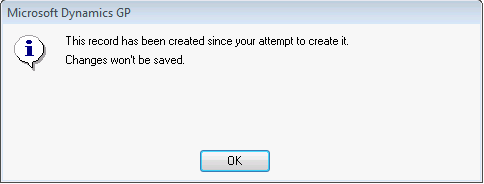
Analytical Accounting Class Maintenance Error: This record has been created since your attempt to create it. Changes won’t be saved.


WARNING: This post explains a method which is carried out in SQL and also affects an active table record. Consultants / Developers / End Users, who are not aware of GP & SQL processes, MUST NOT carry out this without an experienced consultant’s / developer’s supervision or assistance.

This one’s another nightmare. I have no idea about how this happened, but now I know how to rectify this without affecting any of the system’s normal behavior.

When a user tried creating an Analytical Accounting Class, the following error message was thrown at and the record did not get saved:

Analytical Accounting Class Master table is AAG00201 in SQL Server. It is also aaAccountClassMstr in AA dictionary. When I queried this table, it did not give me any indication that something could be wrong there.

Upon taking a SQL Profiler (I trust SQL Profiling to my life), I found that the flow stops at a table DYNAMICS..AAG00102, which is  (table AAG00102, database DYNAMICS) and technical name of this table is aaSyTableRow. When I queried this table, it was quite interesting. Below is a snapshot of the table records:

Logically, the table, DYNAMICS..AAG00102, stores the ID information for each type of record that is stored in Master tables. For instance, in our case, Account Class Master table is AAG00201. See the highlighted record in the above snapshot.

aaTableID: 201 (denotes Account Class Master table)
CMPANYID: 1 (denotes my Production Company ID)
aaRowID: 29 (denotes Last Class ID that was generated when I created Account Classes)

ISSUE: My last Account Class ID at the moment is 30. This is NOT the same as it is in my AA System Table Row (DYNAMICS..AAG00102) table. When the user tried creating the new AA Account Class, it took the aaRowID from AAG00102 table, which is 29, and that clashed with my Account Class Master table, since I already have one record with Class ID 29.

FIX: I realized that I must reset this aaRowID to the last generated Class ID, which I can get from Account Class Master table.

I took a backup of the table DYNAMICS..AAG00102 (SELECT * INTO ) as a precautionary method. Then I executed the below query to reset it:

UPDATE DYNAMICS..AAG00102 –AA System Table Row Table
SET aaRowID = 30 –Last generated class ID in my case
WHERE aaTableID = 201 –Denotes Account Class Master table
AND CMPANYID = 1 –Denote my production company ID

Above query reset it to correct *Next Class ID*. User is now able to create new class IDs.

Issue is resolved, but how aaRowID on DYNAMICS..AAG00102 was not incremented when last Account Class ID got created, remains a mystery.

I am unable to recreate that scenario so far.

VAIDY

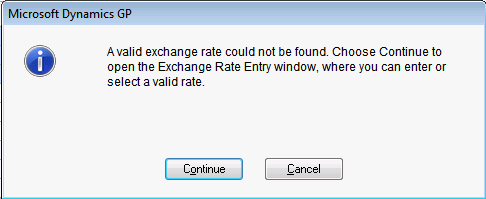
ERROR: A valid exchange rate could not be found. Choose Continue to open the Exchange Rate Entry window, where you can enter or select a valid date.


The following was the message one of the users received when she tried entering a Receiving Entry.

The currency was GBP and there was indeed a valid exchange rate that’s been uploaded on a daily basis. The rate validity duration is set to “Week”. That means, I have a rate which is valid till 23-Nov-2011.

The user mentioned to me that when she uses a particular batch, this message is thrown up. If any other batch is used, it picks up a rate without any issues.

When I checked the batch, I found the reason behind the issue.

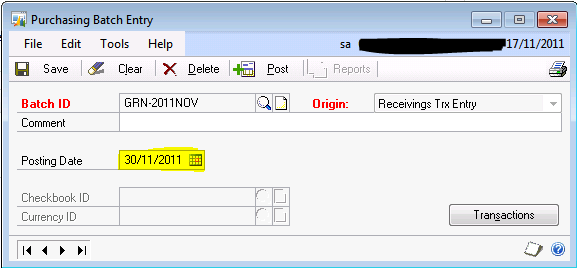
Posting date of that batch was in future. This user had created a batch with the last day of this month as posting date, for which I don’t have a valid rate in the system. When I select this batch and then enter the currency, GP does not find a valid rate and throws above error message.

By default, the exchange rate for a transaction is taken from either the transaction date OR the batch posting date, if a batch is assigned before the currency is entered.

The user do not post the batch itself and always post individual transaction. Keeping this on mind, I had to recommend her in changing the posting date of that batch as first date of the month, so we always have a valid exchange rate for all currencies.

It’s quite a simple concept, but is very VERY critical.

VAIDY

Microsoft Dynamics GP Roadmap – GP "15" Added


Mariano has just published the updated Microsoft Dynamics GP Roadmap on his blog, with GP “15” added to the exciting list of GP versions to come in future.

I am absolutely delighted to see Microsoft’s commitment to this wonderful product.

VAIDY

Perils of Using of DEX_ROW_ID on Customization / Integration – David


This one is certainly a nasty issue, if we are going to use DEX_ROW_ID value on customization or integration.

I have personally fallen into a trap by using DEX_ROW_ID on my customization. But now, it’s all wisdom out of that bad experience.

Only time when I normally depend on a DEX_ROW_ID is to sort records to understand which record was entered last in the table. That itself may not be always correct. So we may have to add other logical fields that are relevant to a particular record.

For instance, if I have to list out transactions entered on a particular day and check in the order in which the records are created, I would use the Transaction Date and DEX_ROW_ID as SORT ORDER.

There are many other reasons, but restrict yourself to use DEX_ROW_ID only for selecting records and analyze it.

VAIDY

Using SQL to retrieve number of records in a table – David


David gives an alternate SQL option for the simple COUNT(*) and explain how it improves the performance as against COUNT(*).

You may have to go thru’ the comments as well; some comments discuss the post further.

VAIDY

YE 2011 Dynamics GP Update


Over at Microsoft Dynamics GP Support and Services blog, Terry details the YE 2011 GP Update that’s due to be released.

This update looks like not just a US Payroll YE Update. It also contain fixes on Inventory, Field Service, Extender, Receivables, eConnect, Manufacturing and Project Accounting.

So customers who are outside US region may also want to get updated with this release.

VAIDY

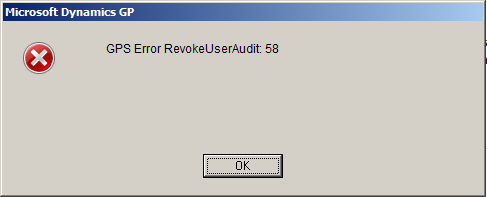
User Access Setup Error: GPS Error RevokeUserAudit: 58


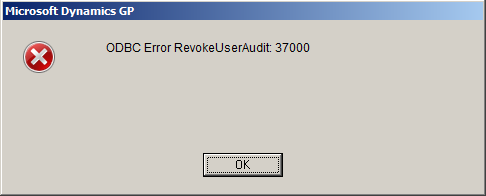
I faced this error message from the time I upgraded to GP2010 R2. The error message is thrown when we revoke access to a user on a company. Below is the exact sequence of error messages that I received:

Since I had not doing this frequently (it’s maximum 3 users in 6 months) and also the purpose of revoking access was working without any issues, I did not consider this as a harmful message.

Yesterday, I had to revoke access to users for an existing company due to some maintenance. Minimum of 10 users and I started receiving this error message each time I select a user and revoke access. It’s then I decided to check this out and clear it once for all.

I could get only one link with exact error message, which I found on our Community Forum. User Access Setup Error: GPS Error RevokeUserAudit: 58.

Let me explain what I did to get rid of this.

1. Check the second error message. It says it did not find the stored procedure *mxCallRevokeUserAudit*.

2. I checked whether this stored procedure is available on any other company that I had on my GP environment. I could not find one on any company.

3. I was intrigued by the name of this stored procedure since, it’s not similar to any Microsoft Dynamics GP SQL object naming convention.

4. I then launched GP and opened Tables Resource Description (Microsoft Dynamics GP -> Tools -> Resource Descriptions -> Tables).

5. Since the message said something about *Audit*, I thought I would first check with *Audit Trails* module. To my surprise (and joy, of course), Physical Name of all tables started with *MX*.

6. I then concluded that the SQL Stored Procedure what I am looking at, is also of *Audit Trails* module.

Now I could not do much with that, since I could not find that stored procedure anywhere. I checked my GP licenses and it did not cover *Audit Trails* module at all.

When I upgraded to Microsoft Dynamics GP2010 R2, I had selected this module also for installation. Since this module is not covered under my license, it installed the dictionary but it did not create the SQL procedures (that’s my assumption and I may be wrong).

The only option that was left; to remove this product from my environment (by removing DYNAMICS.SET file contents alone and not the dictionary itself).

This removed that now (in)famous error message.

VAIDY

Congrats MVPs – Mark & Siva


Congratulations to these tremendously talented and amazing individuals, Mark Polino and Sivakumar Venkataraman, to get their MVP status renewed. Most deserved ones.

Congrats again to you both and wish you many more MVP renewals in future. Do doubt about that.

VAIDY